Category Archives: Tips

How to Turn Off Notifications for Individual Android Apps

application-manager-on-android-phone

Want to take control of what applications you’re receiving notifications for?  Is there an app that is annoying you with a constant interruption?

This guide from Techverse will help you take back control of these interruptions.

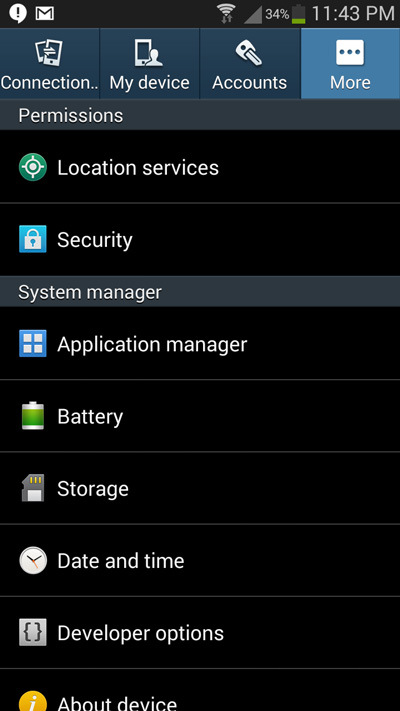
Step 1: Go to your phone’s Settings and navigate to the Apps or Application manager option ( Differs with different manufacturers )

Step 2: Inside the Application manager menu, Swipe from the right to the left and navigate to the ALL tab. Now you will be able to see a list of apps that are currently installed on your Android phone.

Step 3: Tap on any of the apps for which you want to disable the notifications. In the app info menu that opens up, tap on Show notifications to uncheck the option and tap on OK to confirm disabling notifications for that app.

That’s it!  You can repeat the following directions to disable any other app notification.

Useful Windows shortcuts for increased productivity

I’m not a huge fan of the mouse, I find inefficient, sometime inaccurate, but fore most: slow.  Using keyboard shortcuts can help productivity and eliminate frustration.  Below is the list of my most used Windows keyboard shortcuts. 

Open or close the start menu – <windows key>

Switch to a last open window – <alt>+<tab>

Open “my computer” (explorer) – <windows key>+<E>

Search for a file – <ctrl>+<F> or F3

Minimize all open windows – <windows key>+<D>

Open task manager – <ctrl>+<shift>+<esc>

Close the current window – <alt>+<F4> or <ctrl>+<W>

Permanent Delete – <shift>+<delete>

Lock computer – <windows key>+<L>

Refresh current window – <F5>

Select all items in current window – <Ctrl>+<A>

Undo last command – <Ctrl>+<Z>

Copy – <ctrl>+<C>

Cut – <Ctrl>+<X>

Paste – <Ctrl>+<V>

Move to the next item or check box – <TAB>

Select or deselect a check box – <spacebar>

Equivalent of clicking a selected item – <enter>

Open the run menu – <windows key>+<R>

Open a new window – <ctrl>+<N>