Los Angeles hottest startups that you want to watch

In today’s ever changing word new companies can “pop up” and change the way we do simple tasks in business extremely fast. The key to constantly be on the lookout for the latest and greatest startups. In this article I’m going to talk about some of Los Angeles hottest startups that you may want to watch.
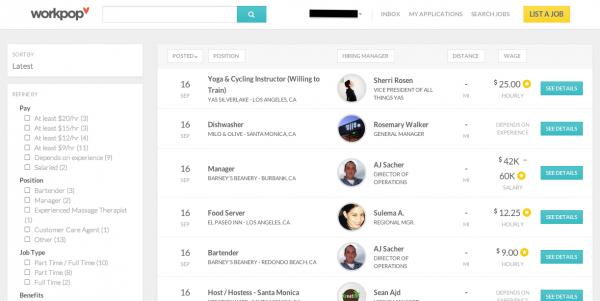
workpopLaunching first in Los Angeles, Workpop hopes to target the 76 million hourly workers in the U.S., most of whom don’t have detailed resumes or work histories online. For them, the platform is designed to simplify the process of creating an application by importing education and work info from Facebook and LinkedIn, setting up a profile and recording a video introduction to help employers screen them. They can even provide hourly availability if they have child care needs or work another job.

On the hiring side, Workpop provides tools to enable businesses to easily create job listings by filling out requirements, job descriptions, and information about the workplace. Since many of these jobs have a high turnover rate, businesses can reuse listings after they’re taken down if a similar job becomes vacant again.

The platform is designed to improve the process for both sides. Businesses can see how many applicants they’ve received for each jo  b, as well as where those applicants are in the process of hiring. The platform is also designed to help with onboarding if a hire is made, and if not, recruiters can give honest feedback to applicants.
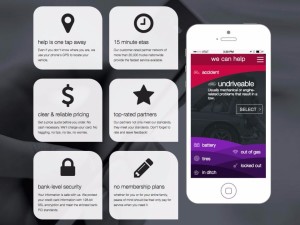
honkHONK is an on-demand mobile app for tow, tire change, jump start, fuel and lock out services from more than 20,000 tow trucks nationwide 24 hours a day, 7 days a week. HONK’s faster ETAs and “Guaranteed Never to Exceed” prices, which start at just $49 without membership fees or limitations, offer motorists an alternative to outdated membership-based motor clubs. The HONK app is free to use and available on iOS, Android, or the web. HONK was founded in 2013 and is headquartered in Santa Monica, California.

HONK connects drivers in need with the right level of roadside assistance at the best price, which helps keep service costs down. The app helps drivers get fast, reliable service for automotive issues like 365 emergency response, car accident response, dead batteries, flat tires, flatbed tow, and vehicle lock-outs.

When you drive, you know that things can go wrong at any time. It’s smart to have a plan in place for accessing help with major and minor auto problems. Up till now the existing model for getting help does not work very well for drivers some drivers. The current system is arguably slow, has not adapted to new technology, and makes drivers wait a long time for needed assistance. With HONK’s pay-on-demand model, you only pay for the services you use when you use them. This app has the potential to put their competition in a challenging spot.
acornsInvesting is complicated. Acorns is not. The app from California-based father-son team Walter and Jeff Cruttenden aims to take the anxiety, deliberation, and intimidation out of investing by boiling it down to a matter of cents. The company, which just released its app on Android in addition to the existing iPhone version (available in the US only), was founded in 2012 and has raised $9 million in three rounds of funding.

Here’s how Acorns works: You connect as many debit or credit cards as you’d like along with a checking account, and the app rounds every purchase made on those cards up to the next dollar, investing the difference in low-cost exchange traded funds. For example, if you spend $10.49 on lunch, that remaining 51 cents is invested. It doesn’t sound like much, but Acorns says that its current users invest $30 to $180 a month in “round ups” alone. Acorns Users can invest their round-ups manually or automatically.

You can also choose to invest larger sums of money directly from your checking account, or set up automatic deposits on a regular basis. No matter how much a user invests, they can use the app to estimate how much their money will grow in future years. This app looks to appeal to the millennial generation, an age group that is mostly untouched in the investing area which could should to be very profitable.
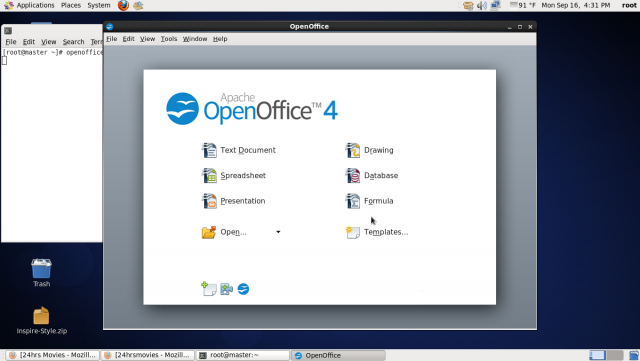
Is OpenOffice heading towards extinction?

ApacheIf you work in computing and are even loosely familiar with the open source software movement, chances are you’ve heard of OpenOffice at some point. For a decade, the OpenOffice Foundation provided the world with a free alternative to Microsoft’s ubiquitous Office suite, and if its programs weren’t always as polished or quick to launch as Microsoft’s, the price tag made up for it. The document suite’s long term future, however, may be in doubt as evidenced by its small developer base and weak release schedule.


Apache OpenOffice’s (that is the current name of the software suite) distresses go back to 2010, when the company Sun was acquired by the database company Oracle. In the wake of that acquisition, a majority of OpenOffice’s developers jumped ship and went on to create a new fork of the old OpenOffice codebase, dubbed LibreOffice.

In June 2011, Oracle handed over the trademarks to OpenOffice over to Apache, which re-launched the product as Apache OpenOffice, or AOO. Since then, LibreOffice and Apache OpenOffice have both competed for market share and users, but it seems as though the bulk of the work is happening on the LibreOffice side of the equation. A recent code analysis demonstrated that there are more than 250 active developers working on LibreOffice from a small group of companies, while OpenOffice has just 16 developers listed and 60% of them work at a single company — IBM.

A recent report prepared on the state of Apache OpenOffice shows that the organization is having a very difficult time. While mailing list activity remains robust, there are few mentors for would-be developers and there is currently no release manager.

Between the lack of code commits and the challenges facing the AOO developers, it is possible that we are seeing one organization withering on the vine while another has largely superseded it. Brand recognition for AOO remains strong and the number of downloads, while off sharply from its onetime peak, and is still significant.

The bigger question is whether the software community needs two open-source divisions of the same source code. From all appearances, it doesn’t. Writing for Datamation, author Bryce Byfield criticizes AOO as being out-of-touch and sounding arrogant when it talks about the need to collaborate with other groups, as though it hasn’t been largely supplanted in the market. I can’t speak his statement, but a lack of developers or product versions when you’re chief competitor is cranking them out is not a great PR tactic.

I’ve used both before, but I prefer the Office Suite to either. That doesn’t mean I’m rooting for either project to fail — in fact, I am very glad that end-users can choose to use an office suite they didn’t have to pay for, particularly with Microsoft moving towards subscription services. I personally don’t believe anyone should ever have to pay Microsoft for a monthly fee to use an Office suite. This might mean I that I need to move to an OSS product at some point in the future.OpenOffice4

How-to troubleshoot browser issues – Part 1

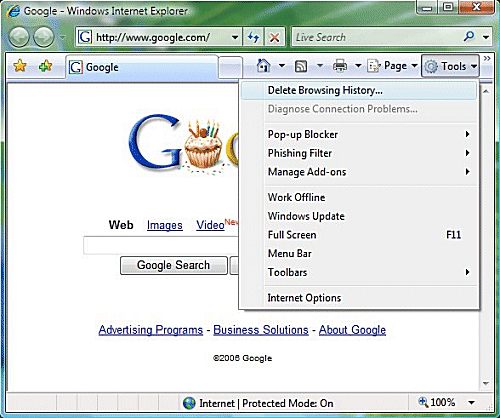
IE7_options Have you ever had problems with not being able to access a website, load information, or view documents through your browser?  Any problem that hinders your ability to get work done can be a pain. In this two part article I am going to explain the features within Internet Explorer and how to troubleshoot browser issues.


So you can’t access a website? No problem. When this happens in some cases it is due to some security settings being placed too high. Sounds simple enough right? Not exactly. Without understanding the problem often it’s difficult to find a solution.

In Internet Explorer (IE), in order for you to “get under the hood” and find out what’s wrong you have to go to Internet Options. To find it, open Internet Explorer=> click on the tools button (it should look like a gear in the upper right hand corner for IE 9 users) => nine spaces down you’ll see Internet Options=> click it.

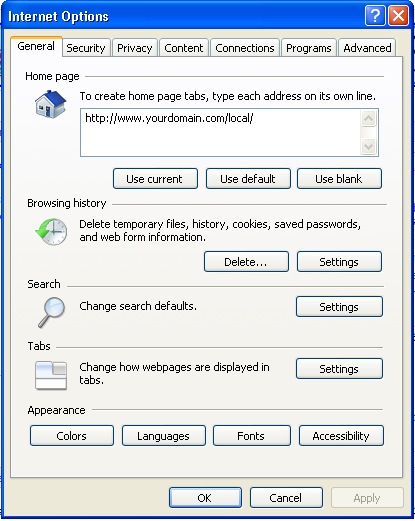
Right now you should see a menu called Internet Options. I won’t discuss every feature here because that would make for an extremely long article. With that said, under General settings the first thing you will see is the Home page. In this box you can change your Home page so when you first open IE it will display whatever URL you choose. If you would like to have more than one tab open up on startup just type in the additional URL underneath the current one. The next section below Home page is Browsing history. Within Browsing history you can click Delete browsing history on exit, which will clear your history once you close all tabs in IE. Next you have Search. This is a vast topic which will not be covered in this article. Along the bottom there are some appearance and languages options.

If you click the next tab to the right you will see Security. This is a tab you shouldn’t really touch unless you’re reading an IT support article or a support technician is walking you through steps within Security. The same can be said about the next tab Privacy. By default the Pop-up Blocker should be on. If not you should click the box labeled Turn on Pop-up Blocker. The next tab over is Content. If you have kids or have sites that would not like your employees to access Parental Controls can be useful. The following below is Content Advisor. Content Advisor is a tool that helps you control internet content that’s viewed on the machine. Again this can be a very useful tool if you have a device that can be accessed by children. However if this does not fit your needs there are many 3rd party companies that offer software specifically designed around this topic. Next is AutoComplete. If you have things that are saved on IE like passwords, usernames etc. AutoComplete is most likely the cause. If you do not want to save this information click settings=> uncheck User names and passwords on forms=> click OK.

Next tab over is Connections. Again unless you are being helped by an IT technician or you are extremely familiar with modems, proxy servers, or VPNs I would recommend bypassing this section.

The next tab is Programs. This is the tab you would come into if you would like to make IE the default browser. In order to do that click Make default. If you would like to know when IE not the default browser is then click the box labeled Tell me if Internet Explorer is not the default web browser.

internet options_generalLastly you have the Advanced tab. Under advanced there is a whole host of things to choose from like emptying temporary internet files on close. If you do however get confused about them there is a “get out of jail free” button on their called Restore advanced settings. Some settings will only take affect after you close and restart IE and they are marked with an asterisk. Again there are some settings in here that can because you trouble so unless you know what it means don’t click it.

In the next How-To article I will discuss how to fix some of the more difficult issues that fall under Security, Privacy, and Advanced.

Could Cortana be the personal assistant we’ve be waiting for?

microsoft_cortanaMicrosoft later this year will offer its Cortana personal assistant as a standalone app for iOS and Android devices, Reuters reported in March. The Cortana personal assistant was inspired by the AI character Cortana in the Halo video game series.

Microsoft is working on a version of Cortana that will incorporate artificial intelligence advances developed in a research project named “Einstein,” according to Reuters.

Google makes money not off Android but on the ad revenue connected mostly to search, and Cortana is essentially a smart search program. So, if Microsoft can get Android to use Microsoft’s Bing search, it could take another good chunk of Android’s revenue. Microsoft currently gets a large amount of their licensing revenue from Android over IP rights.

Microsoft has been working on the engine behind Cortana for decades, and it is arguably better than Siri or Google Now simply because it’s far more mature and comprehensive. Siri and Google Now are ingenious speech-to-text search engine interfaces, but neither of them is particularly smart. Cortana was designed out of the digital assistant work that goes back to the early 90’s and possibly has far more potential. A lot of this “potential” hasn’t been released yet. The biggest issue Microsoft is going to have is marketing. Cortana will need to be properly marketed if it is going to succeed on iOS and Android platforms.

Given that iOS and Android both have voice search already, it seems like a natural move for Microsoft to make. Remember that Microsoft gave free access to Office apps on iOS and Android last year. I believe that was partly due to escaping bets against the Windows OS failing to gain further traction with the mobile market. A big part of growing Microsoft is for it to remove themselves from depending on their OS. It looks like Microsoft is removing this aspect so that they can be a key mobile player no matter what the platform.

For Microsoft, mobility goes beyond devices to include productivity experiences and Microsoft wants to put multiple applications on every home screen. Productivity experiences will go beyond individual applications to deliver vast intelligence that spans applications. Microsoft has long been working to get shared code running in their applications across platforms, even outside of Windows. Realistically, we are looking at Microsoft platforms, Apple platforms (iOS and OS X), Android including some Amazon devices and some applications in major Web browsers.

Although Apple and Google also are competing for dominance in the personal assistant arena, Google likely will allow users to install the Cortana app on their devices. Microsoft is not afraid of a little litigation, and blocking their app would raise questions about antitrust and unfair competition, industry specialist say. Microsoft might siphon off some ad revenue connected to search and get people to consider it as an alternative in the mobile world if people were to opt for Cortana on iOS or Android.

cortana_microsoftWith that being said Windows users who like Cortana could also find it easier to move to iOS and Android, as more and more key Microsoft apps run on them.



Five ways ergonomics changes your life

jumping_for_joy_at_sunsetErgonomics is a branch of science that draws on engineering, physiology and psychology. It is a made-up word, created by joining the Greek words ergos (work) and nomos (natural laws). While the word might sound obscure, the contribution ergonomics has made to everyday life is anything but. Here are five ways ergonomics shape our lives.

Behind the Wheel. People come in all shapes and sizes. Car manufacturers have to make sure the controls can be easily reached, and the dashboard displays easily seen, by the tallest and the smallest drivers. To do so, they study how people use the controls and how bodies can most comfortably fit into vehicles.

Good design and good ergonomics go hand in hand and cars are an excellent example. Car seats can now be adjusted any which way, and you can reach all the controls without having to stretch across yourself to do so. There’s a reason for that; all the car companies invest a lot in ergonomics. At the cheaper end of the market, car companies want to make cars accessible to as many people as possible. At the luxury end of the market, they’re selling optimum adjustability.

The branch of ergonomics that deals with human variability in size, shape and strength is called anthropometry. It is also widely applied to making more comfortable workplaces, such as back-friendly chairs.

Nuclear Power. In 1979, there was a core meltdown at Three Mile Island which is most dangerous type of nuclear plant accident. As coolant poured away from reactor, those on duty could not understand what was happening due to confusing information on their instruments. And so they inadvertently took action that made things worse. Bad ergonomics were partly to blame for making the nuclear leak worse. Bhopal and Chernobyl too have primarily been attributed to “operator error”.

At Three Mile Island, in Pennsylvania, no one died or was injured. But it led to far reaching reforms of how nuclear plants operate, which used ergonomics to work out more logical controls for staff. A 1979 report by the President’s Commission on the Accident at Three-Mile Island noted the control panel is huge, with hundreds of alarms, and there are some key indicators placed in locations where operators cannot see them.

Ergonomics experts were called in to give a crash course to Nuclear Regulatory Commission managers, engineers and scientists. And a panel investigating other plants found “haphazard” control rooms to be a widespread problem. In the US and abroad, the accident led to improved instrumentation and better control rooms.

Pretty Objects. It’s a cliché to hold up Apple’s sleek and stylish products as examples of good design, but all are highly regarded by ergonomists for combining good looks with usability.

An ergonomically designed device should do more than fit pleasingly into one’s hand. It should be as easy and intuitive to use as possible and that involves understanding how we think when carrying out tasks.

Usability is based on three things. Is it effective, doing what you want it to do? Is it efficient, can do this without too many mouse clicks? And is it satisfying, comfortable and pleasant to use?

Apple’s designers have a good understanding of what people want to do with these devices and then they test and test it to refine the end product.

Is the Mini-Cooper a brilliant ergonomic design? Most engineers would say no as it has many flaws. Is it enjoyable, wonderful to drive? Users of this vehicle would say yes because it is great fun. Emotion researchers know that when a person is in a good mood, the brain is flooded with hormones that make one sensitive to changes in the environment, relaxed about events in the world, and generally receptive to positive events. As a result, minor flaws and glitches can be overlooked.

wrap rage

Under Wraps. We encounter packaging a dozen times a day. Many of our encounters probably involve us criticizing the poor ergonomics without ever using them. The worst examples are bits of packaging that are so poor ergonomically they actually constitute a minor danger to the people opening them.

Here in the US, the term “wrap rage” was coined to describe the frustration of trying to open a rigid plastic “clamshell” two bits of plastic molded together around a product. This type of packaging is typically used around electronics, software or other high cost items where the manufacturer does not want anybody clever stealing from the boxes

In the office. The place where the importance of ergonomics is most commonly expressed is in the office. While workplace ergonomics may have its divine home in heavy industry, today it is a hot office topic, because of office related injuries.The end result is people using nail scissors, knives, electric saws and even kitchen utensils to try to open them, with injuries frequently resulting either from the tool used or a jagged piece of plastic. There are companies like Amazon and Microsoft who are trying to make things a bit more ergonomic. The essence of ergonomic packaging design, is thinking about the ease of the consumer at every stage of the process.

The wonderful thing about office ergonomics is that employees have options. There are trackballs, sculpted mice to fit different hand shapes, mice to be used centrally rather than at the side, joysticks for people with hand tremors and mice designed to force the hand into a particular position and that’s just for mice.

Overall the key to adjustability. Everybody is a different shape and does things slightly differently than another. Some ergonomic processes can be disliked of course but the key is taking the time to figure out what works for you.

10 Points about the Art of Spreading Good


keep_calm_and_help_others

1. Good deeds are contagious. We naturally imitate the people around us, we embrace their ideas about appropriate behavior, and we feel what they feel. Our acts of charity are no different. In 2010 generosity experiment was done and it showed that every extra dollar of giving in a game designed to measure altruism caused people who saw that giving to donate an extra twenty cents.

2. The networks acts like a matching grant. That same experiment showed that contagious generosity spreads up to three steps through the network (from person to person to person), and when added up, all the extra donations that resulted at every step the study, found that an extra dollar in giving yielded three extra dollars by everyone else in the network.

3. Messages get amplified when they spread naturally. People are bombarded by information and requests every day, especially in our new mobile and tech-centered society, so the effect of any one request to do a good deed may get lost. But do not underestimate the effect of a broadcasting strategy. Research on the social media appeals suggests that the indirect effect of a message on a person’s friends is about three times larger than the direct effect on the person who received the message in the first place. The more you can get people to deliver the message naturally, the greater this multiplier effect will be.

4. Close friends matter more. When researchers studied behaviors like obesity, smoking, and drinking, they found that spouses, siblings, and friends had an effect on each other’s behavior, but next door neighbors did not. So any attempt to change people’s behavior should probably focus on motivating these “strong ties” rather than broadcasting to a wide range of weak connections.

5. Our real world friends are online too. Although most relationships online are not strong (the average person on Facebook has 150 “friends”), we do tend to be connected to our closest friends online too. So, it is possible for us to use online social networks to reach our real world friends to spread social good. If someone is suggesting friends to a person who could help spread the world, it is important to try to figure out which of his or her relationships are also likely face-to-face. We do this using photo tags and frequency of communication online, both of which work relatively well.

6. Make your good behavior visible. Studies of donations to an NPR pledge drive showed that people donate more when the caller was told about someone else’s donation.

7. Don’t overdo it! That same study found that when callers heard about an extremely large donation, they opted not to donate at all themselves because they did not want to look cheap. There is a sweet spot too low, and it will drag down the average donation, too high and people will not donate at all. In that study they found that the message to optimize donations was one that revealed a donation size at the 90th percentile, in other words, a donation that was bigger than about 90 percent of all donations, but smaller than the other ten percent.

8. Interest, influence, and influence ability are important. A natural suggestion of network science is that people with more friends and friends of friends are important because they are more “central” (a smaller number of steps from everyone else in the network). But, as we argue here, to maximize influence, there must be 1) interest in spreading social good, 2) influential, and can persuade others, and 3) influence-able by their friends. Without these characteristics, even the most connected person won’t be helpful.

9. Central players can also help predict the future. A 2011 flu study showed that people with more friends tend to be affected by things spreading through the network before other people. On average, they got the flu two weeks earlier than others. This means that central players can also be used as leaders to indicate trends or to monitor the progress of a social good campaign.

10. Realize your network power. Everything we do ripples through our network. If you feel better because you did a good deed, this will have a positive effect on your friends, your friends’ friends, and even your friends’ friends’ friends. Your own positive change can affect hundreds of people. And who wouldn’t want to make his or her corner of the vast human social network a better place?how_can_i_help

Microsoft Surface 3: Is it worth your money?

surface 3The Surface 3 is Microsoft’s third attempt at making a lower-cost tablet/laptop hybrid, but will this version of future of computing good enough to attract laptop users? In this article I will discuss the Microsoft Surface 3.

The cheaper, smaller brother of the Surface Pro 3, the Surface 3 is aimed at less power-demanding users, but this time it runs full Windows 8.1 and is ready for Windows 10.

Anyone familiar with Microsoft’s other Surface tablets will instantly recognize the Surface 3. It looks just like the Surface RT and Surface 2 before it, with a grey metal body, three position kickstand and a capacitive touch Windows button.

The Surface 3 is 2mm thinner and 54g lighter than its predecessor, at 8.7mm thick and 622g in weight. Compared to most tablets it is both thick and heavy. The iPad Air 2 is 6.1mm thick and weighs 437g but it is pretty slim and light for a fully functional PC. The Surface Pro 3, for instance is 9.1mm thick and weighs 800g, while even Apple’s thinnest and lightest MacBook is 13.1mm thick and 920g.

The Surface 3 has a smaller screen than the Surface Pro 3, but has the same 3:2 ratio as its bigger brother. Most Windows laptops and tablets use the wider 16:9 or 16:10 ratio, which is great for watching videos but not so great for browsing sites and reading text.

The 10.8in full HD screen has wide viewing angles and is relatively crisp for a PC. However the Surface 3 is not in the same league as many tablets or high-end computer screens that have twice the resolution and higher pixel densities such as the iPad Air 2, Samsung’s Galaxy Tab S, Apple’s MacBook, Dell’s XPS 13 or the Surface Pro 3.

Microsoft still has some fundamental problems within Windows 8.1 and the high resolution displays which distort some applications. According to some Microsoft new this issue will be addressed in the Windows 10 release.

Windows apps downloaded from the Microsoft store look crisp as do some standard applications such as Google’s Chrome. But many do not take advantage of high resolution icons and text. As a result programs like Evernote look poor with blurry icons, menu buttons and text.

The Surface 3 comes with a copy of Microsoft Office 365 personal, which is a nice added extra and works very well on the tablet.

The Surface 3 is powered by Intel’s Atom X7 1.6GHz quad-core processor, which is the latest low-power processor for mobile devices. General computing performance is great. The Surface 3 feels snappy and handles most things without issue. The Surface 3 can handle light Photoshop tasks and standard office duties with ease. It can also support a second screen through the mini DisplayPort.

The Surface 3 is completely fan-less which is impressive given the performance. It is silent even when installing apps. Also notable is the inclusion of a full size USB 3.0 port, which makes connecting accessories, mice or just about anything very easy a big bonus for a full PC. A docking station is promised for later in the year, which will add further ports and utility as a desktop computer replacement.

The Surface 3 does not ship with a keyboard. It is considered optional, but I would not consider it optional. Without a keyboard for the Surface 3 it’s just a second-rate tablet. With a keyboard it makes an excellent hybrid.

The Surface 3 has an eight megapixel camera on the back, which works well enough for a tablet. In my opinion the camera isn’t worth writing home about. The front-facing 3.5-megapixel camera is good for making business video calls.

Overall the Surface 3 is Microsoft’s best compromise between price, size and power so far. As a tablet it performs admirably, but not as good as most dedicated tablets with longer batteries, crisper screens and slimmer profiles. The issue is similar when it comes to using the Surface 3 as a laptop replacement. It is not as easy to use on a lap and is not as powerful as equally priced laptops. A big issue is that at $499 without the optional detachable keyboard it’s really not that cheap. The Surface Pro 3 has a better screen, faster processor and similar battery life. It also comes with the “optional” keyboard. Despite that the Surface 3 is the best “jack of all trades” so far and is debatably a better work machine than an iPad with keyboard case.surface 3_2

Maximize interactions between social media & content marketing

social_media_marketing_banner Social media market and content marketing have been two different entities but is it possible that they may be a perfect pair? Unfortunately, many companies approach both as if one has nothing to do with the other. The simple truth is that social media marketing cannot function without the others content. If you have no content, you have nothing to share, tweet or post. Without valuable content, you cannot drive engagement on social media. It would be reasonable to say that content serves as the core of any successful social media marketing campaign. In this article I am going to discuss some tips on how to maximize the interaction between social media and content marketing.

Unlike traditional content marketing, content within the scope of social media marketing must serve specific purposes. In order for it to be effective, content for social media marketing must be designed to fit the constraints of specific platforms and, also, must be set up to either generate discussions or provide an open dialogue for current customers. The tips below will help you through the process of bringing your social media and content marketing together.

Test your content for effectiveness with your target audience. Simply publishing content on social media and hoping it works is not an effective plan. Testing a variety of content and messages across different networks can help you to determine which type of content resonates best with your audience. If you only publish one piece of content and you do not receive the response you expected, you may never know exactly what was wrong with it. A randomized experiment with two variants (A/B testing) can give you the insight you need to determine how to best connect with specific audiences. Using programs like GetResponse can help businesses test what works when contacting customers through email. Optimizely can aid companies with A/B testing of its website pages.

Customize your content for specific social media networks. Your audience should be able to choose from a range of different social media networks. Whether it’s Twitter, Facebook, Instagram or Pinterest, each social media network has its unique audience and features. Ignoring these distinctive differences is the equivalent of a disaster in terms of social media marketing. Taking the time to ensure that the content you publish on each platform and is optimized for that specific channel will give you a far greater chance to connect with your audience. They are also more likely to frequent that platform. For instance, while Twitter has a strict 140-character limit and requires brief but powerful content, content on Facebook is far more flexible. You wouldn’t want to promote a law firm on Instagram or Pinterest.  These sites typically requires the inclusion of a photo or video in order to gain traction with audiences.

Ask your audience for what they want. Take the time to ask your followers and fans for recommendations regarding the types of content that interests them. There are also tools you can use to influence and determine the types of content most likely to gain traction in your social media marketing, such as Hootsuite, which can  generate a digital map of the types of topics that your followers and fans are discussing.

Don’t rely on standard strategies. In a perfect world basic search engine optimization efforts would be enough for all of your marketing needs and best of all it’s free. Unfortunately these systems aren’t perfect and sometimes you have to pay for an increase in site traffic. This could be the social media fix for some users.

social_media_marketing_planSocial media provides a place for giving your content its own voice. With careful planning, you can merge content marketing and social media together to create a highly effective social media marketing campaign.

VoIP: The latest security threat for businesses

VoIP_SecurityMore businesses than ever are jumping on the Voice over IP (VoIP) bandwagon today. Aside from significant cost savings when compared to traditional phone services, VoIP also offers many value-added features such as voicemail-to-email transcription, barge and whisper service, call screening, conferencing, music on hold, call routing, portability, and increased flexibility and mobility for employees that are always on the move or required to travel. Although VoIP’s advantages have plenty to offer the business world, there is also the need for companies to secure voice technology.  In this article I am going to discuss VoIP security and ways you can protect your business.

Studies show that over 75 percent of US businesses are using IP-based VoIP telephone systems as their primary telephone system. As the many advantages of hosted VoIP become increasingly evident to businesses, I think it’s important to clear up a basic misconception when it comes to security. By this, I mean that even if you are connected to your VoIP system through an insecure Wi-Fi network, it does not therefore mean that your VoIP system is automatically vulnerable to hackers.

In order to get into the VoIP system there are additional passwords required. The conversations themselves are encrypted. Undoubtedly the ability to have your phone accessible across multiple platforms makes it vulnerable to hackers generally, but the security issue concerns are related to data network and hardware security issues, not VoIP itself.

When it comes to securing VoIP, businesses need to go above and beyond basic compliance and become proactive in securing VoIP technology from hackers. Since VoIP packets flow over the network (just like data packets do), sensitive corporate information could be intercepted. Some of the same threats that affect data networks can also affect VoIP.

Other threats that can affect VoIP systems are:

  • Conversation eavesdropping/sniffing
  • Default passwords
  • Hacked voicemail
  • Identity spoofing
  • Man-in-the-middle exploits.
  • Denial of Service (DoS) attacks
  • Toll fraud
  • Web-based management console hacks.

VoIP security is a challenge for many companies, but the bottom line is: VoIP security should operate on the same rung as network data security both forms of data contain valuable information. Remember this: The bad guys never sleep; they are always looking for new and innovative ways to hack into business VoIP systems.

Security practices for every company should include:

  • Separating data traffic from voice traffic by creating two virtual VLANs.
  • Protecting the remote admin interface with a complex password and non-standard port.
  • Encrypting sensitive voice traffic:
  • Using Secure Session Internet Protocol (SIPS) for protection from eavesdropping and tampering.
  • Applying physical and logical protection: The VoIP server should be behind a SIP-aware firewall and intrusion prevention system (IPS).
  • Creating user names that are different from their extensions.
  • Keeping VoIP systems always up-to-date and patched.
  • Limiting calling by device.
  • Using encryption to secure calls.
  • Setting strong security policies.
  • Utilizing traffic analysis and deep packet inspection (DPI).
  • Properly securing VoIP gateways.
  • Using a strong voicemail 6-digit passcode or device certificate.
  • Deleting sensitive voicemail messages.
  • Removing mailboxes when employees leave the company.
  • Limiting invalid login attempts.
  • Restricting type of calls allowed on the network and implementing time of day policies.
  • Disabling international calls by default.
  • Security awareness training for employees.
  • Requesting that all employees report odd occurrences.


VoIP_phoneOf course some of these practices may not be feasible for some company. With that in mind here are three tips for maintaining VoIP system security:

Restrict password permissions. Business grade VOIP apps have an extra layer of security that has to be activated in order for a user to become connected. When launched on a computer, a VoIP unified communications (UC) app will require users to register with their unique user name/password every time. Companies can restrict the “remember me” options and require users to sign in every single time. That means that even if the VoIP app is attacked in the computer there will be always be another password that would need to be hacked as well in order for someone to get into the system.

Use the available safeguards. It should be said that even if hackers managed to get the password and hack into one phone, it would not affect the entire network it would only affect one user. Fortunately most business grade services have “fraud detection” monitoring and can determine if there are an unusual number of minutes being racked up and will flag it. Watch user trends and stay on top of alerts or changes in tracked usage.

Lastly, exercise common sense when working remotely. Common sense is one of the main security measures you can employ. It’s simply about being aware of your surroundings, where you keep passwords stored.

Calling it a VoIP security issue when someone has your passwords is like calling a bank security issue when someone takes your money after finding your card and PIN together, it’s not.

No network is perfectly secure. But having a clearer understanding of VoIP and its security measures together with basic practices that every company should implement will help ensure better overall security for all users. It will also help businesses looking at their phone options to consider the real risks and benefits of VoIP in achieving success.

Smartglasses could revolutionize to the workplace

SmartGlassesSmartglasses aren’t just for the tech nerds. There are many business scenarios that will benefit from smartglasses. The use of smartglasses has the potential to improve worker efficiency in vertical fields such as manufacturing, field service, retail and healthcare and more. Smartglasses, such as Google Glass, are causing companies to take a fresh look at the impact wearable electronics will have on the workplace. In this article I am going to discuss the use of smartglasses in the workplace.

When you use a smartphone, you’re constantly switching between looking down at your display and up again into your environment. That can be very disruptive. Smartglasses with augmented reality (AR) and head-mounted cameras can increase the efficiency of technicians, engineers and other workers in field service, maintenance, healthcare and manufacturing roles. Studies have shown in the next three to five years, the industry that is likely to experience the greatest benefit from smartglasses is field service, potentially increasing profits by up to $1 billion annually. The greatest savings in field service will come from diagnosing and fixing problems more quickly and without needing to bring additional experts to remote sites. Smartglasses still remain an emerging technology in the enterprise and less than one percent of companies in the U.S. The introduction of lower-priced consumer versions of smartglasses will further help with the introduction of smartglasses in companies. According to recent studies in 10 years half the companies that would benefit from using smartglasses will give them to at least some of their employees who could make use of them.

Adoption of smartglasses will be slow because the benefits they provide depend heavily on the apps and services targeted at smartglasses. However, during the next five years, the ecosystems will evolve to include more apps that do specific tasks with smartglasses, which may cause IT organizations to provide them for a wider range of employees.

Smartglasses are expected to have the most impact on heavy industry, such as manufacturing, and oil and gas, because the AR glasses enable on-the-job training of workers in how to fix equipment and perform manufacturing tasks. The impact is likely to be medium for mixed industries, such as retail, consumer packaged goods and healthcare, where the benefits may mostly be looking for information via a visual search.

The weightless industries, such as insurance, media and banking will likely experience a low impact from smartglasses. However, there are still potentially beneficial uses for smartglasses. Insurance agents, for example, may use smartglasses to video property that has been damaged and then check on the replacement value of items they have identified using a visual search. Financial institutions and the media will use smartglasses to deliver alerts via subscription services for smartglasses to professionals who need up-to-the-minute information.

SmartGlasses2

Experts expect that some of the basic functions of smartglasses to help bring added efficiency to companies. How-to instructions and illustrations on the smartglass displays enable workers to perform tasks even if they do not remember all the procedures. The virtual assistant on the smartglasses could serve as an interactive, hands-free “how-to” manual. As a result, workers may successfully complete tasks they have little experience doing. Workers with mild memory issues or cognitive impairment may find smartglasses useful tools for remembering how to complete tasks.

Video collaboration with experts in remote locations will result in faster repairs and will save the expense of flying an expert to the site to help. Employees at remote sites can communicate and share video of what they see with experienced workers to get advice on how to diagnose and fix problems. In this way, companies can improve the cost-effectiveness of their field service and remote operations by employing a larger percentage of less-experienced workers to experienced ones or specialists, in result saving labor costs.

Companies are already asking their IT organizations to make recommendations about whether smartglasses should be used in the workplace based on benefits and risks perspective, as well as policy and implementation. Though IT organization could possibly provide smartglasses to employees in the future for job tasks, the biggest impact may come from employees who wear their personal smartglasses at work. Overall, if a company were to wait to release smartglass into the workplace today they may not regret it but as shown they might be missing out on the latest way to save money.