
Microsoft 365 Support for Orange County Businesses
Practical Help for the Microsoft 365 Tenant Your Business Relies On
Microsoft 365 brings email, files, collaboration, meetings, and identity tools into one connected platform. That convenience can also make a seemingly small change—such as adding a user, updating a domain, or changing a group—affect several services at once. Apex IT Solutions helps Orange County businesses administer and support Microsoft 365 with clear procedures, careful coordination, and documentation suited to the organization.
Our work can include tenant and account administration, Outlook troubleshooting, permissions, Teams, SharePoint, OneDrive, migration coordination, licensing questions, and user guidance. The exact service scope is defined before work begins. Microsoft operates the cloud platform; Apex provides human IT support during the support arrangements established with each client. Platform availability, automated monitoring, and immediate human response are not the same thing.

Microsoft 365 Administration and User Support
A healthy Microsoft 365 environment depends on more than creating mailboxes. Accounts, licenses, groups, permissions, devices, domains, and data locations should reflect how the business actually works. Apex can assist with defined administrative tasks or coordinate Microsoft 365 support as part of broader managed IT services for Orange County businesses.
Tenant, Account, and License Administration
We can coordinate user creation and removal, assign available licenses according to approved requests, maintain selected groups, and document relevant tenant settings. License purchasing, billing, renewals, and vendor matters may involve Microsoft or the organization’s chosen licensing provider. Apex can help identify what information is needed and coordinate the conversation without representing itself as the software vendor.
User Onboarding and Offboarding
New hires may need an account, license, mailbox, group memberships, file access, Teams access, and Outlook setup. Departures require an authorized plan for access blocking, password handling, mailbox or file retention, license changes, and ownership transfer. Apex follows approved contacts and procedures; password resets, MFA resets, and account-access requests are not performed solely because someone asks.
Email and Outlook Troubleshooting
Support may cover Outlook profiles, mailbox access, mobile setup, shared mailboxes, calendars, distribution groups, message-delivery investigation, and coordination of Exchange Online settings. When the symptom points to filtering, spoofing, or unwanted mail, we can also evaluate related email security and spam protection support.
Domains and DNS Coordination
Adding or changing a Microsoft 365 domain can require verification and carefully timed DNS records. Apex can review the requested configuration and coordinate changes with the authorized domain registrar or DNS provider. DNS propagation and third-party processing times are outside any IT provider’s direct control, so changes should be scheduled with rollback details and business impact in mind.
Teams, SharePoint, and OneDrive
We can help configure teams, channels, sites, libraries, sharing options, and user access within an agreed scope. We also help users distinguish personal OneDrive storage from shared SharePoint or Teams content. Thoughtful structure and ownership reduce duplicate files, confusing access requests, and information that becomes stranded when an employee leaves.
Permissions and Group Administration
Apex can apply approved access changes, review selected memberships, and help map business roles to groups. Access should be granted deliberately rather than copied from another user without review. Administrative roles and broad sharing permissions deserve extra scrutiny because they can expose data or allow settings to be changed beyond a person’s job responsibilities.
Migration Planning and Coordination
Email and file migrations require discovery, source-system access, destination design, identity matching, pilot testing, cutover planning, and user communication. We define which party handles each step and identify dependencies before scheduling a move. Migration scope, tools, licensing, data volume, unsupported content, and third-party systems can all affect timing and results.
Security Settings and User Guidance
When explicitly included, Apex can help configure baseline settings such as multifactor authentication and selected access policies, then guide users through enrollment. Security choices should reflect business operations, supported devices, licensing, and recovery procedures. Technology guidance is not legal or compliance advice, and no single control removes every risk.
Signs Your Microsoft 365 Environment Needs Attention
- Former employees still appear to have active accounts, sessions, licenses, or ownership responsibilities.
- Staff repeatedly lose access to shared mailboxes, calendars, Teams channels, SharePoint sites, or OneDrive files.
- New employees wait for email and file access because onboarding tasks are handled informally.
- Mailbox delivery problems, Outlook prompts, synchronization failures, or calendar issues are disrupting work.
- Administrators are uncertain who controls the tenant, domain registrar, DNS, billing relationship, or emergency recovery methods.
- Teams and SharePoint have grown without naming standards, clear owners, or a process for external sharing.
- MFA enrollment and account recovery are inconsistent, or users share credentials to keep a workflow moving.
- A planned acquisition, office move, domain change, or application rollout depends on Microsoft 365 changes that have not been mapped.
Some symptoms originate outside Microsoft 365. A damaged Outlook profile, unstable Wi-Fi, device problem, DNS error, or security product can look like a cloud-service failure. Apex can investigate across the relevant layers and, where appropriate, coordinate business network support or computer and server support.
Clear Scope, Ownership, and Service Boundaries
Microsoft 365 support works best when responsibilities are explicit. Before recurring administration, a migration, or a significant configuration change, Apex identifies authorized requesters, affected users, expected outcomes, dependencies, maintenance timing, and the evidence needed to verify completion.
Work That May Be Included
- Account, group, mailbox, license, and selected tenant administration
- Outlook, Teams, SharePoint, and OneDrive configuration or user assistance
- Domain, DNS, migration, and third-party vendor coordination
- Approved MFA, access-policy, sharing, and permission changes
- Runbooks, account inventories, change notes, and end-user instructions
Important Boundaries
- Microsoft controls its platform, service health, product roadmap, and provider-side incidents.
- Apex support hours and response expectations are defined by the applicable service arrangement; cloud uptime or monitoring does not promise an immediate technician response.
- Licenses, migration tools, backup products, domain services, and other third-party costs are separate unless expressly included.
- Security and retention settings depend on available licensing and an approved business policy.
- Legal, regulatory, records-management, and compliance decisions remain the client’s responsibility with advice from qualified professionals.
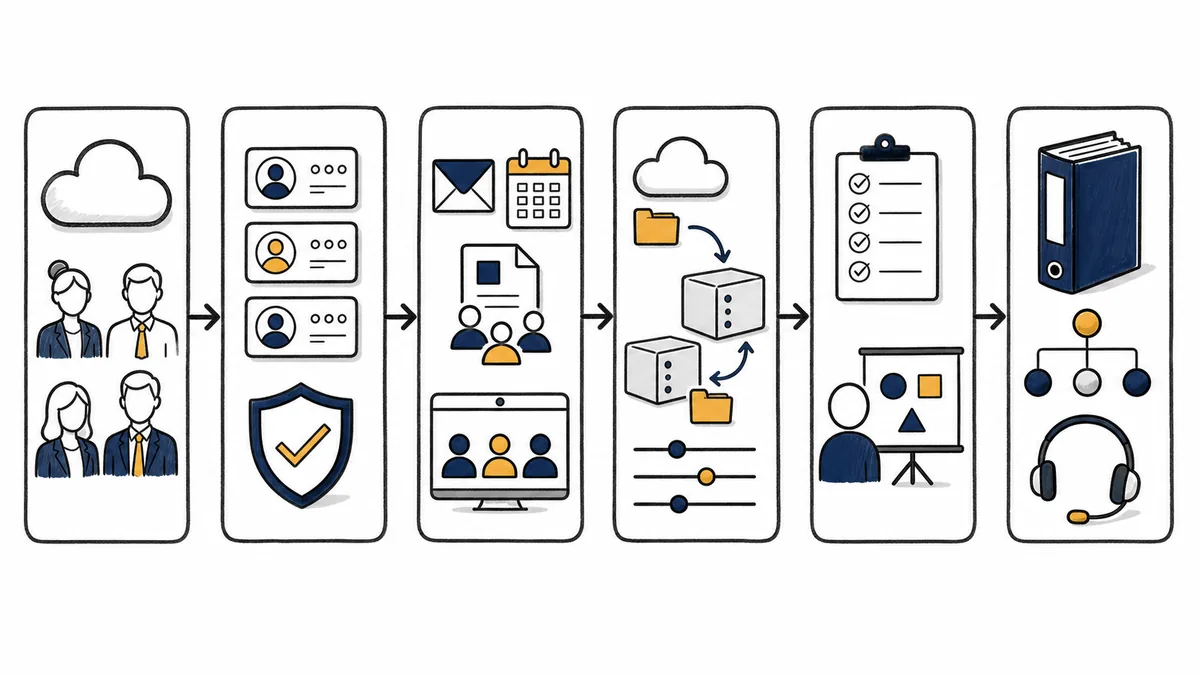
A Controlled Microsoft 365 Support Process
- Discover: We identify the tenant, domains, licensing relationship, administrators, business applications, affected users, and the requested outcome.
- Authorize: We confirm an approved contact and validate sensitive requests. Identity, password, MFA, and account-recovery changes follow authorized procedures.
- Plan: We document dependencies, risk, user impact, licensing needs, third-party involvement, timing, communication, and a practical rollback or escalation path where applicable.
- Implement: We make or coordinate the approved changes within scope. Larger efforts may use a pilot group or staged rollout to limit disruption.
- Verify: We test the intended result from the relevant administrator and user perspectives, while recognizing that some DNS, synchronization, or vendor-side changes require processing time.
- Document and guide: We record material changes, open items, ownership, and user instructions so the business is not dependent on undocumented knowledge.
Microsoft 365 Support for Real Business Changes
A Growing Company Adds Staff
Apex can turn an approved role and start date into a repeatable onboarding checklist covering the account, license, mailbox, groups, Teams, shared files, device setup, and MFA enrollment. The same checklist creates a record of what was requested and completed.
A Departure Requires Controlled Access Changes
We coordinate the authorized sequence for blocking access, preserving needed business data, transferring ownership, handling mailbox access, reviewing sessions, and changing licenses. Decisions about retention or access to an individual’s information must come from the organization’s authorized leadership and policies.
Teams and Files Have Become Disorganized
We can inventory selected workspaces, identify owners, clarify where shared information belongs, and propose a manageable structure. Changes are staged to avoid breaking useful links or removing access without review.
A Domain or Email Migration Is Planned
Apex can map the source and destination, coordinate DNS and vendors, prepare users, test representative accounts, and support a defined cutover. The plan should also address applications, scanners, websites, and services that send mail using the organization’s domain.
Business Microsoft 365 Support Across Orange County
Apex IT Solutions serves businesses in Orange County, including Anaheim, Irvine, Santa Ana, Costa Mesa, Fullerton, Brea, and Buena Park. Local context matters when Microsoft 365 work intersects with office connectivity, employee devices, line-of-business software, printers, conference rooms, or an upcoming move.
Remote administration can resolve many account and cloud-configuration requests, while some problems require attention to the local network or endpoint. We determine the appropriate approach from the issue and agreed service scope. Microsoft 365 assistance is for business environments, not personal or household accounts. Organizations seeking broader help can review our Orange County IT support services.
Microsoft 365 Support FAQs
What does Microsoft 365 support from Apex include?
Depending on the agreed scope, support can include tenant and account administration, onboarding and offboarding coordination, Outlook and email troubleshooting, groups and permissions, Teams, SharePoint, OneDrive, domain and DNS coordination, migrations, user guidance, documentation, and licensing or vendor coordination. A proposal or service arrangement defines what is included.
Can Apex reset a password or MFA method for any employee who calls?
No. Password resets, MFA resets, account recovery, and access changes must follow the client’s authorized procedures. Apex verifies the requester and approval path appropriate to the situation. This protects both the user and the organization from social-engineering and unauthorized-access attempts.
Do you help with Microsoft Teams, SharePoint, and OneDrive?
Yes, when included in scope. Apex can assist with user access, teams and channels, SharePoint sites and libraries, OneDrive configuration, sharing, ownership, and common user issues. Larger information-architecture, records-management, or governance projects require separate discovery and business decisions.
Can Apex migrate our email or files to Microsoft 365?
Apex can plan and coordinate a migration after assessing the source, data volume, identities, domains, applications, permissions, tools, licensing, and timing. A migration is not treated as a one-click task. Responsibilities, exclusions, testing, cutover, and post-migration support are documented for the specific project.
Does Microsoft 365 eliminate the need for backup planning?
No. Native retention and recovery options vary by service, settings, licensing, and the type and timing of data loss. The business should define retention and recovery requirements, understand native capabilities, and decide whether a separately managed backup is appropriate. Apex can assist with that assessment when scoped.
Can you configure MFA and access policies?
Apex can help configure MFA and selected access policies when the work is explicitly authorized and supported by the organization’s licensing. We consider user enrollment, emergency access, supported devices, service accounts, operational impact, and recovery. These controls improve security posture but cannot prevent every incident.
Who handles Microsoft service outages?
Microsoft operates the platform and resolves provider-side outages. Apex can investigate symptoms, review available service-health information when authorized, distinguish local issues from platform issues, communicate practical workarounds, and coordinate escalation. Microsoft platform availability does not define Apex technician availability or response time.
Can you help us choose Microsoft 365 licenses?
We can review business and technical needs, identify feature or administrative dependencies, and coordinate questions with the organization’s chosen licensing provider. Microsoft controls product packaging, terms, pricing, and availability. Final purchasing decisions and costs remain subject to the vendor relationship.
Which locations and customers do you support?
This service is for businesses in Orange County, including Anaheim, Irvine, Santa Ana, Costa Mesa, Fullerton, Brea, and Buena Park. Support may be remote or coordinated with local IT work depending on the request and service arrangement. Apex does not present this page as support for personal Microsoft accounts.
Bring Structure to Microsoft 365 Support
Whether your business needs help with recurring administration, a difficult Outlook issue, access cleanup, collaboration tools, or an upcoming migration, Apex IT Solutions can start by clarifying the environment, the requested outcome, and the right scope of work.