
Layered cybersecurity for Orange County small businesses
Coordinate People, Devices, Accounts, Email, Networks, and Recovery
Small businesses rely on the same connected systems that attract security threats: email, cloud accounts, workstations, business applications, remote access, firewalls, Wi-Fi, shared files, and backups. A company with fewer than twenty users may not need an enterprise security program, but it still needs clear ownership, sensible controls, maintained technology, and a practical way to handle suspicious activity.
Apex IT Solutions provides cybersecurity services directly for Orange County businesses. Work may be a defined project or part of a recurring service arrangement. Depending on the agreed scope, Apex can help with antivirus, managed firewalls, anti-spam and anti-phishing controls, selected monitoring, and general security hardening. Most configuration and support can be performed remotely. Onsite service is used when physical equipment, installation, local access, or the business environment requires it.
Cybersecurity is not one product and no tool provides complete protection. The useful approach is to identify important business systems, understand realistic threats, choose compatible controls, define who reviews selected alerts, and document what Apex, the customer, and any outside vendor are responsible for doing.
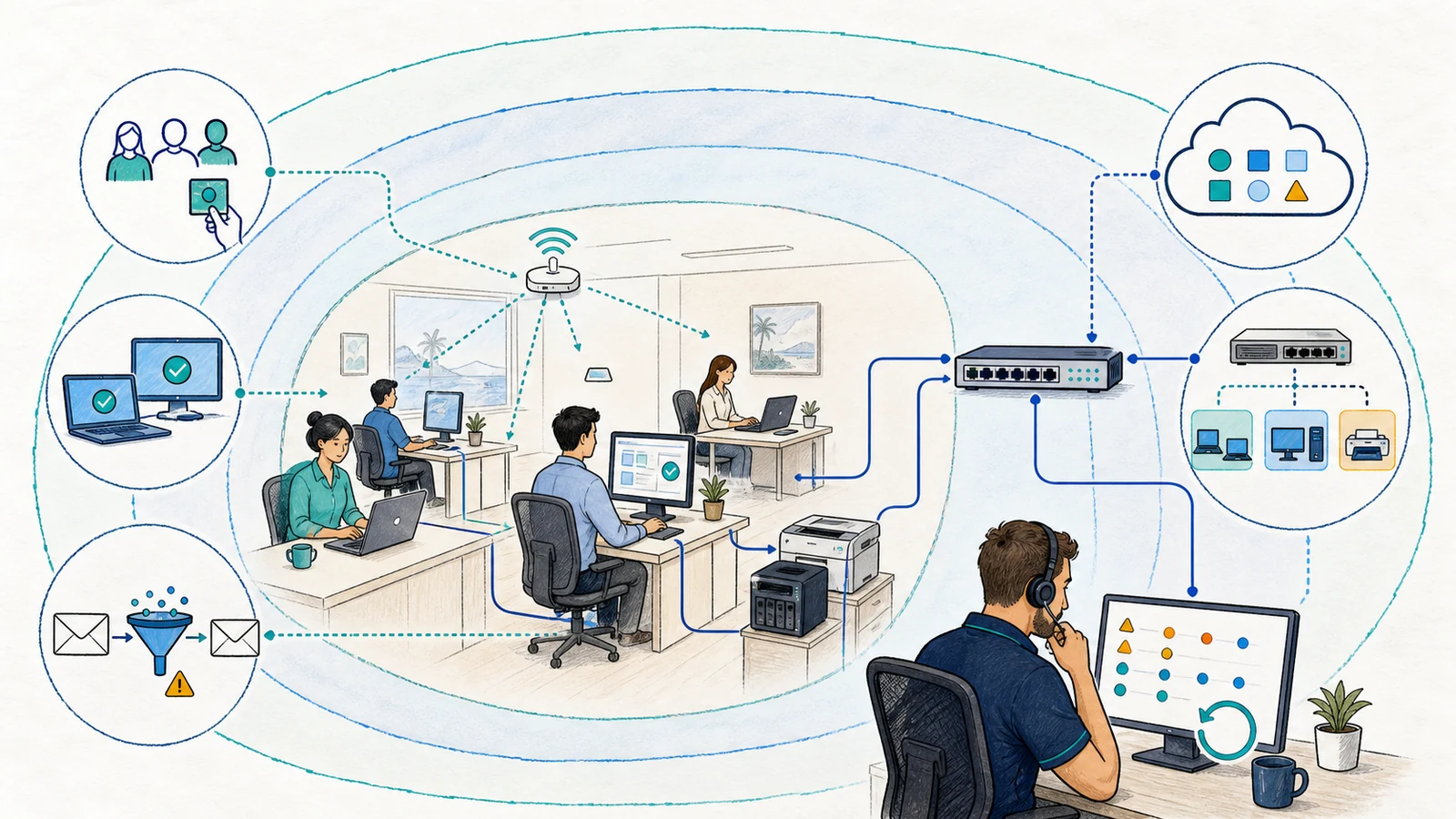
Start With the Business Work That Technology Supports
Security planning is more useful when it begins with operations rather than a fear-based product list. A professional office may depend on email, Microsoft 365, shared documents, accounting software, remote work, and a small number of administrators. A machine shop may also depend on production files, vendor connections, specialized workstations, and equipment networks. A medical or dental practice may need technical safeguards while relying on its legal and compliance advisers to interpret regulatory obligations.
The first questions are practical: Which systems must employees access? Where is important data stored? Which accounts can make administrative or financial changes? How are employees and vendors added or removed? What would interrupt operations? Which backup copies exist, and has restoration been reviewed? These questions help organize priorities without pretending that every difference from a generic checklist has the same risk.
Unknown or Shared Access
Old accounts, shared credentials, excessive permissions, informal vendor access, and incomplete offboarding can make ownership unclear. Access should be tied to a current person, role, device, service, and business reason where the supported system permits it.
Inconsistent Endpoint Protection
Workstations may have different operating conditions, updates, security agents, local administrators, or support status. Coverage needs to be confirmed from inventory and management records rather than assumed from one visible icon.
Email and Identity Attacks
Phishing, impersonation, malicious links, credential theft, unfamiliar sign-ins, and deceptive payment requests can bypass a user’s expectations without looking like a traditional computer virus.
Unclear Network Boundaries
Firewalls, remote access, Wi-Fi, switches, vendor connections, and cloud-managed devices can accumulate rules and administrative paths whose current owner or purpose is no longer documented.
Unverified Recovery Readiness
A successful backup notification does not establish that all required systems are covered or that the business can restore the right data in the needed order. Retention, access, testing, and recovery dependencies matter.
Alerts Without an Operating Plan
A product may generate virus, login, firewall, or service notifications, but value depends on configuration, delivery, context, review ownership, approval authority, escalation contacts, and the response included in the agreement.
Use Several Controls Because Each Addresses a Different Part of Risk
Apex can help small businesses combine appropriate controls across users, accounts, endpoints, email, networks, cloud services, and recovery planning. The combination depends on the systems already in place, licensing, hardware, business workflow, and service scope. Apex works with a broad range of business hardware, but compatibility, support status, and required changes are assessed case by case.
Identity controls address who can sign in and what an account is allowed to do. Endpoint controls address supported workstations and the activity visible to the installed tools. Email controls address message flow, impersonation, malicious content, and reporting. Firewalls and network segmentation address permitted connections and management paths. Backups and recovery procedures address a different question: how the business may restore supported data or systems after an error, failure, or security event.
These controls support each other, but they do not become interchangeable. Endpoint protection does not replace secure account administration. A firewall does not determine whether a user should approve a payment request. Multi-factor authentication does not repair an unsupported workstation. A backup does not stop credential theft. Security improves when the controls and their owners are coordinated around the real environment.
Protect Accounts, Administrative Access, and Supported Cloud Services
Business accounts deserve attention because a valid sign-in can give an attacker access to real mailboxes, files, applications, contacts, and trusted communication channels. Security review may include account inventory, administrator roles, multi-factor authentication, recovery methods, active sessions, onboarding and offboarding, shared accounts, forwarding rules, application access, and approved vendor administration where the platform and scope provide visibility.
Multi-factor authentication can reduce reliance on a password alone, but enrollment quality, supported methods, recovery procedures, legacy access, user behavior, and emergency administration still matter. A business also needs a reliable process for removing departed users, changing access when roles change, and reviewing administrators who can alter security settings or access sensitive information.
Microsoft 365 configuration may connect email, identity, sharing, devices, third-party applications, and licensing. Apex can coordinate applicable account, mail, and administration work through Microsoft 365 support. Product capabilities vary by subscription and configuration. Public page language should not be treated as proof that a particular tenant owns or has enabled every feature.
Unknown-login notifications and related configured events may alert Apex internal staff under an agreed service. A notification is a signal for review, not proof of compromise, complete evidence, or a guaranteed response. The account owner, available logs, platform retention, device context, user confirmation, and agreed authority determine the appropriate next steps.
Coordinate Endpoint, Firewall, Remote-Access, Email, and Backup Controls
Apex provides antivirus and can provide managed endpoint detection and response for supported Windows systems under a defined managed-service scope. Endpoint tools may examine activity visible to their installed agents and generate selected detections. Coverage depends on successful installation, device support, policy, connectivity, licensing, exclusions, and agent health. Endpoint detection and response does not mean that every activity is malicious, every threat will be detected, or every alert receives immediate human review.
A managed firewall can help enforce approved network paths, separate business functions, support remote access, record selected events, and provide a controlled place for policy changes. It still depends on correct topology, supported hardware, current licensing, rule ownership, administrator access, upstream services, and the systems on both sides of a connection. Learn more about managed firewall services, VPN and secure remote access, and focused network security assessments.
Email security may include supported spam filtering, anti-phishing configuration, authentication planning, quarantine procedures, identity dependencies, and a reporting path for suspicious messages. Filtering can reduce risk, but a compromised legitimate sender, new lure, deceptive business request, or allowed service may still reach a user. The email security and spam protection page explains these controls in detail.
Backup and disaster-recovery planning should identify important systems, protected copies, retention, access, restoration priorities, and testing needs. Cybersecurity does not remove the need for backups, and backups do not prevent an incident. Review business backup and disaster recovery services as a separate but connected part of resilience.
Separate Automated Signals From Human Availability and Response Authority
Selected tools can produce notifications for conditions such as virus detections, unfamiliar logins, endpoint events, firewall activity, agent health, or service status. Apex internal staff may be notified of configured events within the customer’s service scope. Monitoring details vary by product, licensing, system, severity, notification path, and agreement.
An automated event is not the same as a person continuously watching a screen. Apex does not advertise a staffed 24/7 security operations center, guaranteed incident response, or a promise that every alert will be detected, delivered, reviewed, contained, or resolved. Staffed support operates during normal business hours, and the public page does not create an after-hours response commitment.
The agreement should identify which systems produce alerts, who receives them, when review is staffed, which events are in scope, who can authorize device isolation or configuration changes, how the customer is contacted, and when another vendor or specialist is required. Some supported endpoint actions can be configured to isolate a device automatically, but automatic isolation is not appropriate or enabled in every circumstance. Business impact, device role, policy, authorization, and tool behavior must be considered.
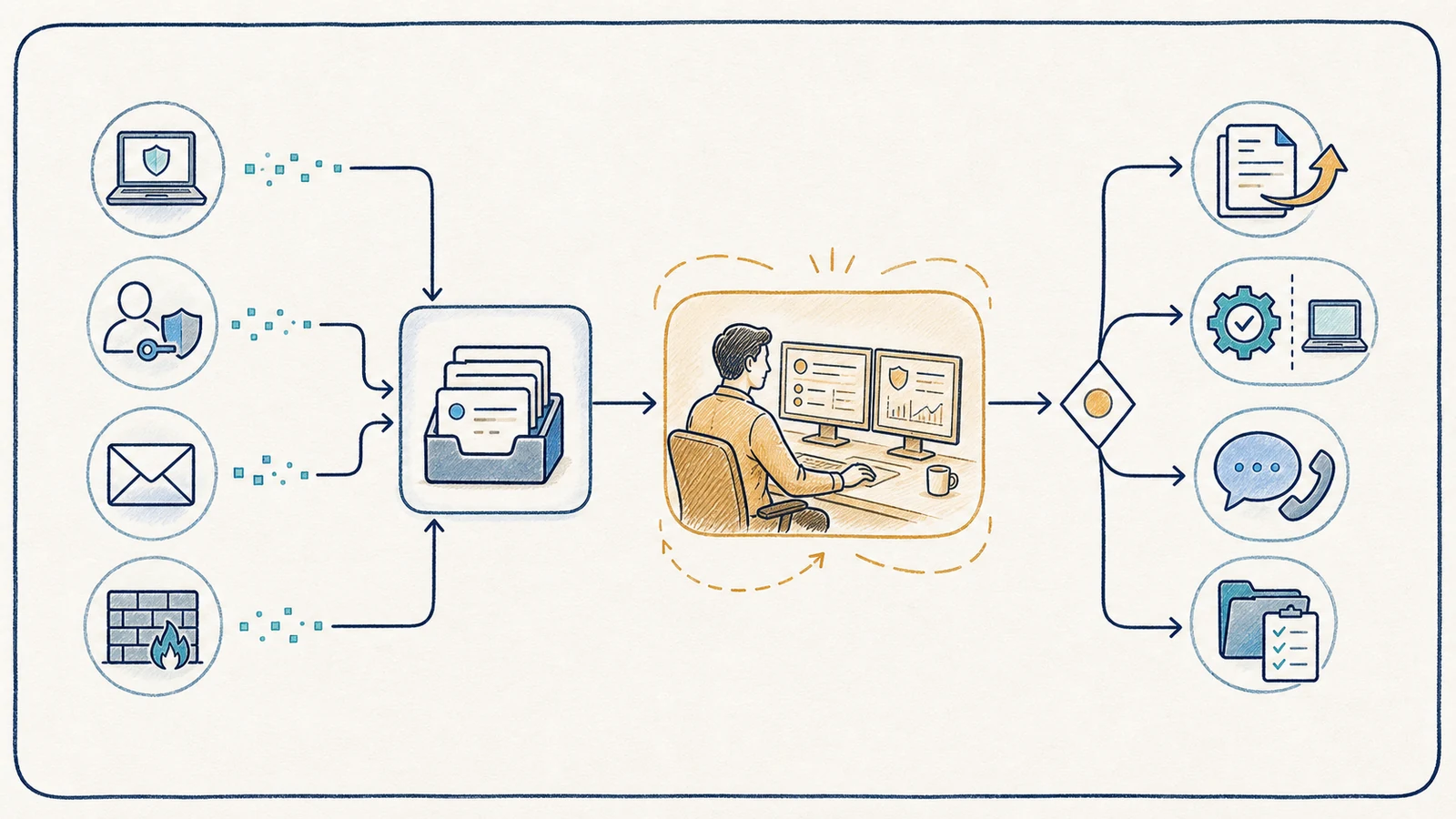
If a business needs forensic investigation, legal advice, regulatory notification, breach counsel, insurance coordination, ransomware negotiation, around-the-clock incident response, or another specialized service, those responsibilities must be arranged separately with appropriately qualified providers. General cybersecurity management should not be represented as including those services automatically.
Define What Apex Provides and What Requires Separate Scope
A Defined Apex Cybersecurity Scope May Include
- Business technology and security-control inventory
- Antivirus and supported Windows endpoint protection
- Managed firewall policy, selected logging, and documented changes
- Anti-spam, anti-phishing, and supported email-security configuration
- Identity, account, Microsoft 365, and administrative-access review
- General security hardening for supported systems
- Selected monitoring and alert review with documented ownership
- Cybersecurity assessments with prioritized findings and a roadmap
- Remote work and onsite service where equipment or the environment requires it
- Project-based remediation or recurring management as agreed
It Does Not Automatically Include
- Complete protection or proof that no vulnerability exists
- Detection of every threat or immediate review of every alert
- A staffed 24/7 SOC, SIEM operation, MDR service, or threat-hunting program
- Penetration testing, exploit attempts, red-team activity, or other offensive testing
- Guaranteed containment, recovery, response time, uptime, or business outcome
- Compliance certification, formal audit, legal advice, or regulatory interpretation
- Digital forensics, breach notification, ransomware negotiation, or public relations
- Unsupported hardware, operating systems, applications, or unapproved vendor work
- Licenses, replacement equipment, subscriptions, or third-party fees unless quoted
- Changes, isolation, or access beyond the customer’s authorization
These boundaries protect the customer as well as the service provider. They make it possible to assign the right owner, obtain required authorization, coordinate vendors, plan disruptive changes, and avoid a false sense that one general service label covers every security activity.
Assess the Environment, Prioritize Work, and Verify Approved Changes
- Describe the business concern. Identify affected users, systems, locations, recent changes, suspicious activity, operational impact, deadlines, and existing providers.
- Define authority and scope. Record included accounts, endpoints, mail systems, cloud services, firewalls, networks, backups, sites, administrators, vendors, exclusions, and permitted techniques.
- Collect available evidence. Review supported configurations, inventories, licenses, agent status, account roles, selected logs, alerts, policies, diagrams, backup records, and known exceptions.
- Identify dependencies and gaps. Separate verified conditions from missing evidence, unsupported systems, licensing limits, ownership questions, and work that belongs to another vendor or adviser.
- Prioritize practical actions. Consider exposure, privilege, business impact, support status, existing safeguards, change risk, effort, equipment, licensing, and maintenance needs.
- Plan approved changes. Define the exact action, owner, users and systems affected, communication, timing, backups, validation steps, and rollback or recovery approach.
- Implement within scope. Complete authorized configuration, agent deployment, firewall, email, identity, hardening, documentation, or related work directly or coordinate confirmed vendor dependencies.
- Test and document. Confirm representative business functions, record the changed condition, identify remaining limitations, and establish ongoing ownership or a future review trigger.
A broad organizational cybersecurity assessment can cover identity, Microsoft 365, endpoints, email, backups, policies, users, vendors, patch practices, awareness, and incident readiness. Apex delivers findings, risk priorities, a roadmap, and a presentation. Assessments are included for managed-services customers and may be quoted as projects for other businesses. Follow-up validation is separately quoted.
Give the Service Clear Access, Contacts, Decisions, and Boundaries
The customer remains responsible for authorizing access and work, identifying business owners, providing accurate system and vendor information, designating escalation contacts, and approving changes that can affect users or operations. Passwords, recovery codes, and sensitive records should be exchanged through an approved secure method rather than the public contact form.
The business should maintain current employee and vendor information, promptly report staffing or role changes, protect devices from unauthorized physical access, follow agreed backup and business procedures, and participate in testing. If an automatic isolation policy or other potentially disruptive action is considered, the customer and Apex should define authority, exceptions, important device roles, communication, and recovery steps in advance.
Project work is quoted around the specific objective, environment, hardware, licensing, and dependencies. Recurring cybersecurity components are plan-dependent and documented in the managed-service agreement. The agreement determines included systems, monitoring selections, responsibilities, support boundaries, customer duties, exclusions, and separately billed work. A public page cannot replace that written scope.
Businesses that want security work coordinated with user support, maintenance, documentation, vendors, and technology planning can review managed IT services. A project may also be appropriate when a company needs an assessment, firewall change, email-security review, endpoint deployment, hardware installation, or focused remediation without a broader recurring plan.
Cybersecurity Support for Orange County Small Businesses
Apex focuses on business customers in Orange County, including organizations in Anaheim, Irvine, Santa Ana, Costa Mesa, Fullerton, Brea, Buena Park, and other local communities where service is available. The work is shaped for small businesses, commonly with fewer than twenty users, rather than presented as an enterprise security-operations program.
Remote service is appropriate for many supported account, endpoint, email, firewall, cloud, documentation, and configuration tasks. Onsite service may be needed for new hardware, physical access, a network rack, cabling dependencies, local troubleshooting, or systems that cannot be assessed safely from a remote session. Discovery can begin remotely and move onsite when the actual work requires it.
Cybersecurity Services FAQs
What cybersecurity services does Apex provide?
A defined scope may include antivirus, managed firewalls, anti-spam, anti-phishing controls, supported Windows endpoint protection, selected monitoring, general security hardening, account and Microsoft 365 review, cybersecurity assessments, documentation, and approved remediation. The exact systems, tools, licensing, responsibilities, and exclusions are confirmed before work begins.
Does Apex work only with managed-services customers?
No. Cybersecurity is available to business customers as project-based or recurring work. Assessments are included for managed-services customers and can be quoted as projects for others. Managed endpoint detection and response and recurring monitoring require an appropriate managed-service scope.
Can cybersecurity work be performed remotely?
Most supported configuration, review, agent, account, email, firewall, cloud, and documentation work can often be completed remotely when authorized access is available. Onsite service is used when new hardware, physical equipment, local conditions, installation, or direct troubleshooting requires it.
Does monitoring mean Apex watches every event around the clock?
No. Configured systems may send selected alerts, such as virus detections or unfamiliar-login events, to Apex internal staff under the service scope. Automated notifications are different from continuous human review. Staffed hours, included systems, alert types, escalation, and response authority are defined by the agreement; Apex does not advertise a staffed 24/7 SOC.
Is endpoint detection and response the same as antivirus?
No. Antivirus and EDR can overlap, but EDR typically provides additional endpoint activity, detections, investigation context, and supported response actions. Apex provides managed EDR for supported Windows systems. It does not detect every threat, replace email or network security, or remove the need for backups and identity controls.
Can Apex certify that our business is compliant?
No. Apex can review supported technical controls, document findings, help improve configurations, and coordinate approved remediation. Compliance certification, legal interpretation, official audits, and regulatory determinations belong with the appropriate legal, compliance, audit, insurance, or other qualified advisers.
What should we prepare before requesting cybersecurity help?
Prepare the business concern, affected users and locations, important systems, Microsoft 365 or email platform, supported Windows devices, firewall and vendor ownership, recent alerts or suspicious activity, known licensing, existing security tools, backup information, and authorized contacts. Do not send passwords or sensitive evidence through the public form.
How is cybersecurity pricing structured?
Pricing is quoted or plan-dependent. A project is scoped around its objective, systems, access, hardware, licensing, vendors, onsite needs, and validation. Recurring services are defined in a managed-service agreement. Product subscriptions, replacement equipment, and third-party services are included only when the written proposal says so.
How does an Orange County business get started?
Use the Request IT Support form to describe the business concern, affected systems, users, locations, and recent events, or call (800) 275-6513. Apex can determine whether the next step is an assessment, project, managed service, onsite visit, or coordination with another provider.
Build the Security Scope Around Your Actual Business Environment
Describe the users, systems, accounts, email platform, network equipment, recent concerns, existing tools, vendors, and business operations that need attention. Apex IT Solutions can help define a proportionate project or recurring cybersecurity scope for your Orange County small business without promising that one tool or service removes every risk.