
Business connectivity for Orange County offices and facilities
Plan the whole network, not one disconnected component at a time
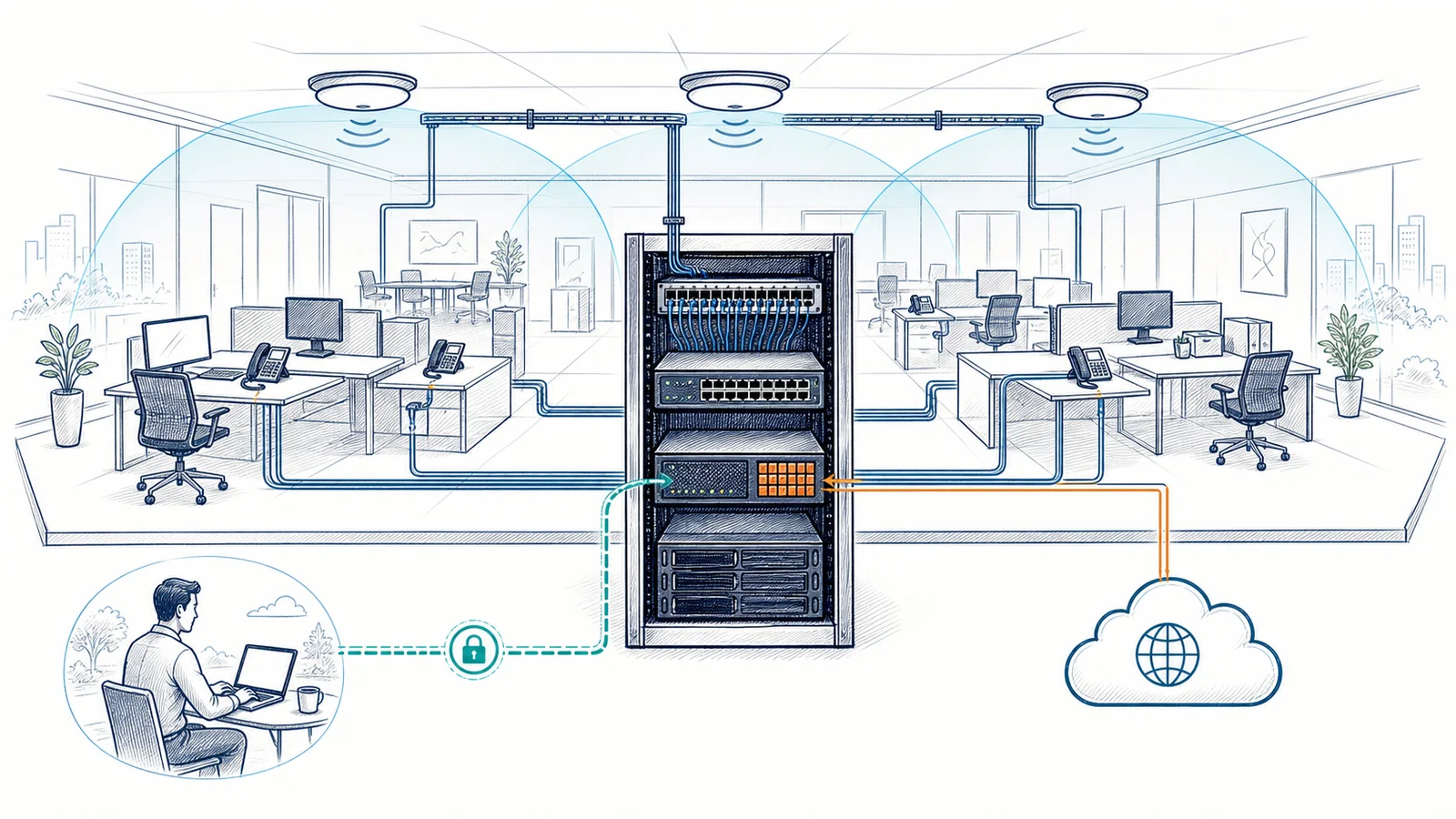
An office network is the path between employees and the systems they need: internet service, cloud applications, shared data, printers, phones, cameras, servers, and remote access. A fast internet plan cannot correct poor Wi-Fi placement. New access points cannot overcome damaged cabling or an undersized switch. A firewall change can affect VPN access, phones, or traffic between locations. Reliable business connectivity starts by understanding those dependencies before equipment is selected or settings are changed.
Apex IT Solutions provides network assessment, design, installation, troubleshooting, monitoring, and coordination for Orange County businesses. Work can cover switches, routers, business Wi-Fi, managed firewalls, VPN connections, CAT5e and CAT6 structured cabling, internet and failover planning, and multi-location connectivity. Recommendations depend on the facility, current infrastructure, number and type of devices, business workflows, security needs, vendor services, and expected growth.
Warning signs that the network needs more than another quick fix
A single dropped connection may have a simple cause. Repeated or location-wide symptoms point to a larger dependency that should be traced rather than guessed at.
- Internet access drops for many users. The cause may sit with the provider, modem or handoff, firewall, router, switching path, power, or configuration. Rebooting one device without isolating the failing layer can hide the pattern.
- Wi-Fi works in one room but not another. Coverage, building materials, interference, access-point placement, channel use, cabling, and client density all affect the result. Adding an extender is not a substitute for reviewing the office.
- Calls, cloud applications, or file transfers become inconsistent. Congestion, packet loss, unstable links, device errors, or traffic handling may affect delay-sensitive and data-heavy workflows differently.
- Employees move cables or use unmanaged equipment to stay connected. Workarounds can create loops, unknown devices, competing wireless networks, and support blind spots.
- No current network diagram exists. Staff cannot quickly identify internet circuits, firewall connections, switch uplinks, wireless access points, patch-panel ports, or which vendor owns a problem.
- Remote access works for some people but fails unpredictably. Account permissions, VPN settings, endpoint configuration, internet conditions, and the destination system may each be involved.
- A move, expansion, or new system is approaching. Cabling, power, rack space, internet lead times, port capacity, Wi-Fi coverage, and vendor requirements need review before installation day.
- Different offices have unrelated equipment and settings. Inconsistent addressing, firewall rules, Wi-Fi names, hardware, and documentation can make cross-site support and change planning harder.
The office network in plain English
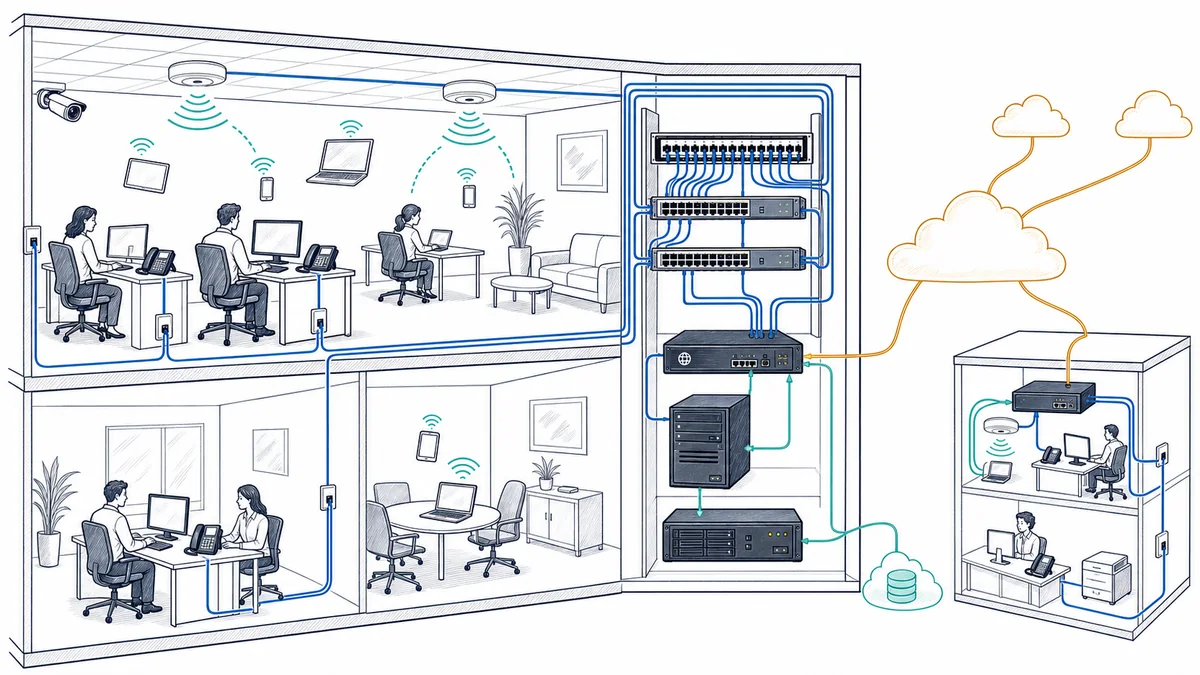
A business network is a set of connected layers. Each layer has its own job, but employees experience the result as one service. When a cloud application feels slow, for example, the problem could be the employee’s device, Wi-Fi signal, switch path, firewall, internet circuit, the application provider, or the route between them.
1. Internet service and provider handoff
The internet service provider delivers a circuit to the facility and hands it off to customer equipment. Available bandwidth matters, but so do circuit stability, provider equipment, public addressing, and contract or installation details. A secondary circuit may support a failover plan, although failover behavior depends on compatible equipment, configuration, application sessions, and the condition of both providers.
2. Firewall and routing
The firewall sits near the network edge and applies approved traffic rules. Routing determines where network traffic should go, including between internal segments, the internet, VPN users, or another office. Configuration must account for business applications and vendors without assuming that one device can remove every security or availability risk.
3. Switching and network segments
Switches connect wired devices and carry traffic to access points, servers, phones, cameras, and other supported systems. Managed switches can support intentional separation of traffic into logical network segments. Port capacity, uplinks, power requirements for connected devices, and configuration all need to match the design.
4. Structured cabling
CAT5e or CAT6 cable connects work areas and network devices back to patch panels and switches. Cable category alone does not establish performance. Terminations, run condition, patching, pathways, labeling, and the connected equipment also matter. Testing can help identify faults and confirm what an installed run supports.
5. Wired and wireless access
Workstations and fixed systems may use wired connections, while laptops and mobile business devices often rely on Wi-Fi. Business Wi-Fi design considers coverage and capacity, not just whether a signal is visible. Access points also depend on working cabling, switch ports, power, configuration, and a stable path to the services users need.
6. Business systems and users
Servers, cloud services, VoIP phones, printers, networked business cameras, and remote employees sit at the ends of these paths. Apex can coordinate network requirements for supported systems, but each application, cloud platform, internet carrier, phone service, camera system, or specialized device may retain a separate vendor and support boundary.
What network and infrastructure services include—and what they do not
A defined project or support scope may include
- Review of the facility, users, devices, applications, current equipment, internet service, and known trouble spots.
- Network diagrams, equipment and port planning, IP addressing, wireless placement, segmentation, and implementation sequencing.
- Installation or configuration of supported routers, switches, business access points, managed firewalls, and VPN connections.
- CAT5e and CAT6 cable planning, installation, repair, termination, labeling, patch-panel work, and testing within the agreed job.
- Network troubleshooting, selected monitoring, documentation, and coordination with internet or system vendors.
- Internet circuit and failover planning, plus connectivity planning for additional business locations.
It does not automatically include or promise
- Guaranteed internet availability, Wi-Fi coverage in every condition, fixed application performance, or prevention of every outage.
- Immediate human response whenever an automated monitoring tool creates an alert.
- Support for every device, application, carrier, building system, or vendor product connected to the network.
- Carrier construction, utility work, building permits, code or licensing determinations, or work outside the approved proposal.
- Hardware, software, internet circuits, subscriptions, or third-party charges unless the proposal states otherwise.
- Security work beyond the approved network-assessment, firewall, and remote-access scope, or any guarantee that a firewall or VPN prevents every security event.
Start with the business situation in front of you
The network is failing now or has recurring problems
Begin with troubleshooting and evidence collection. Identify affected users, locations, times, applications, and recent changes. Testing the path from device to destination helps separate a local workstation issue from Wi-Fi, switching, firewall, provider, or application trouble. If the immediate fault is corrected, recurring causes and documentation gaps can be addressed next.
We are moving, remodeling, or opening an office
Start early enough to review floor plans, work areas, equipment rooms, cable routes, rack and power needs, internet ordering, Wi-Fi placement, device counts, and vendor dependencies. Installation order matters: provider service, cabling, network equipment, business systems, and testing should not be left as unrelated day-of-move tasks.
Growth has exposed capacity or coverage limits
More employees, cloud traffic, phones, cameras, or connected equipment can change what the network must carry. An assessment can compare current port counts, uplinks, wireless capacity, internet use, segmentation, and equipment lifecycle with expected demand. The answer may involve configuration, placement, cabling, equipment, or provider changes rather than a single upgrade.
Our locations need to work together more consistently
Document each site’s providers, addressing, equipment, Wi-Fi, firewall policies, remote access, and critical systems. Multi-location planning can then define shared standards, appropriate site-to-site connectivity, local exceptions, failover priorities, and change procedures. Standardization is useful where requirements match; it should not erase legitimate facility differences.
We do not know what we have
An assessment can build a baseline of circuits, network devices, cable paths, wireless coverage, configurations, vendors, and dependencies. Findings can identify urgent faults, lifecycle concerns, undocumented settings, and sensible next projects. Assessment does not require replacing working equipment simply because it is already installed.
A security, insurance, or vendor request raised network questions
A network security assessment can review supported technical controls and identify configuration or documentation gaps. Changes may include firewall rules, network separation, remote-access settings, or device administration. Apex can coordinate remediation planning, but does not certify compliance or replace legal, audit, insurance, or regulatory advisers.
Remote diagnosis and onsite network work have clear boundaries
Remote work is useful when supported equipment is reachable and authorized access is available. A technician may review configurations, logs, interface status, addressing, firewall or VPN settings, monitoring data, and reported symptoms. Remote diagnosis can also narrow the likely fault before anyone travels to the facility. It cannot inspect a damaged jack, trace an unlabeled cable through a building, relocate an access point, rack a switch, or restore power to disconnected equipment.
Onsite service is appropriate for facility assessment, wireless surveys, cable installation and testing, equipment mounting, patch-panel and rack work, hardware replacement, provider handoff checks, and faults that cannot be reproduced or isolated remotely. Some projects combine both. Design and configuration preparation may happen remotely, physical installation occurs onsite, and follow-up review can continue through remote access.
Network monitoring has another boundary. Configured tools may report device reachability, interface state, utilization, or other selected conditions. The useful signal depends on what is monitored and how alerts are set. Monitoring does not prove the cause of an event, repair a physical fault, or mean a technician is continuously watching the network. Alert review, support availability, escalation, and response expectations are separate terms of the selected service.
Network and infrastructure service options
These service areas can be used individually or combined around a move, expansion, reliability problem, security review, or ongoing support need. Each card links directly to focused guidance at its final public URL.
Plan business network design and installation
Translate floor plans, users, devices, applications, provider services, security needs, and growth plans into a network layout, equipment approach, implementation sequence, and test plan.
Improve business Wi-Fi coverage and capacity
Assess the workplace, connected devices, coverage gaps, interference, access-point placement, cabling dependencies, and network settings for employee and approved business-device access.
Review managed firewall services
Plan, configure, maintain, and document supported firewall functions and approved traffic rules. Exact tools, licensing, monitoring, and response procedures depend on the selected scope.
Set up VPN and secure remote access
Connect approved remote users or business sites to supported resources through a planned access method, with attention to accounts, permissions, endpoint settings, firewall configuration, and application dependencies.
Explore business network monitoring
Use configured checks and alerts to improve visibility into selected devices and conditions. Monitoring coverage, alert handling, technician availability, and escalation procedures are defined separately.
Diagnose recurring network trouble
Trace symptoms across devices, Wi-Fi, switches, cabling, firewalls, internet service, and destination systems to isolate likely causes and identify corrective work.
Configure business switches and routers
Review port use, uplinks, addressing, routing, network segments, connected-device needs, and documentation before making supported equipment changes.
Plan structured CAT5e and CAT6 cabling
Install, terminate, label, repair, patch, and test business network runs according to the agreed facility scope, equipment layout, and connected-device requirements.
Request a network security assessment
Review supported network architecture, administration, firewall rules, segmentation, remote access, and documentation to identify technical gaps and practical remediation priorities.
Coordinate multi-location network connectivity
Plan internet, site-to-site links, remote access, equipment standards, addressing, local exceptions, provider coordination, and documentation across business locations.
Plan business VoIP services
Coordinate voice requirements with internet service, switching, cabling, PoE, firewall policy, Quality of Service, call flow, E911 records, devices, and carrier responsibilities.
Plan business security cameras
Coordinate approved camera views, cabling, PoE, switching, recorder capacity, storage, remote viewing, segmentation, and documentation with the wider business network.
A network process built around the facility and the work
-
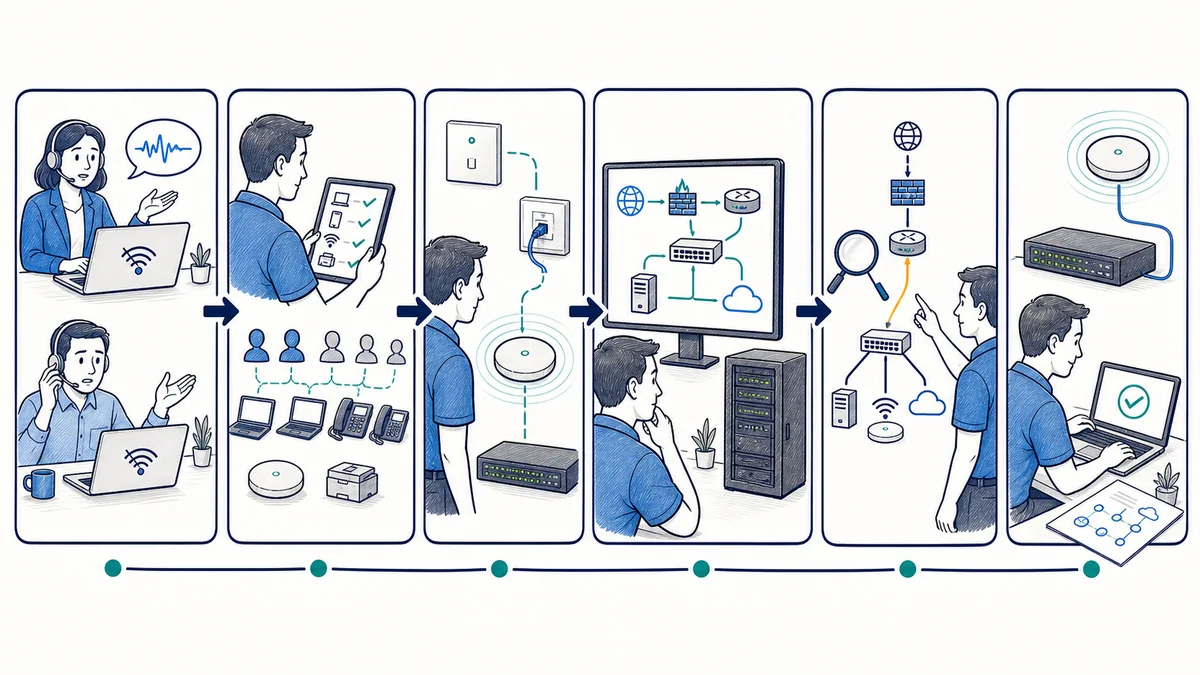
Assess the business environment and the physical site
Apex starts with the reason for the work: an outage pattern, move, growth plan, coverage problem, security concern, or new system. The review may cover floor plans, work areas, users, device types, applications, cloud access, servers, phones, supported cameras, remote users, existing cabling, network equipment, internet circuits, and internal or vendor responsibilities.
-
Map traffic paths and dependencies
Important workflows are traced to the systems they rely on. This can show how an internet circuit, firewall rule, switch uplink, wireless connection, cable run, remote-access method, or vendor-managed service affects operations. Existing diagrams and configurations are compared with what is physically present where access permits.
-
Design the proposed network and change sequence
The design may address topology, equipment roles, port capacity, addressing, network separation, Wi-Fi placement, cable runs, internet or failover options, remote access, rack layout, and multi-site connections. Recommendations reflect the current facility and expected use. Alternatives and known constraints should be documented before purchasing or scheduling disruptive work.
-
Prepare implementation and coordination
A work plan identifies prerequisites, approved changes, equipment, access, outage considerations, rollback needs, internet-provider or application-vendor tasks, and the order of installation. New office work may require cabling and provider service before network equipment and dependent business systems can be commissioned.
-
Install and configure the approved scope
Work may include cable runs and terminations, racks or patching, switches, routers, access points, managed firewalls, VPN settings, and connections for supported servers, phones, cameras, or cloud workflows. Actual tasks depend on the proposal and site conditions discovered during implementation.
-
Test from the user’s connection to the required service
Testing should match the change. That may include cable tests, link and port status, wired and wireless access, addressing, internet connectivity, routing, approved firewall behavior, VPN access, failover behavior where included, and access to important business systems. A successful basic connection does not replace workflow-specific testing with authorized client contacts.
-
Document the result and open items
Useful closeout records may include diagrams, device roles, port and cable labels, addressing, wireless and circuit information, configuration backups where appropriate, vendor contacts, test notes, known limitations, and follow-up recommendations. Sensitive administrative information should be handled through approved secure procedures rather than placed in a general diagram.
What a coordinated network approach can improve
Network design and support cannot remove every provider outage, equipment failure, software problem, or site constraint. A planned and documented environment can still improve day-to-day operations and the quality of future decisions.
- More consistent connectivity: appropriate wired paths, Wi-Fi placement, equipment capacity, and configuration can reduce avoidable weak points.
- Faster fault isolation: diagrams, labels, monitoring data, and known dependencies can help technicians determine where a problem begins.
- Cleaner change planning: impact review can reveal which VPNs, phones, cameras, servers, cloud services, or sites depend on the component being changed.
- Better growth decisions: port counts, cable routes, wireless capacity, circuit options, and lifecycle information give leaders a firmer basis for expansion planning.
- More deliberate security controls: documented firewall, segmentation, administration, and remote-access choices can reduce accidental exposure and clarify remediation work.
- Simpler vendor coordination: a known topology and responsibility map can improve conversations with internet, application, phone, camera, and equipment providers.
- More consistent locations: shared standards and documentation can make rollout and support easier while preserving necessary site-specific differences.
Network considerations vary by business environment
Professional offices, law firms, and accounting firms
Employees may depend on cloud platforms, shared files, document systems, printers, phones, video meetings, and remote access throughout the workday. Network planning should account for conference rooms, private offices, guest connectivity, wired work areas, and vendor-managed applications without assuming every application issue begins in the network.
Medical and dental practices
Practice systems can connect workstations, servers, imaging or other vendor-supported devices, phones, printers, and cloud services. Network changes should identify vendor requirements and technical safeguards before implementation. Apex can assist with supported network controls and documentation, but does not make legal compliance determinations.
Machine shops and production businesses
Office IT, production-adjacent systems, vendor equipment, cameras, wireless devices, and facility conditions can create distinct network zones and support boundaries. Dust, distance, construction materials, equipment placement, and specialized vendor requirements may affect design. General network support does not imply control of industrial machinery.
Multi-location businesses
Each office may have a different provider, floor plan, equipment age, and local workflow. Coordinated standards can simplify site-to-site connectivity, remote access, firewall administration, Wi-Fi, monitoring, and documentation, while assessment identifies where a location needs a different design.
Network and infrastructure services for Orange County businesses
Apex IT Solutions works with business networks in Orange County, including offices and facilities in Anaheim, Irvine, Santa Ana, Costa Mesa, Fullerton, Brea, and Buena Park. Local onsite work is useful when a technician needs to inspect a provider handoff, trace cabling, test a jack, review wireless conditions, install equipment, or verify the physical side of a network problem. Configuration review, monitoring, planning, vendor calls, and suitable troubleshooting may also be handled remotely.
Orange County buildings are not interchangeable. An office suite, medical practice, professional firm, production facility, and multi-tenant building can have different cable pathways, internet options, wireless obstacles, access procedures, and property-management requirements. The network scope should reflect the actual site rather than a city-name template. For broader coverage information, visit the Orange County business IT service area.
Network and infrastructure frequently asked questions
Do we need a full network replacement to solve recurring problems?
Not necessarily. Troubleshooting may identify a failed cable, poor access-point placement, configuration issue, saturated link, provider problem, or one aging component. An assessment separates corrective work from optional improvements. Replacement should follow evidence, compatibility, lifecycle, capacity, and business priorities rather than the assumption that every existing device must change.
What information should we gather before a network assessment?
Useful information includes floor plans, employee and device counts, important applications, current internet providers and circuits, network equipment lists, known passwords or approved access procedures, diagrams, recurring symptoms, recent changes, remote-user needs, vendor contacts, and growth or move plans. Missing records can be identified during assessment; do not send sensitive credentials through an unapproved channel.
Can network troubleshooting be performed remotely?
Remote troubleshooting can review reachable equipment, configurations, logs, monitoring data, addressing, and symptoms. Onsite work is needed for physical cable tracing, jack testing, wireless condition checks, disconnected or failed hardware, rack work, and installations. Remote triage may still make the onsite visit more focused.
What is the difference between a router, switch, firewall, and wireless access point?
A router moves traffic between networks. A switch connects devices within the wired network. A firewall applies rules to allowed and blocked traffic, often at the internet edge. A wireless access point connects approved Wi-Fi devices to the network. One appliance may combine roles, but the functions and dependencies remain distinct.
Does a second internet connection guarantee that the office stays online?
No. A secondary circuit can support a failover design, but results depend on provider diversity, equipment, configuration, power, testing, and how applications handle an address or path change. Some active sessions may need to reconnect. The proposed design should identify which failures it addresses and how failover will be tested.
Can Apex coordinate network needs for phones, cameras, servers, and cloud systems?
Yes, network coordination for supported business systems can be included. This may involve cabling, switch ports, addressing, routing, firewall rules, internet capacity, VPNs, and vendor communication. The phone, camera, server, cloud, or application provider may remain responsible for its own system.
What does network monitoring actually watch?
It depends on the selected tools and scope. Configured checks may report whether selected devices are reachable, whether interfaces are up, or whether measured conditions cross a threshold. Monitoring does not guarantee fault prevention or immediate technician action. Coverage, alert review, notification, escalation, and support availability should be defined in the service terms.
How long does a network installation take, and will work interrupt the office?
Timing and disruption depend on facility access, cable routes, provider lead times, equipment availability, existing conditions, configuration complexity, vendor dependencies, and the amount of work. Assessment produces a more useful sequence than a generic duration. The implementation plan should identify expected interruptions, prerequisites, authorized contacts, and testing windows before work starts.
How do we request network help?
Use the contact page to describe the location, number of affected users, symptoms or planned change, important systems, current internet service, and whether the issue is intermittent or active. You can also call (800) 275-6513. Apex can then determine whether remote triage, an onsite assessment, or project planning is the appropriate next step.
Build the next network decision on a clear view of the current environment
Whether the immediate concern is an unreliable connection, office move, weak Wi-Fi, aging equipment, remote access, or multiple locations, begin with the users, facility, systems, and dependencies involved. Apex IT Solutions can assess the situation and define an appropriate path for design, installation, troubleshooting, monitoring, or documentation.