
Layered email protection for Orange County businesses
Reduce Email Risk Without Treating the Filter as the Only Control
Business email carries invoices, account notices, shared documents, password resets, customer requests, and instructions that employees act on quickly. Attackers take advantage of that trust. A message may imitate an executive, vendor, bank, delivery service, or Microsoft 365 sign-in page without using an obviously malicious attachment.
Apex IT Solutions helps Orange County businesses review and configure supported email-security controls around mail flow, domain authentication, user identity, reporting, and response procedures. The right scope depends on the mail platform, licenses, domains, users, devices, existing rules, and business workflow. Filtering can reduce unwanted and harmful messages, but it cannot replace user judgment, account security, endpoint protection, backups, or an approved incident process.
Recognize the Problems That a Spam Count Does Not Show
Ordinary spam is usually unsolicited bulk mail. Phishing asks the recipient to click, sign in, open a file, send information, or approve an action. Business email compromise often relies on impersonation and timing rather than malware. An attacker may use a lookalike domain, compromise a real account, or display a familiar name while sending from an unrelated address.
Unexpected Sign-In Prompts
A message directs an employee to a page that imitates a known service and requests credentials or an approval code. The link destination, domain, and sign-in context need review before the employee proceeds.
Payment or Account Changes
A familiar name requests new banking details, gift cards, a confidential transfer, or an exception to normal approval steps. Independent verification through an established channel matters even when the message passes technical checks.
Unfamiliar Mailbox Activity
Unknown sent messages, deleted items, forwarding addresses, inbox rules, sign-in notifications, consent grants, or recovery changes can indicate account misuse. A quiet rule that hides replies may be as important as a visible spam burst.
Delivery and Reputation Trouble
Legitimate mail enters quarantine, recipients reject messages, or users report mail sent in the company’s name. Authentication alignment, connector settings, bulk-mail behavior, compromised accounts, and third-party senders may all be relevant.
Malicious links can lead to credential theft or exploit attempts. Attachments may contain harmful code, deceptive documents, or links inside otherwise ordinary files. Display-name spoofing can fool someone who looks only at the name shown in the inbox. None of these conditions can be assessed reliably by asking whether the message “looks professional.”
Use Several Controls Because Each One Answers a Different Question
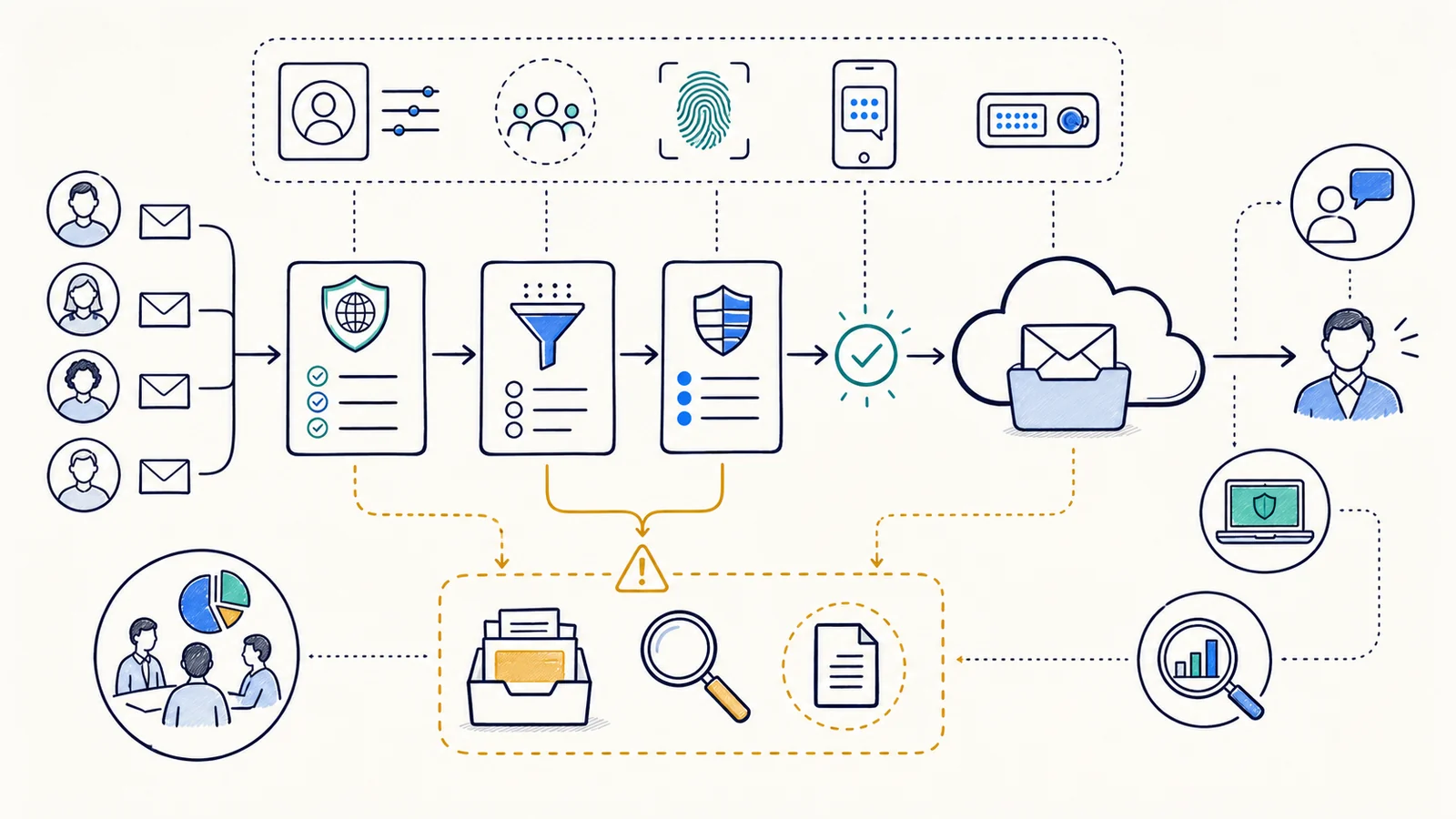
Inbound filtering evaluates messages arriving for users. Depending on the supported platform and license, it may consider sender reputation, message characteristics, links, attachments, impersonation signals, authentication results, and administrator policy. Outbound filtering can help identify suspicious sending patterns, restricted content categories, or compromised-account behavior, but available actions and visibility vary by product.
Link inspection and attachment analysis may be available in some licensed services. Microsoft uses names such as Safe Links and Safe Attachments for specific Defender for Office 365 capabilities; equivalent categories exist elsewhere. Apex does not assume those features are present merely because a business uses Microsoft 365. Product edition, licensing, policy assignment, exclusions, supported workloads, and configuration must be confirmed first.
Coordinate SPF, DKIM, and DMARC With Real Sending Sources
Sender Policy Framework (SPF) publishes which systems are permitted to send mail for a domain for SPF evaluation. It checks the sending path and domain used for that check; SPF alone does not authenticate the visible message content or establish that a message is trustworthy. Forwarding and indirect mail flows can also affect results.
DomainKeys Identified Mail (DKIM) adds a cryptographic signature that a receiving system can validate against a public key in DNS. It helps show that signed portions of a message have not changed and that the signing domain authorized the signature. A valid signature does not mean the sender’s request is safe, and unsigned or misconfigured services require separate review.
Domain-based Message Authentication, Reporting, and Conformance (DMARC) uses SPF and DKIM results plus alignment with the domain visible to the recipient. A published policy can tell participating receivers how to handle messages that fail the defined checks and can provide reports for review. DMARC protects only the domains and subdomains covered by their configuration. Moving toward an enforcement policy requires an inventory of legitimate senders, alignment work, report review, DNS access, and controlled changes so required business mail is not silently overlooked.
Protect the Account as Well as the Message
A message filter cannot stop an attacker who signs in with a stolen password and uses a real mailbox. Multi-factor authentication adds another verification factor and can reduce reliance on a password alone. It still depends on user enrollment, supported methods, recovery procedures, and resistance to approval fatigue and social engineering. Legacy protocols, application passwords, shared accounts, unattended devices, and weak administrator practices can leave paths that need separate attention.
Conditional Access may help a suitably licensed Microsoft 365 environment apply identity policies based on factors such as user, application, device, location, or risk signals. It is not automatically included in every subscription and should be designed with exclusions, emergency-access planning, staged rollout, and testing. Apex can review supported dependencies through Microsoft 365 support without claiming a Microsoft certification or partnership.
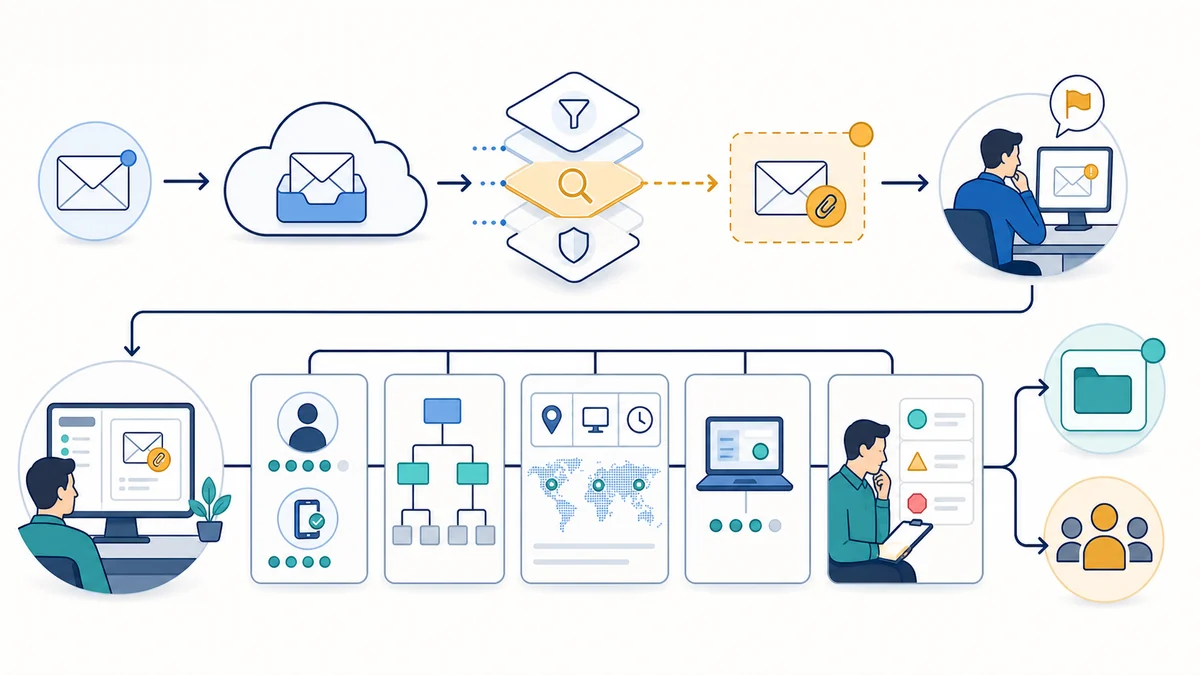
Account-takeover review may include recent sign-ins, authentication methods, active sessions, forwarding settings, inbox rules, delegates, sent and deleted items, application consent, administrative changes, and known recipient complaints, where the platform, retention, access, and authorization permit. Some evidence may expire or be unavailable. Endpoint review, password changes, session revocation, legal notification, financial coordination, or specialist investigation may require separate owners.
Manage Quarantine, Rules, Alerts, and Delivery as Operational Work
Quarantine policies determine who can review or release held messages and what notifications users receive. Overly broad self-release can reintroduce risk, while administrator-only review can delay legitimate business mail. Reviewers need the original sender, authentication results, message path, reason for the action, and business context. Allow lists and bypass rules should be narrow, documented, time-limited where practical, and revisited after the underlying issue is corrected.
Mail-flow rules and connectors can route, reject, tag, encrypt, redirect, or otherwise process messages, depending on the platform. A rule can also override filtering or create an unexpected delivery path. Changes should identify the owner, purpose, affected senders and recipients, test cases, maintenance constraints, and rollback method. Third-party billing, marketing, scanning, application, and relay services must be included in the sender and connector inventory.
Alerts can draw attention to selected events, but an alert is not proof that a person has reviewed or contained an incident. Notification delivery can fail, and platform detections have limits. Continuous staffed monitoring, fixed response times, forensic analysis, legal advice, and round-the-clock incident response are not included unless a separate verified agreement says otherwise.
Give Employees a Reporting Path and Define What Happens Next
A Defined Email-Security Scope May Include
- Mail-platform, domain, license, connector, rule, quarantine, and sender inventory
- Supported inbound and outbound filtering policy review
- SPF, DKIM, and DMARC planning for confirmed sending sources
- MFA and supported identity-policy review
- User-reporting workflow, administrative triage steps, and documentation
- Approved policy changes, test messages, and post-change review
It Does Not Automatically Include
- Removal of all spam, phishing, impersonation, or malicious content
- Endpoint protection, device remediation, backups, or data recovery
- Security-awareness training beyond the agreed topic and audience
- Forensic investigation, legal advice, breach notification, or financial recovery
- Licenses, third-party subscriptions, DNS ownership, or vendor fees
- Continuous human alert review or after-hours incident response
Security awareness supports the technical controls when it uses the organization’s real workflows: payment changes, shared files, account notices, executive requests, and vendor communication. Training does not transfer responsibility to employees or make them a filter. The business should provide a low-friction reporting route, avoid punishing good-faith reports, and require independent verification for sensitive actions.
Assess, Change, Test, and Document the Supported Environment
- Identify business mail flows. Record domains, user groups, shared mailboxes, applications, devices, external senders, sensitive workflows, and recurring complaints.
- Confirm platforms and ownership. Review the mail service, licenses, administrative access, DNS control, connectors, gateways, identity services, endpoint dependencies, and responsible vendors.
- Inspect current controls. Examine supported filtering policies, authentication records, quarantine behavior, mail-flow rules, forwarding, alerts, reporting tools, and documented exceptions.
- Prioritize findings. Separate configuration gaps, licensing limits, unknown senders, risky bypasses, identity weaknesses, user-process issues, and third-party dependencies.
- Plan approved changes. Define the exact change, affected users and mail, test cases, communication, maintenance timing, rollback method, and owner approval.
- Implement in stages. Use a pilot or observation mode where the technology and risk permit. Review false positives, false negatives, authentication reports, and business impact before broader enforcement.
- Test and document. Confirm representative inbound and outbound mail, quarantine actions, reporting, notifications, identity access, exceptions, and administrative ownership. Record remaining limitations and review dates.
Better configuration can reduce inbox noise, make impersonation harder, clarify suspicious-message handling, and improve evidence for troubleshooting. Outcomes still depend on the sender, platform, licenses, identity controls, endpoints, users, vendors, and the organization’s willingness to maintain the process.
Email Security Support for Orange County Organizations
Apex IT Solutions works with businesses and organizations in Anaheim, Irvine, Santa Ana, Costa Mesa, Fullerton, Brea, Buena Park, and other Orange County communities where service is available. Professional offices, medical and dental practices, manufacturers, warehouses, retailers, nonprofits, and multi-location teams can have different mail flows, approval practices, shared mailboxes, vendors, and tolerance for delayed messages.
Start with the mail platform, domains, user count, recent suspicious messages, delivery problems, licensing, known sending services, and current reporting process. Apex can determine whether the next step is a focused configuration review, Microsoft 365 assistance, broader IT support, or coordination with another provider.
Email Security and Spam Protection FAQs
Can a spam filter stop every phishing message?
No. Filtering can reduce risk, but some messages use compromised legitimate accounts, new domains, ordinary file-sharing services, or requests with no malicious link or attachment. Licensing, policy, reputation data, user behavior, and review affect results.
What is the difference between SPF, DKIM, and DMARC?
SPF evaluates an authorized sending path, DKIM validates a domain signature over signed message content, and DMARC evaluates alignment with the domain visible to the recipient and publishes policy. They work together but do not establish that every authenticated message is safe.
Will DMARC start blocking spoofed mail as soon as it is published?
DMARC affects participating receivers only for domains covered by the published configuration. Enforcement should follow sender discovery, SPF or DKIM alignment, report review, and controlled policy changes. Lookalike domains and compromised real accounts require other controls.
Are Safe Links and Safe Attachments included with Microsoft 365?
They are product capabilities associated with particular Microsoft security offerings and policies, not an automatic assumption for every tenant. Apex must confirm the subscription, supported workload, assigned policy, exclusions, and configuration before describing coverage.
Why did a legitimate message enter quarantine?
Possible causes include reputation, content, authentication failure, policy, bulk-mail thresholds, a mail-flow rule, or the sender’s configuration. Review the message trace and policy result before creating a broad bypass that could weaken filtering.
What are warning signs of a compromised mailbox?
Unknown sent mail, forwarding addresses, inbox rules, deleted replies, sign-ins, MFA prompts, changed recovery details, consent grants, or recipient complaints deserve review. The available evidence depends on licensing, retention, access, and how much time has passed.
Does email security replace endpoint protection or backups?
No. A user may download a file, disclose credentials, or act on a deceptive request even when mail controls are present. Endpoints, identity, permissions, backups, restoration, user verification, and incident procedures address different parts of the risk.
How can our Orange County business get started?
Share the mail platform, domains, licenses, user groups, sending services, suspicious-message examples, delivery symptoms, and reporting process. Use the Request IT Support form or call (800) 275-6513.
Review the Mail Flow, Identity, and Business Process Together
Describe the suspicious messages, delivery problems, domains, mail platform, users, sending services, current licenses, and business actions that need protection. Apex IT Solutions can assess the supported environment, document boundaries, and recommend a practical next step for your Orange County organization.