
Managed endpoint visibility for supported Windows systems
Give Endpoint Security Alerts a Defined Management and Response Process
Business computers hold access to email, cloud services, customer information, financial workflows, shared files, and specialized applications. When suspicious activity appears on a workstation, a business owner needs more than a warning on one employee’s screen. The organization needs a clear process for reviewing available evidence, deciding what the event means, taking supported action, and communicating with the right people.
Apex IT Solutions provides managed endpoint detection and response, or EDR, for supported Windows systems. Apex procures and manages licensing, monitors the management console and detections during normal business operations, investigates alerts, performs supported remediation, escalates when needed, and communicates with the customer. The work is delivered in-house, while the underlying product and vendor remain private.
EDR improves endpoint visibility and gives authorized responders useful options, but it is not complete protection. Automated detection and notification can continue when staff are not working; that automation is not continuous human monitoring. Apex does not provide after-hours human monitoring or response through this service. Normal business hours apply, and coverage depends on the supported Windows version, agent health, connectivity, policy, exclusions, licensing, available telemetry, and retention.

Make Endpoint Security Operational, Not Merely Installed
An endpoint security product creates value only when the right devices are enrolled, policies are appropriate, agents remain healthy, detections reach the intended console, and someone owns the next decision. A license purchase alone does not establish those conditions. Neither does an icon in the Windows notification area. Managed EDR turns the product into a defined operational service for supported systems.
For an owner or manager, the practical benefit is accountability. Apex manages the licensing and console, reviews detections during staffed business hours, investigates available context, takes supported remediation within authorization, and explains relevant events to the customer. That creates a more coherent path than expecting employees to interpret technical pop-ups or asking an office manager to operate a security dashboard.
Centralized Status
A management console can show enrolled supported devices, policy status, agent condition, detections, and available activity in one place, subject to platform and licensing limits.
Detection Context
EDR may connect an alert with processes, files, users, device activity, or other available telemetry so review is not limited to a single generic warning.
Supported Action
Authorized actions may include investigating, applying product-supported remediation, adjusting an appropriate policy, or coordinating additional IT work when the issue extends beyond the endpoint tool.
Clear Escalation
Events that require customer decisions, another provider, a specialist, or work outside the service are escalated rather than being presented as automatically resolved.
Managed EDR belongs within a layered security approach. Secure account administration, email security, firewalls, software maintenance, backups, user procedures, and recovery planning address risks an endpoint agent cannot solve by itself. Apex can coordinate these areas through its broader cybersecurity services and managed IT services.
Understand the Difference Between Antivirus and EDR
Antivirus remains a useful endpoint safeguard. It is designed to identify and block known or suspicious malicious software using the protections and methods available in the product. Modern antivirus can include several detection techniques, and there can be meaningful overlap between antivirus and EDR. The distinction is not that antivirus is obsolete or that EDR makes every other safeguard unnecessary.
EDR generally adds broader endpoint activity visibility, centralized detections, investigation context, and supported response capabilities. Instead of treating one file result as the complete story, EDR may preserve related endpoint observations that help a reviewer understand what happened before or after a detection. Depending on the product, policy, telemetry, and retained data, that context can help distinguish an expected business action, a blocked item, an unwanted program, or activity that deserves further attention.
The two capabilities can work together. Antivirus can help prevent or block malicious content, while EDR can help organize endpoint evidence and response. Neither guarantees detection of every threat. Neither replaces secure identity, protected email, managed network controls, tested backups, or informed employees. The right question is not which acronym sounds stronger; it is whether supported devices have healthy, appropriately managed protection and whether the business has a realistic process when a detection occurs.
Apex Manages the Service From Licensing Through Customer Communication
Apex procures and manages the EDR licensing used for the agreed supported Windows systems. Centralized license management helps align subscriptions with enrolled devices and the managed-service scope. It does not make unsupported operating systems eligible or guarantee that every device has successfully connected; inventory and agent status still need review.
Apex monitors the console and detections, investigates alerts using the information available to the service, and performs remediation supported by the product and authorized scope. If the evidence points to a wider account, email, network, application, or operational issue, Apex can coordinate appropriate IT steps or explain what needs separate attention. Relevant conditions and decisions are communicated to the customer’s designated contacts.
All Apex service work described here is performed in-house. The endpoint security product is a third-party technology, but Apex does not publish its product or vendor name. Keeping that detail private does not change the need for a clear service scope: the agreement identifies included systems, licensing, policy, contacts, authorization, staffed availability, and exclusions.
Investigate the Alert, Choose Supported Action, and Escalate When Needed
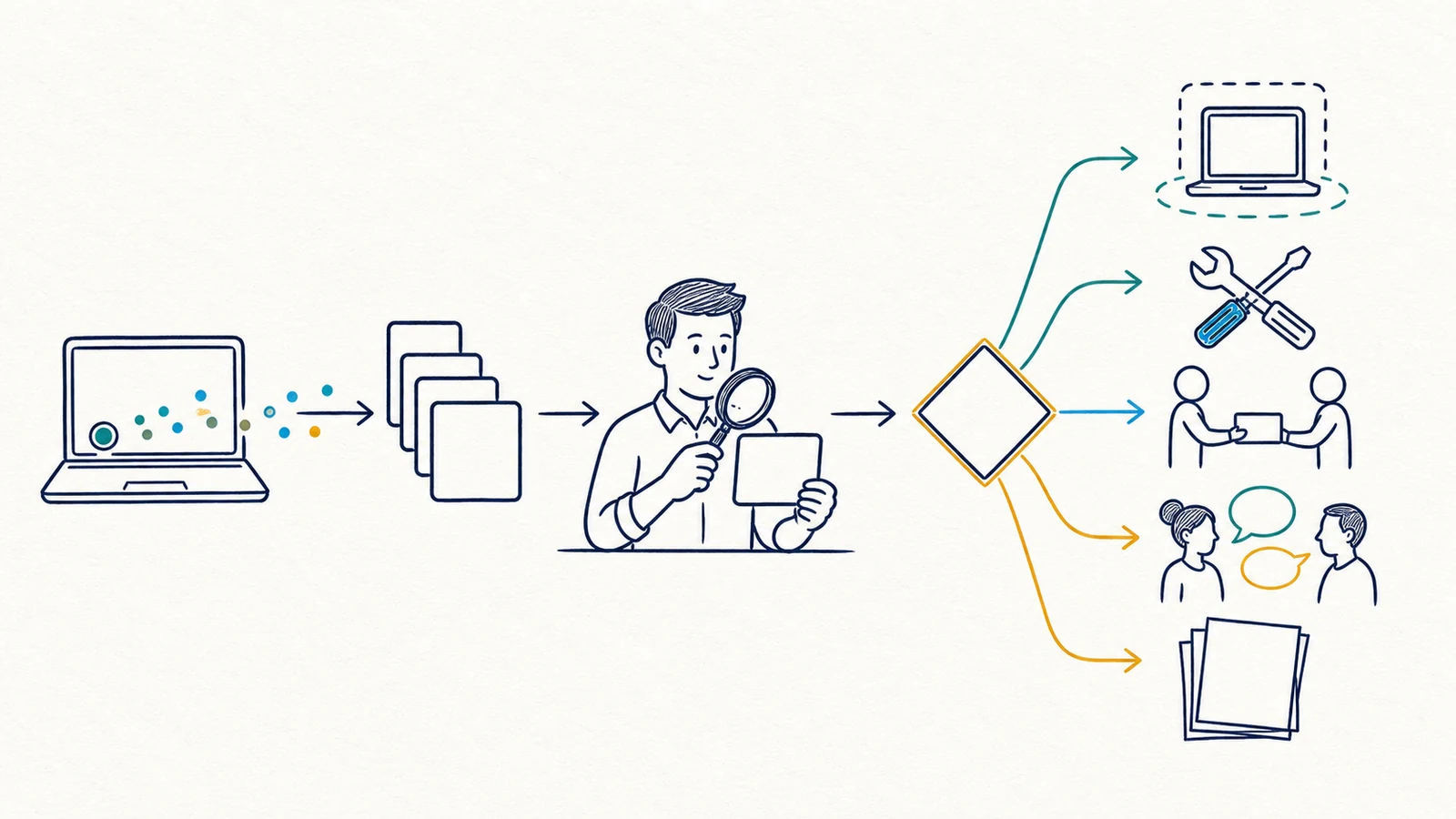
- Receive the detection. The agent and service platform may generate and deliver a detection according to available telemetry, policy, connectivity, product behavior, and licensing.
- Review available context. During normal business hours, Apex examines the console information, affected supported device, alert details, related activity where available, agent health, and known business context.
- Assess what can be established. A detection may represent blocked malware, suspicious behavior, an unwanted application, legitimate administrative activity, or an event that remains uncertain. The label alone does not prove the full cause or impact.
- Take supported remediation. Within the approved scope, Apex may use product-supported actions or coordinate related IT changes. The exact action depends on the alert, system condition, policy, authority, and operational risk.
- Escalate appropriately. Apex contacts the customer when a business decision, user confirmation, system interruption, additional access, another vendor, or specialist service is required.
- Communicate the outcome. Apex explains material findings, actions taken, remaining uncertainty, and practical next steps to the designated customer contact.
This process is deliberately evidence-led. An alert is not ignored simply because it might be benign, and it is not described as a confirmed breach merely because a detection name sounds serious. Investigation uses the telemetry and records available at that time. Limited retention, offline devices, failed agents, exclusions, or missing context can constrain the conclusion.
Configure Automatic Isolation Only When Policy and Device Role Support It
Some supported endpoint actions may be configured to isolate a device automatically. Isolation can reduce some network communication while an event is reviewed, but it can also interrupt access to files, applications, printers, remote support, or business processes. It is therefore not a universal setting that should be enabled without considering how the device is used.
Apex may configure supported automatic isolation depending on customer policy, authorization, and device role. A standard employee workstation may present different operational consequences than a computer attached to specialized equipment, a shared front-desk system, or a machine needed for a time-sensitive workflow. The business and Apex should identify authorized actions, important exceptions, escalation contacts, and recovery expectations before relying on automation.
Automatic isolation is not guaranteed to occur or succeed in every event. The action depends on what the product detects, the configured policy, agent health, connectivity, platform support, and the condition of the device. Isolation also does not establish that an incident is fully contained or remediated. Accounts, cloud sessions, email, network devices, shared data, or other endpoints may require separate review.
Confirm Supported Windows Coverage and the Conditions Behind Visibility
Apex managed EDR is for supported Windows systems. Eligibility depends on the Windows version and the endpoint platform’s current technical support requirements. Unsupported operating systems and other platforms are not implied by this page. If an older device or specialized application cannot meet requirements, Apex can help identify the business dependency and discuss a separate upgrade, replacement, segmentation, or vendor-coordination decision.
Coverage Depends On
- A supported Windows version and compatible device condition
- A correctly installed, running, and healthy agent
- Connectivity needed for telemetry, policy, updates, and actions
- Current licensing and successful enrollment
- Appropriate policies and documented exclusions
- Telemetry the platform can collect and make available
- Data retention sufficient for the question being investigated
Coverage Does Not Establish
- Visibility into every account, application, cloud service, or network
- Detection of every malicious or unwanted activity
- Immediate review of every notification
- Successful isolation, remediation, or recovery in every case
- Protection for offline, unenrolled, unhealthy, excluded, or unsupported systems
- A complete historical record beyond available telemetry and retention
- That an absence of detections proves an endpoint is safe
Coverage review should be routine because endpoint fleets change. Employees join or leave, laptops are replaced, devices remain offline, software conflicts appear, licenses change, and business applications create exceptions. Apex uses the console and available records to manage supported coverage, while the customer helps maintain accurate device ownership and promptly reports relevant staffing or equipment changes.
Separate Automated Operation From Normal-Business-Hours Human Service
The endpoint agent, detection logic, console, and notification paths may operate automatically outside normal business hours. That does not mean an Apex employee is continuously watching the system. Human monitoring, investigation, remediation, escalation, and customer communication are provided during normal business hours. After-hours human monitoring or response is not part of this service.
Apex does not present managed EDR as a 24/7 security operations center, managed detection and response service, SIEM operation, or instant-response commitment. It also does not include proactive threat hunting, digital forensics, legal or compliance determinations, breach notification, or a guarantee of containment, remediation, or recovery. If a customer requires any of those capabilities, the need should be identified and arranged separately with an appropriately qualified provider.
These boundaries help owners make an informed decision. Automated endpoint protection can still provide meaningful value without being described as round-the-clock human staffing. The service agreement, customer contacts, authorization, and complementary procedures should reflect the organization’s operational needs, including what employees should do if they notice suspicious activity outside staffed hours.
Prepare Supported Devices, Contacts, Policies, and Business Context
Onboarding begins by identifying the supported Windows systems intended for coverage, their owners and roles, current protection tools, important applications, connectivity, existing exclusions, and any operational limits. Apex can then coordinate licensing, agent deployment, policy, console enrollment, and representative status checks within the agreed scope. Installation should be planned carefully where a device supports specialized hardware or an application with vendor requirements.
The customer authorizes deployment and response actions, provides accurate device and user information, identifies decision-makers and escalation contacts, reports equipment and staffing changes, and discloses known business-critical device roles. The customer should also maintain appropriate email, account, network, backup, and business-continuity measures. Sensitive credentials or incident evidence should not be sent through the public contact form.
Businesses considering EDR may benefit from a broader cybersecurity assessment when endpoint coverage is only one of several concerns. Related services include email security and spam protection, managed firewall services, Microsoft 365 support, and business backup and disaster recovery.
Endpoint Detection and Response FAQs
What does Apex manage as part of the EDR service?
Apex procures and manages licensing for agreed supported Windows systems, monitors the console and detections during normal business operations, investigates alerts, performs supported remediation within scope, escalates when needed, and communicates with the customer. Apex performs this service work in-house.
Is EDR the same as antivirus?
No, although modern products can overlap. Antivirus remains an important safeguard focused on identifying and blocking malicious software. EDR generally adds centralized endpoint activity, detections, investigation context, and supported response options. EDR complements rather than discredits antivirus, and neither replaces identity, email, network, backup, or user controls.
Does Apex monitor EDR alerts 24 hours a day?
No. Agents and notifications may operate automatically outside business hours, but automation is not continuous human monitoring. Apex provides human monitoring and response during normal business hours and does not provide after-hours human monitoring or response through this service.
Can a computer be isolated automatically?
Supported automatic isolation may be configured depending on policy, customer authorization, and device role. It is not appropriate for every system and is not guaranteed to trigger or succeed. Connectivity, agent health, platform support, policy, and the detected condition affect the action.
Which devices can receive managed EDR?
The service covers supported Windows systems that meet applicable platform requirements. Coverage depends on Windows support status, compatibility, agent health, connectivity, licensing, enrollment, policy, exclusions, telemetry, and retention. This page does not claim support for other or unsupported platforms.
Will EDR detect and stop every threat?
No. EDR improves visibility and supported response options, but no endpoint tool detects every threat or guarantees isolation, remediation, or recovery. Offline devices, unhealthy agents, exclusions, limited telemetry, retention, new techniques, and activity outside the endpoint can all affect results.
What happens when Apex investigates an alert?
Apex reviews available console context during normal business hours, considers the affected system and known business activity, uses supported remediation where authorized, and escalates when a customer decision, user confirmation, broader IT work, outside vendor, or specialist is needed. A detection is evaluated rather than automatically treated as proof of a breach.
Does managed EDR include forensics or compliance services?
No. The service does not include digital forensics, threat hunting, legal advice, compliance determinations, or breach notification. Those needs require separate scope and may require appropriately qualified legal, compliance, insurance, forensic, or incident-response providers.
How can our business get started?
Use the Request IT Support form to describe your number of supported Windows devices, important device roles, current endpoint protection, business applications, locations, and main concerns, or call (800) 275-6513. Do not send passwords or sensitive evidence through the public form.
Build Managed EDR Around Your Supported Windows Environment
Tell Apex about your Windows devices, employee roles, important applications, current endpoint protection, operational constraints, and response contacts. We can determine whether managed EDR fits the environment and define licensing, deployment, policy, monitoring, authorized action, communication, and service boundaries clearly.