Business technology support organized around the way your company works
Business technology problems rarely stay inside one category. An unreliable wireless connection can interrupt cloud applications and business phones. A server problem can affect shared files, line-of-business software, and backups. A new office can require coordinated internet service, firewall configuration, switching, cabling, Wi-Fi, workstations, phones, and secure access for remote employees. Apex IT Solutions helps Orange County businesses examine those connections, address immediate issues, and plan practical improvements across the supported environment.
The right starting point depends on what is happening now. Some companies need help with a specific network, computer, server, backup, email, or Microsoft 365 problem. Others need an ongoing resource that can handle employee requests, system upkeep, vendor coordination, and technology planning. Apex provides remote and onsite business support across approved service areas, with the exact scope defined after the environment and business need are understood.
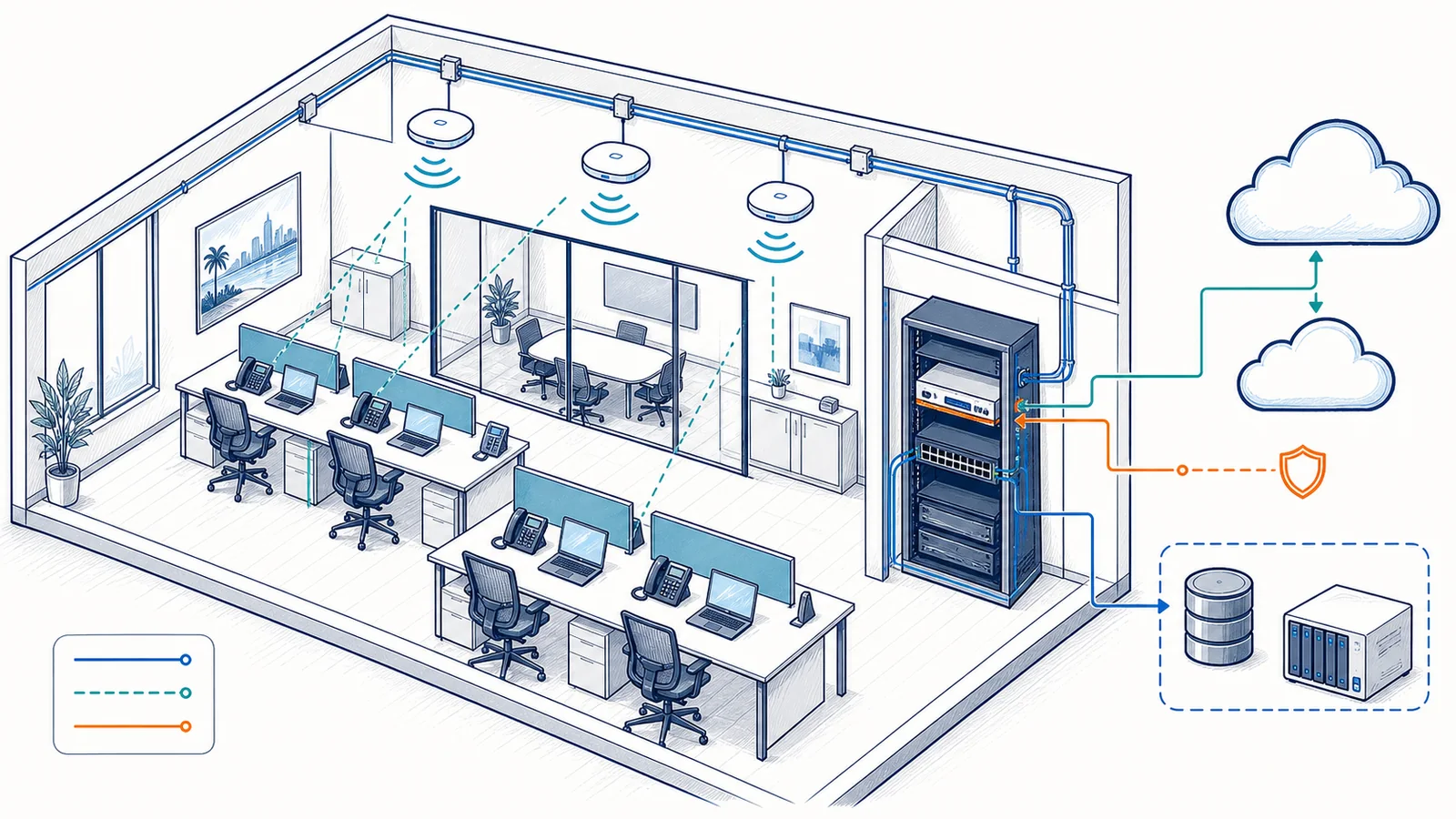
Business IT services connect users, infrastructure, cloud systems, security controls, communications, and backup planning.
Explore Apex business IT service groups
Use these service groups to find the most relevant path. Each hub explains the related problems, service boundaries, typical process, and focused services in more detail. If the cause is unclear, describe the affected users, systems, and business impact through the support form instead of trying to diagnose the problem first.
Managed IT & Support
Bring employee support, routine administration, maintenance, monitoring, vendor coordination, and technology planning into a defined working relationship. Managed IT can serve as an outsourced resource or complement an internal administrator through a co-managed arrangement.
Plan and support the connected foundation behind workstations, servers, cloud applications, phones, cameras, and remote access. Network work may involve design, installation, monitoring, troubleshooting, switching, routing, Wi-Fi, firewalls, VPNs, and structured cabling.
Review technology-related risk and strengthen appropriate controls across users, devices, networks, email, and supported cloud environments. The selected tools, licensing, monitoring level, and response procedures depend on the agreed service plan.
Identify important systems and data, determine how backup copies should be protected, and plan realistic recovery procedures. Recovery objectives are established through assessment, system design, retention decisions, testing, and the selected backup architecture—not through a blanket promise that every system or file can always be restored.
Support business account administration, user setup and removal, email configuration, permissions, file sharing, migration assistance, basic security settings, backup planning, and troubleshooting within the confirmed environment. Licensing and vendor matters may require coordination with Microsoft or an authorized licensing provider.
Diagnose and address business workstation, server, performance, configuration, hardware, connectivity, and maintenance problems. Remote troubleshooting may be appropriate for software or configuration issues, while onsite service is used when equipment, cabling, or the local environment needs direct inspection.
Plan and support approved business communication and video-surveillance systems that rely on the company network. VoIP work may include planning, configuration, deployment assistance, handset setup, and call-flow support. Business camera work stays within video surveillance, IP cameras, network video recorders, storage planning, remote viewing, network configuration, and maintenance.
Not sure which category applies? A recurring outage may involve the internet connection, firewall, switching, cabling, Wi-Fi, server, or application rather than the device where the symptom appears. Start with the business impact and affected users; the technical path can be narrowed during discovery.
Common signs that the IT environment needs attention
A business does not need to wait for a complete outage before reviewing its technology. Recurring small problems often show where ownership, documentation, capacity, lifecycle planning, or system design has become unclear. The warning signs that matter most are the ones that interrupt work, create avoidable risk, or repeatedly consume employee time.
Recurring user and workstation issues
Employees repeatedly lose access to applications, printers, files, shared resources, email, or business systems. The same tickets return after temporary fixes, new employees take too long to set up, or no one is certain who owns account and device administration.
Unstable connectivity
Internet sessions drop, wireless coverage varies by room, voice calls break up, cloud applications feel inconsistent, or different parts of the office behave as though they are on unrelated networks. These symptoms can require more than replacing a single device.
Aging or poorly understood infrastructure
Servers, switches, firewalls, access points, workstations, backup devices, and cabling have accumulated over time without a current diagram, inventory, replacement plan, or clear configuration record. Changes become harder because dependencies are unknown.
Uncertain backup and recovery readiness
Backup jobs are assumed to work but have not been reviewed, important systems may not be covered, retention needs are unclear, or nobody has documented what should be restored first after a disruption.
Security settings vary across the business
User access, endpoint protection, email filtering, firewall rules, remote access, updates, and cloud permissions have been configured at different times without a current risk review. A technology assessment can identify gaps without claiming to certify legal or regulatory compliance.
Growth or change is stretching the current setup
A move, office expansion, new application, additional location, staffing change, cloud transition, phone deployment, camera project, or production-floor requirement is placing new demands on infrastructure that was designed for a smaller or different operation.
Choose a starting point based on what is changing
A service name is not always the easiest way to describe what a company needs. The same technical capabilities can be organized differently depending on whether the business is building its first formal support relationship, supplementing internal staff, preparing for growth, or trying to stop a recurring operational problem.
We need a more organized support model
Employee requests are reaching different people, recurring issues are handled one at a time, and routine administration or maintenance lacks a clear owner. Begin with managed IT and support services to compare help desk, remote and onsite support, co-managed responsibilities, monitoring, planning, and related support options.
Our internal IT person or team needs help
An internal administrator may need added capacity, onsite coverage, project assistance, infrastructure skills, documentation, monitoring, or a second resource for defined responsibilities. Review co-managed IT services and identify which tasks should remain internal and which tasks require outside support.
We are opening, moving, expanding, or connecting locations
A facility or staffing change can affect internet service, firewall and switching design, cabling, Wi-Fi, workstations, phones, cameras, cloud access, vendors, and support ownership. Start with network and infrastructure planning and multi-location IT support so the dependencies are reviewed together.
We are concerned about security or recovery readiness
Unclear firewall rules, inconsistent endpoint settings, suspicious email, uncertain backups, or undocumented recovery priorities may require a broader review than a single product change. Compare cybersecurity services with backup and disaster recovery planning. Technology guidance does not replace legal, audit, insurance, or compliance advice.
Remote and onsite business support serve different purposes
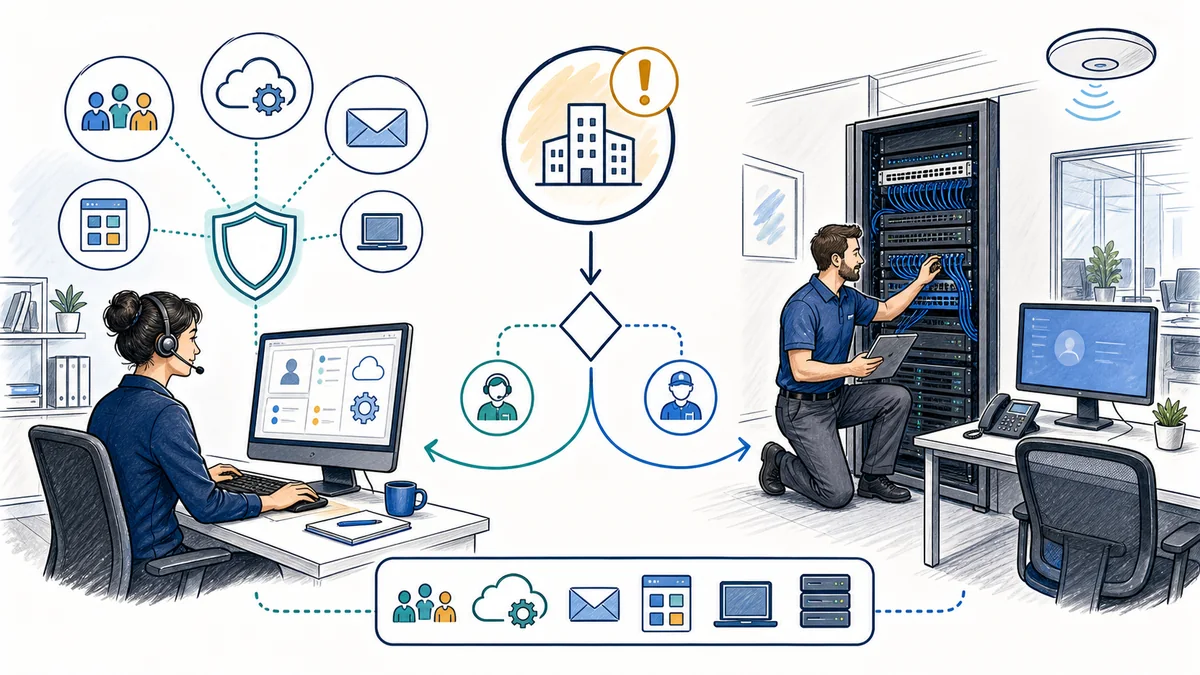
Many account, software, configuration, email, permission, workstation, and cloud-service issues can be assessed remotely. Remote work can also help gather symptoms, review supported settings, coordinate with a vendor, and determine whether an onsite visit is necessary. It is not the right method for every problem.
Onsite support is appropriate when a technician needs to inspect or work directly with physical equipment, cabling, wireless coverage, a server room, a network rack, a failed device, a new installation, or conditions inside the facility. A connectivity issue may require testing at the wall jack, patch panel, switch, access point, or internet handoff. A camera, phone, or cabling project also depends on the physical layout and existing infrastructure.
The service path should follow the problem rather than a rigid rule. Discovery may begin remotely and move onsite, or an installation may begin with an onsite assessment and continue with remote configuration and documentation. Exact availability, response procedures, and service coverage depend on the selected engagement and current commitments; automated monitoring should not be confused with technician availability outside confirmed support hours.
Remote and onsite support address different parts of a business technology environment; the problem and required access determine the appropriate path.
Prepare useful context. When requesting help, identify the affected location, users, devices, applications, when the problem began, whether it is constant or intermittent, and how it affects business operations. Do not send passwords, private access codes, or sensitive records through the public contact form.
How business IT work is assessed and planned
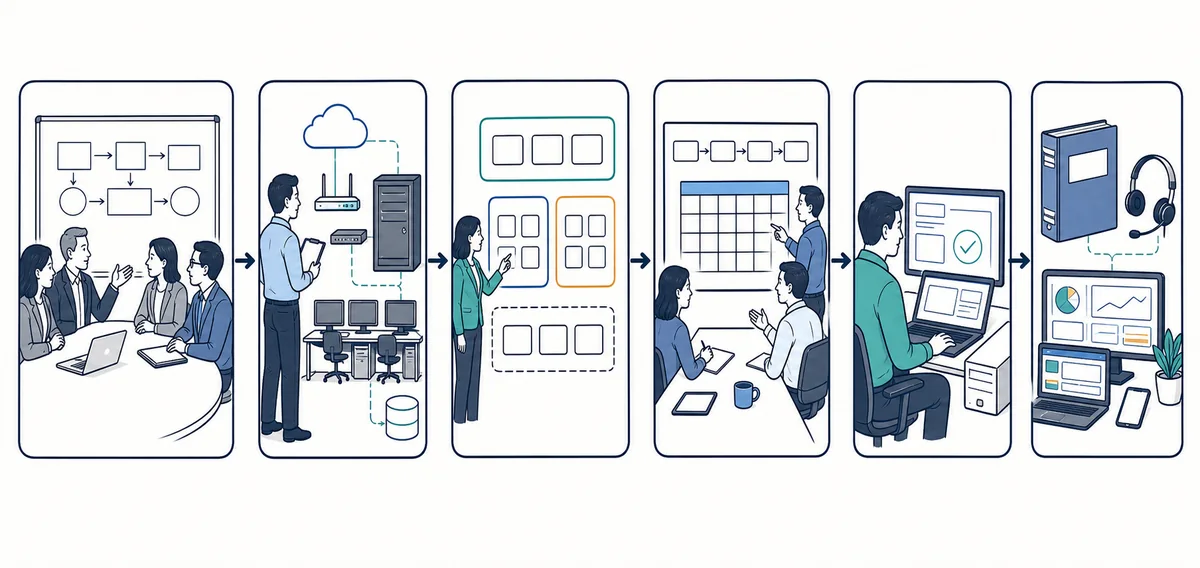
The sequence varies by service. Troubleshooting a failed workstation is different from planning a multi-location network or a disaster recovery arrangement. Even so, careful work generally moves from understanding the business need to confirming the current environment, selecting an appropriate scope, implementing the change, and verifying the result.
A service-planning workflow moves from the business problem through review, scope, planning, implementation, testing, documentation, and support.
Describe the business impact
Identify what is happening, who is affected, the operational priority, recent changes, and any deadline tied to a move, new employee, vendor, audit, renewal, or business project.
Review the environment
Gather relevant information about users, devices, servers, network equipment, internet service, cloud platforms, backups, phones, cameras, locations, and existing vendor responsibilities.
Define the service boundary
Clarify the immediate objective, included systems, dependencies, assumptions, responsibilities, licensing questions, onsite requirements, and items that need separate vendor or adviser involvement.
Plan the work
Choose a practical sequence that considers downtime, access, change risk, testing, rollback needs, documentation, hardware lead time, and communication with affected employees or vendors.
Implement and test
Complete the agreed configuration, installation, migration assistance, repair, or support work and test the relevant functions. A successful technical change should be evaluated against the original business problem.
Document and support
Record useful configuration and ownership information, identify remaining risks or follow-up items, and determine whether the environment needs ongoing support, monitoring, maintenance, or lifecycle planning.
Some projects require coordination with an internet provider, software vendor, hardware supplier, cloud platform, licensing provider, carrier, legal adviser, compliance adviser, auditor, insurance representative, building contact, or another specialist. Apex can coordinate supported technology tasks without representing that it replaces those parties or controls their timelines and decisions.
What better IT coordination can improve
Technology support should be tied to how the business operates. The goal is not to add tools for their own sake. It is to reduce avoidable friction, make responsibilities clearer, and give decision-makers better information about systems that affect employees and customers.
Clearer ownership of issues: employees know where to report a problem and which party is responsible for the next step.
More consistent systems: workstations, accounts, network components, and supported services can be managed with fewer one-off decisions.
Better visibility: current inventories, diagrams, documentation, and monitoring information make recurring problems easier to investigate.
Easier employee changes: onboarding, role changes, permissions, and offboarding can follow a more deliberate process.
Improved recoverability: backup coverage, retention, restore priorities, and recovery procedures can be reviewed before an incident.
More practical planning: equipment lifecycle, capacity, expansion, cloud changes, office moves, and multi-location needs can be considered before they become urgent.
Simpler vendor coordination: internet, software, licensing, carrier, and equipment questions can be handled with better technical context.
These are planning objectives rather than guaranteed outcomes. The actual result depends on the current environment, selected scope, third-party services, equipment, licensing, user practices, and the work a business chooses to implement.
Support shaped by the operating environment
Different businesses can use similar technology while depending on it in different ways. A professional office may be most concerned with employee access, file sharing, email, meetings, printing, and remote work. A medical or dental practice may also need technology safeguards, backup and retention planning, access configuration, and coordination with its compliance or legal advisers. A law or accounting firm may place particular emphasis on document access, permissions, reliable remote connectivity, email protection, and time-sensitive workflows.
Machine shops and production businesses may need dependable office systems alongside production-floor connectivity, segmented network design, shared applications, equipment-vendor coordination, and careful planning around operational downtime. Multi-location businesses need more consistent networks, remote access, account administration, communication systems, vendor responsibilities, and support processes across sites.
Apex does not assume expertise, certification, or service scope merely because a company belongs to a particular industry. The useful starting point is the actual workflow: which systems employees depend on, where data is stored, how users connect, what happens when a component is unavailable, and which legal, compliance, insurance, or vendor requirements must be interpreted by the appropriate adviser.
Explore business IT support by industry for focused discussions of common operational needs.
Business IT services across Orange County
Apex focuses this service architecture on Orange County businesses. The mix of remote and onsite work can support offices, practices, professional firms, production businesses, and multi-location operations in Anaheim, Irvine, Santa Ana, Costa Mesa, Fullerton, Brea, Buena Park, and other appropriate Orange County business locations.
Location matters most when a task depends on the building, cabling, equipment, wireless environment, network handoff, server room, phone system, camera placement, or coordinated work at multiple sites. Remote service can address many supported account, software, configuration, cloud, and troubleshooting needs without turning every issue into an onsite visit.
The Orange County service-area section is intended to help local businesses understand coverage, not to create repetitive city pages. Individual locations should receive their own page only when there is enough genuinely distinct business and infrastructure information to justify it.
Frequently asked questions about Apex IT services
Which service should I choose if I do not know the cause of the problem?
Start with the symptoms and business impact. Identify the affected users, devices, location, application, and when the issue began. Apex can use that information during discovery to determine whether the next step belongs with user support, computers, servers, networking, cloud services, backup, security, phones, cameras, or a third-party vendor.
Does Apex work with businesses that already have internal IT staff?
Co-managed IT is an approved service. The working boundary can be defined around the internal team’s needs, such as additional help desk capacity, onsite work, infrastructure tasks, monitoring, documentation, projects, vendor coordination, or planning. Exact responsibilities should be agreed rather than assumed.
Can business IT issues be handled remotely?
Many software, account, email, permission, cloud, and configuration issues can be assessed remotely. Onsite service is used when equipment, cabling, wireless coverage, facility conditions, or hands-on installation and troubleshooting require direct access.
What information should we gather before requesting support?
Gather the location, affected users, device or system names when known, the exact symptom, recent changes, when the issue began, whether it is intermittent, and how operations are affected. Do not submit passwords, access codes, financial data, health information, or other sensitive records through the public form.
Does monitoring mean technicians are always available?
No. Automated monitoring and staffed support availability are different. Monitoring may collect status information or generate alerts according to the selected service, while technician availability and response procedures depend on the confirmed service arrangement.
Can Apex guarantee that data or systems will be recovered?
No blanket recovery guarantee is appropriate. Backup coverage, system condition, media damage, retention, available restore points, architecture, and testing all affect what can be restored. Recovery objectives should be established through assessment, planning, system design, testing, and the selected backup arrangement.
Does cybersecurity or compliance consulting certify that our business is compliant?
No. Apex may help review technology controls, identify gaps, improve supported configurations, plan backup and retention, support documentation, and coordinate remediation. Legal compliance determinations, official audits, and certification belong with the appropriate legal, compliance, audit, or other qualified advisers.
Can Apex help with more than one business location?
Multi-location IT support and network connectivity are approved services. Useful planning may cover consistent equipment and configuration, secure connectivity, account administration, phones, backups, vendor responsibilities, documentation, and a support process that recognizes differences among sites.
How do we request support?
Use the Request IT Support form to describe the business need, or call (800) 275-6513. Do not include passwords or sensitive records in the message.
Start with the business problem, not a product list
Describe what is not working, which employees or locations are affected, and what the company needs to accomplish. Apex can help identify the appropriate service path and the information needed to define the next step.