
Measured assessment for supported business servers
Start With Evidence Before Changing a Production Server
A slow or inconsistent server can affect file access, sign-ins, reporting, line-of-business applications, printing, databases, and other workflows across an Orange County workplace. The visible symptom does not identify the cause. Resource pressure, storage behavior, network conditions, background services, scheduled work, application design, virtualization limits, configuration choices, and aging hardware can produce similar user complaints.
Apex IT Solutions approaches server optimization as a controlled assessment and change process for supported environments. We establish the business symptom, observe the relevant workload, document a baseline, and separate configuration opportunities from capacity limits, hardware faults, application issues, and vendor-controlled dependencies. Any proposed change should have a reason, an approval path, prerequisites, a test, and a rollback approach.
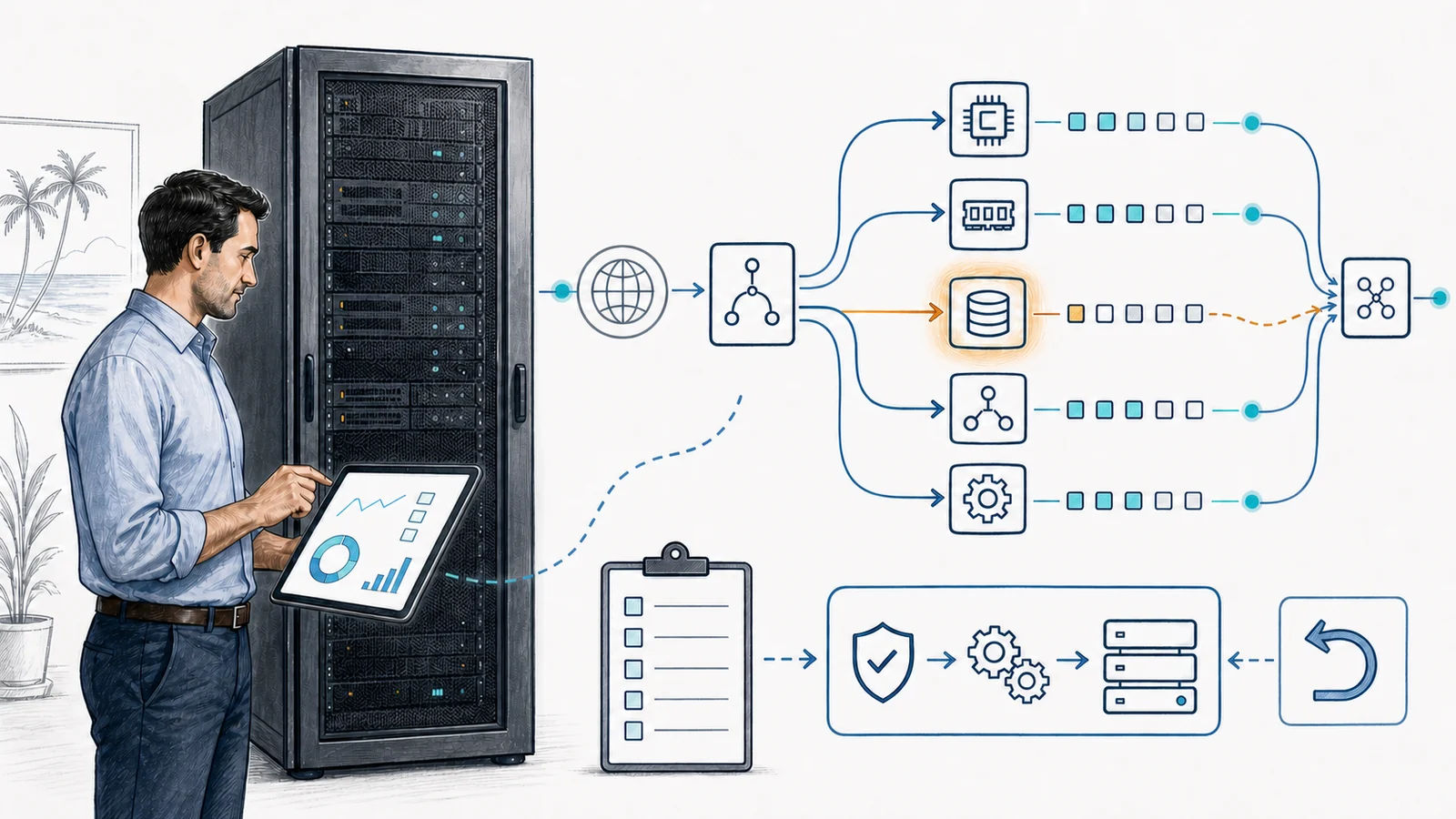
Connect the Business Symptom to the Actual Workload
Optimization should begin with what people are trying to accomplish and when the problem occurs. “The server is slow” may mean a shared file opens slowly, a database report runs longer at month end, an application pauses after login, remote users experience latency, or a nightly process overlaps the start of the workday. We ask which users, locations, applications, files, and time periods are affected; whether the condition is new or recurring; and what changed before it appeared.
The initial assessment may inventory server roles, operating-system and firmware status, physical or virtual placement, storage layout, network paths, important services, scheduled tasks, backup windows, security software, application owners, vendor restrictions, and recent changes. Existing server monitoring history can provide useful evidence, but optimization is not simply monitoring with a different name. Monitoring collects selected signals and alerts; optimization evaluates evidence and may propose controlled changes.
User and Workflow Symptoms
We identify the affected business task, users, locations, timing, frequency, error messages, and operational impact instead of treating every complaint as a processor problem.
Recent Change Context
Updates, new software, data growth, added users, changed security tools, altered backup schedules, virtualization moves, and network changes can help define the investigation window.
Role and Dependency Inventory
A file server, directory server, database host, application server, and virtualization host have different workloads and dependencies. Assessment should reflect the actual role.
Supportability Check
Operating systems, applications, hypervisors, hardware, firmware, drivers, licenses, and vendor access must support the review and any contemplated change.
Build a Baseline Before Interpreting a Busy Server
A snapshot taken during an idle minute says little about a problem that appears under Monday-morning logins or an afternoon reporting load. A working baseline records selected observations during representative business periods, known peaks, scheduled maintenance, backup activity, and—where practical—a comparison period when users are not experiencing the symptom. Sampling interval, collection duration, data quality, and workload changes all affect the conclusion.
CPU and Processes
Processor utilization, queue behavior, and running processes may help identify sustained demand or a specific workload. A brief spike can be normal, and high utilization alone does not prove the root cause.
Memory and Paging
Available memory, committed memory, paging activity, process consumption, and application behavior may show pressure. Free-memory numbers must be interpreted with caching, workload, and operating-system behavior.
Storage
Capacity, latency, throughput, queues, volume state, controller or disk alerts, and file-system conditions may be relevant. Guest, host, array, and backup-storage layers can tell different parts of the story.
Network
Interface use, errors, retransmissions, name resolution, route, switching, firewall, and client-to-server path conditions may affect a workload. Server tuning cannot correct every upstream or remote-site limitation.
Services and Startup
Service state, dependencies, startup type, delayed startup, process ownership, and service-account requirements can be reviewed. Disabling an unfamiliar service without dependency validation is not optimization.
Scheduled and Background Work
Scheduled tasks, backups, scans, indexing, reports, synchronization, updates, and maintenance jobs may overlap. Changing a schedule requires owner approval and consideration of recovery and security needs.
Separate Configuration Opportunities From Capacity and Hardware Limits
Not every performance concern has a tuning answer. A configuration issue might involve an inappropriate service setting, overlapping task, constrained application parameter, unsuitable storage placement, or network setting that can be changed within vendor guidance. A capacity issue means a legitimate workload is approaching available processor, memory, storage, network, or platform resources. A hardware issue may involve a degraded array, failing component, thermal condition, firmware problem, or other fault requiring diagnosis and repair.
The distinction matters because the remedies are different. A documented configuration change may address a verified bottleneck. Capacity pressure may call for an approved hardware or resource upgrade. A fault belongs in server support or repair. A platform approaching end of support may require lifecycle planning or migration. Optimization should not be used to disguise inadequate capacity, defer necessary repair, or represent an obsolete system as supported.
Review the Host, Guest, Application, and Vendor Boundaries
Virtual servers share resources and depend on the host, hypervisor, storage, and virtual networking. A guest may show processor or storage delay while the constraint exists outside its operating system. Conversely, adding virtual resources without understanding host capacity, application architecture, licensing, or non-uniform memory behavior can fail to address the original condition. The assessment should identify whether Apex has visibility and authorization at each required layer.
Line-of-business applications may impose database, service-account, antivirus-exclusion, port, version, memory, or storage requirements. Those requirements should be confirmed with current vendor documentation or the authorized application provider. Database maintenance, query or code changes, application reconfiguration, licensing, and vendor case work are separate unless explicitly included. Apex can collect infrastructure observations and coordinate, but does not replace the application owner or make unsupported changes around a vendor-controlled system.
Use Change Control, Maintenance Windows, Testing, and Rollback Planning
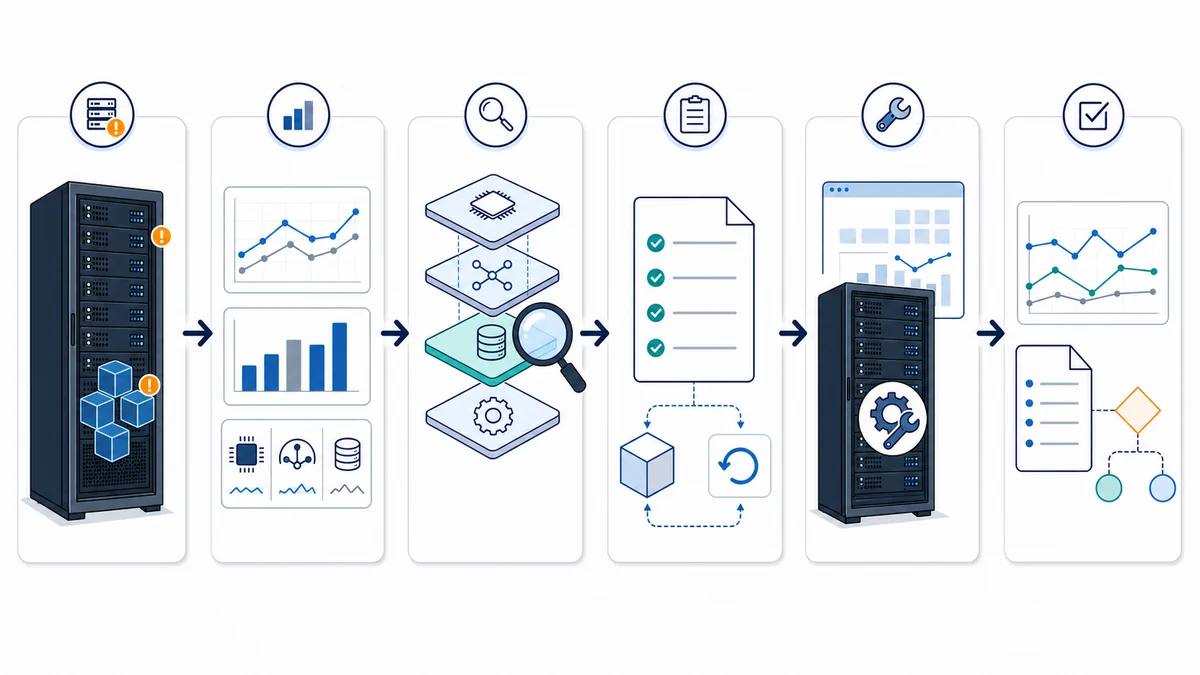
- Define the symptom and success criteria. Record the affected workflow, current behavior, representative test, owners, constraints, and evidence needed to compare before and after.
- Collect a relevant baseline. Observe selected resource, service, task, event, network, storage, host, and application indicators during the appropriate workload period.
- Classify the likely constraint. Distinguish configuration, capacity, hardware, network, virtualization, application, vendor, or mixed causes and document uncertainty.
- Prepare the change. Identify the exact setting or action, rationale, dependencies, approvals, vendor guidance, security impact, expected restart or interruption, test, and stop conditions.
- Confirm prerequisites. A current, scoped backup and a feasible rollback method must be established before a change that could affect production. Backup status alone does not prove restore readiness; critical changes may require separately authorized recovery validation.
- Schedule an approved window. Coordinate users, application owners, vendors, remote access, credentials, and any anticipated outage or service restart. No-change or no-downtime assumptions should not replace a documented window.
- Change narrowly and test. Apply only the approved item, verify service health and the representative business workflow, compare observations, and roll back or stop when acceptance criteria are not met.
- Document the result. Record the prior state, authorization, change, time, outcome, measurements, exceptions, rollback status, and follow-up recommendation so future troubleshooting has reliable context.
For backup planning and restore readiness, see server backup services. If data is already inaccessible or storage media is damaged, data recovery requires a separate assessment; optimization should not be attempted as a substitute for recovery.
Define What Optimization Includes—and What It Does Not
A Defined Optimization Scope May Include
- Business-symptom interviews and a supported server, role, workload, and dependency inventory
- Baseline review of selected CPU, memory, storage, network, service, startup, scheduled-task, event, and configuration observations
- Physical-server, virtualization-host, and guest context where access and supportability permit
- Classification of likely configuration, capacity, hardware, network, application, or vendor constraints
- Prioritized recommendations with prerequisites, risk, maintenance-window, test, and rollback considerations
- Approved narrow changes, comparison testing, and documentation when specifically authorized
Separate Scope, Approval, or Provider Needed
- Continuous monitoring, alert response, incident repair, upgrades, migrations, or broad administration
- Application code, database query design, vendor-owned configuration, or unsupported product changes
- Hardware, licenses, warranties, subscriptions, parts, cloud resources, or third-party fees
- Backup redesign, restore testing, data recovery, security assessment, compliance, or certification work
- Unsupported or obsolete operating systems, applications, hypervisors, firmware, or hardware
- Changes without required backup, rollback feasibility, authorization, access, or an appropriate maintenance window
Optimization also differs from an upgrade or migration. An upgrade adds or replaces resources or product versions. A migration moves workloads or data to another platform. Monitoring observes defined conditions. Repair addresses a fault. Application and vendor work changes the software layer. These services can inform one another, but they should not be assumed to be included in one optimization engagement.
Remote Analysis Where Practical, Onsite Work Where Physical Context Matters
Remote work may be appropriate when approved access is stable and the required operating-system, hypervisor, storage, network, and application evidence is available. It can support interviews, inventory review, baseline collection, log and configuration review, vendor coordination, and approved changes during a maintenance window.
Onsite assessment may be needed to identify undocumented equipment, inspect physical alarms, trace server and network connections, confirm power or cooling conditions, access a restricted console, or coordinate component work. Physical repair, installation, parts handling, and cabling are separately scoped through computer repair and server support.
Server Optimization for Orange County Workplaces
Apex IT Solutions supports businesses in Anaheim, Irvine, Santa Ana, Costa Mesa, Fullerton, Brea, Buena Park, and other Orange County communities. A professional office, medical practice, warehouse, manufacturer, and multi-location organization can have very different peak periods, application dependencies, maintenance constraints, and tolerance for interruption. The assessment should reflect the workplace rather than apply a universal tuning template.
Optimization can be a focused project or one part of broader managed IT services. Start with the business symptoms, server role, important applications, recent changes, current backup and monitoring practices, vendor contacts, and available maintenance windows.
Server Optimization FAQs
What does server optimization mean?
It is a measured process of connecting a business symptom to server and dependency evidence, classifying the likely constraint, and recommending or applying approved changes with testing and documentation. It is not automatic tuning or a promise that every server will become faster.
Do you assess the server before making changes?
Yes. The scope normally begins with symptoms, workload timing, server role, dependencies, recent changes, supportability, and a relevant baseline. A production change should not be made merely because a generic checklist labels a setting as unnecessary.
Which server conditions may be reviewed?
Depending on scope and access, observations may include processor and process behavior, memory and paging, storage capacity and latency, network conditions, service and startup settings, scheduled tasks, event history, operating-system configuration, virtualization layers, and application or vendor dependencies.
Can you guarantee a faster server?
No. The server may already be appropriately configured, or the limitation may be capacity, failing hardware, an application, shared infrastructure, a remote network, or a vendor-controlled service. The assessment can still produce useful findings and a clearer next step.
Is optimization the same as server monitoring or repair?
No. Monitoring collects selected conditions and may generate alerts. Optimization analyzes workloads and may propose controlled changes. Repair addresses faults. Ongoing administration and incident response belong in a defined server-support or managed-services arrangement.
Will Apex disable startup services or scheduled tasks?
Only after identifying ownership, purpose, dependencies, vendor requirements, security or backup impact, approval, and a test and rollback path. An unfamiliar or resource-intensive service can still be required for the operating system, application, security, management, or recovery process.
Do we need a backup before optimization work?
A current backup and feasible rollback method are prerequisites for changes that could affect production. The required protection depends on the proposed change. A reported successful backup job is not by itself proof that the necessary systems and data can be restored.
Can older or unsupported servers be optimized?
Apex does not represent unsupported or obsolete systems as supported. An assessment may document limitations and help identify repair, upgrade, isolation, replacement, or migration planning, but unsupported configuration changes may be excluded.
Can the work be completed remotely?
Some assessment and approved change work can be remote when access and evidence are sufficient. Onsite service may be needed for undocumented infrastructure, console access, physical alarms, cabling, power or cooling conditions, or component work. Contact Apex or call (800) 275-6513 to discuss the environment.
Turn “The Server Is Slow” Into a Structured Technical Assessment
Share the affected workflow, timing, server role, important applications, recent changes, available monitoring history, backup status, vendor contacts, and maintenance constraints. Apex IT Solutions can review the supported environment, document findings, and recommend a practical next step without assuming that a risky change or new hardware is always the answer.