
Wireless planning for Orange County workplaces
Design Wi-Fi Around the Building, Devices, and Work Your Business Actually Has
Business Wi-Fi is shared infrastructure. Employees may depend on it for cloud applications, voice and video meetings, inventory systems, tablets, scanners, point-of-sale devices, and ordinary internet access, while visitors may need a separate path online. A strong signal icon does not show whether the network has enough capacity, whether a client is using the intended access point, or whether the wired network and internet connection behind Wi-Fi can support the workload.
Apex IT Solutions helps Orange County businesses assess, design, install, and support appropriately scoped wireless networks. The process begins with business requirements and an onsite look at the physical and radio-frequency environment. Access-point locations, channels, transmit power, cabling, switching, PoE, network separation, authentication, and client limitations are considered together rather than treating additional access points as an automatic fix.
Start With Users, Applications, Devices, and Operating Priorities
A floorplan alone cannot define a business wireless network. Apex asks where people work, how many devices may be active at busy times, which applications matter, and whether the space includes conference rooms, warehouse aisles, production areas, outdoor work zones, temporary staff, or visitors. A small office, high-density training room, and distribution facility can require different placement, capacity, and client decisions at similar square footage.
People and Device Density
Counts should reflect concurrent laptops, phones, tablets, scanners, printers, specialty devices, and guests—not just employees. A device inventory also identifies older radios, limited bands, and vendor-controlled equipment.
Application Needs
Ordinary web access, large file transfers, cloud applications, voice, video, mobile checkout, and warehouse workflows place different demands on latency, capacity, mobility, and availability. Requirements should be prioritized rather than described only as “fast Wi-Fi.”
Coverage Areas
Required work areas, conference rooms, reception, break areas, loading zones, and approved outdoor areas are mapped. Utility rooms, vacant areas, neighboring suites, and public spaces are not automatically part of the coverage scope.
Growth and Change
Planned hiring, remodeled walls, new shelving, relocated teams, added devices, and changed applications can affect the design. Future capacity is considered from known plans, not promised without limits.
Inspect the Physical Space and RF Environment Onsite
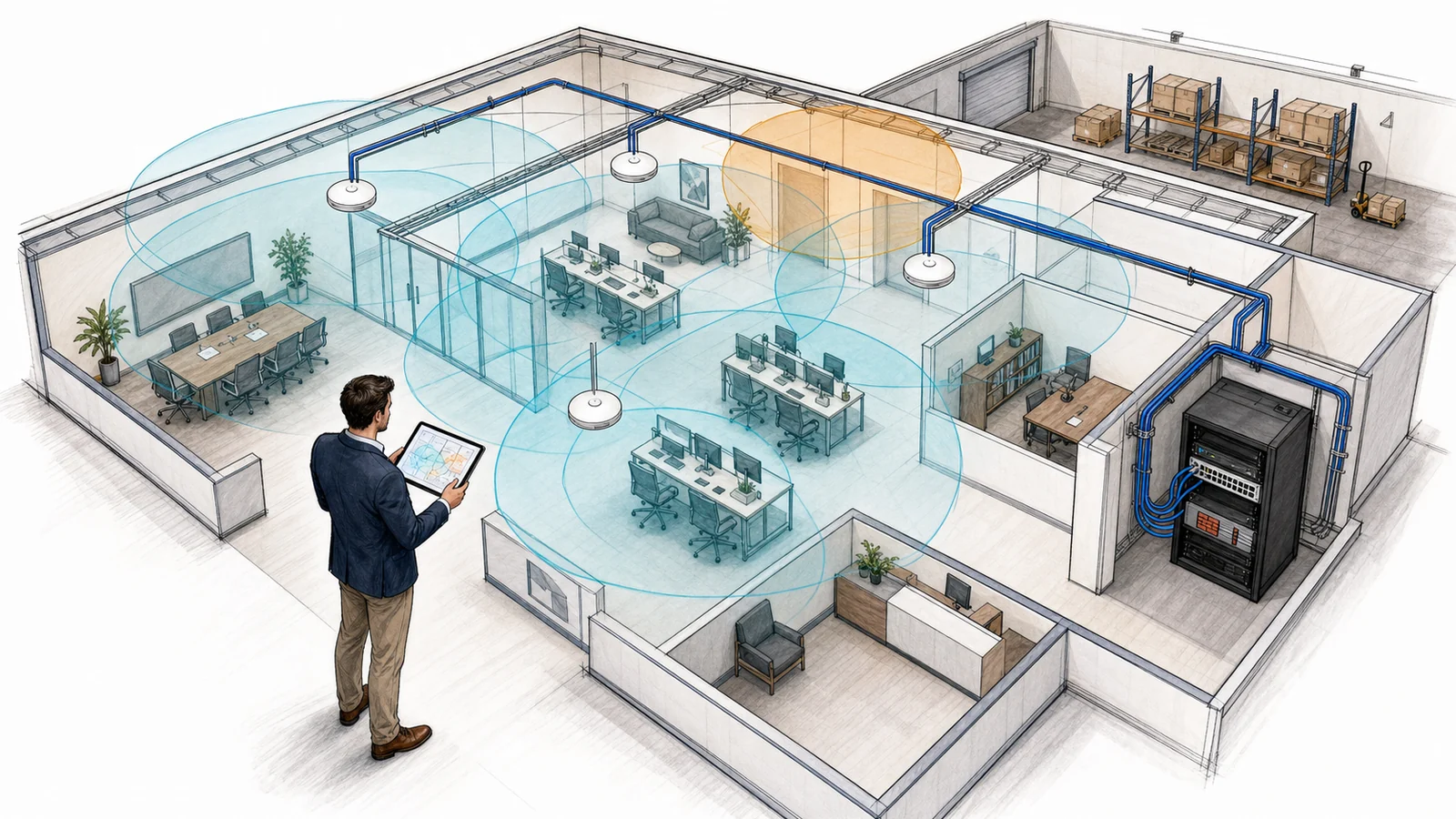
Radio waves interact with the actual building. Concrete, masonry, metal shelving, glass treatments, elevator cores, machinery, stored inventory, water, and dense partitions can change attenuation and reflections. Neighboring networks and non-Wi-Fi equipment may add contention or interference. Furniture, stock levels, doors, and occupancy can also differ from an empty floorplan. That is why an onsite review is normally important before final placement or before diagnosing a persistent coverage complaint.
The assessment may include floorplans, materials, ceiling access, mounting restrictions, cable paths, equipment rooms, switch/PoE capacity, existing access points, visible neighboring networks, representative RF measurements, and known trouble locations. A predictive design, troubleshooting survey, and post-install verification answer different questions. Measurements describe observed conditions; they cannot establish that the RF environment will never change.
Coordinate Access-Point Placement, Channels, Power, and Capacity
Placement should support the intended work areas while allowing sensible channel reuse and practical cable runs. Access points hidden above unsuitable materials, mounted beside metal obstacles, or placed only where a power outlet happens to exist may not serve users as expected. The design can identify proposed locations, mounting approach, antenna considerations, supported bands, and areas that require validation after installation.
Channel width, assignment, and transmit-power ranges affect how neighboring cells share airtime. Wider channels may offer higher link potential but use more spectrum. Excessive power can make an access point audible farther than a client can reliably answer and enlarge contention areas. Settings must follow the equipment’s regulatory domain. Automated radio management can assist where available, but it still requires design constraints and validation.
Capacity planning focuses on active clients and airtime in important areas, not only the outer edge of signal coverage. Client radios vary in bands, antenna capability, drivers, power behavior, and roaming logic. The client ultimately participates in association and roaming decisions, so no design can promise support for every device or uninterrupted handoffs in every application. Representative business devices should be included in acceptance testing where practical.
Business Wi-Fi Still Depends on Ethernet, Switching, PoE, and the Internet Edge
Most business access points use wired Ethernet backhaul to reach switches, gateways, local resources, and the internet. Each proposed location therefore needs a suitable cable path and tested run. The switch must have compatible port speed, VLAN configuration, uplink capacity, and an adequate Power over Ethernet standard and budget for the selected access point and its operating mode. Injectors or alternate power arrangements may be possible in some designs, but they add equipment and support considerations.
Existing cable labeling, patch panels, racks, grounding, pathway access, firestopping, and building permissions may affect installation. New runs, remediation, certification testing, lifts, permits, after-hours access, and work by a licensed trade are separately scoped through structured cabling services. Switch replacement or reconfiguration is also distinct from the access-point installation unless expressly included.
Define Who Connects and Where Their Traffic Is Allowed to Go
A business may need separate wireless access for employees, guests, company-managed devices, or a specific operational system. Where the selected access points, switches, firewall, and network design support it, SSIDs can map to separate VLANs and policies. Guest access can be restricted from internal business resources while still depending on the same access points, switching, firewall, DNS, DHCP, and internet circuit. Separation must be configured and tested end to end; naming two SSIDs does not by itself create an effective boundary.
Authentication may use a shared credential for a limited use case or enterprise authentication tied to a supported identity and RADIUS service. WPA2/WPA3, transition modes, certificate methods, and per-user or per-device policy vary with access points, licenses, identity systems, and clients. Apex can review options without representing a configuration as guaranteed security or compliance. Password policy, certificate lifecycle, identity administration, firewall rules, endpoint management, and security monitoring remain separate unless included.
Too many SSIDs can add management-frame overhead and complicate support. The goal is the fewest networks that satisfy real access and policy needs. Legacy or specialty clients may constrain stronger settings; those exceptions should be identified, risk-reviewed, and isolated where practical rather than silently weakening every user’s network.
Separate the Wi-Fi Link From the LAN, Firewall, ISP, and Device
A Defined Wi-Fi Scope May Include
- Business requirements, floorplan review, and onsite physical/RF observations
- Proposed access-point locations, mounting, bands, channels, and power ranges
- Capacity considerations for known high-density areas and representative clients
- Wired-backhaul, switch-port, PoE, uplink, VLAN, DHCP, and gateway prerequisites
- Supported SSID, guest-access, authentication, and network-separation configuration
- Staged deployment, defined testing, as-built records, and administrator handoff
It Does Not Automatically Include
- Internet service, carrier repair, promised internet speed, or provider equipment changes
- New cabling, switching, firewall, VPN, identity, certificate, or endpoint-management projects
- Support for every client, application, printer, scanner, phone, or specialty device
- Continuous monitoring, automatic alerting, round-the-clock human staffing, or immediate onsite response
- Outdoor links, building-to-building wireless, temporary-event networks, or public hotspots
- Claims of complete coverage, elimination of all coverage gaps, uninterrupted roaming, immunity from interference, security guarantees, or compliance certification
- Hardware, cloud management, licenses, subscriptions, permits, lifts, or vendor fees unless listed
The ISP delivers service to the customer handoff. The router or firewall controls the internet edge and often routes between networks. Switches and cabling carry the wired LAN. Wi-Fi is the radio link between supported clients and access points. A slow cloud application can originate in any of these layers or beyond the business. Broader computer networking, firewall, or VPN and secure remote access work should be diagnosed and scoped separately.
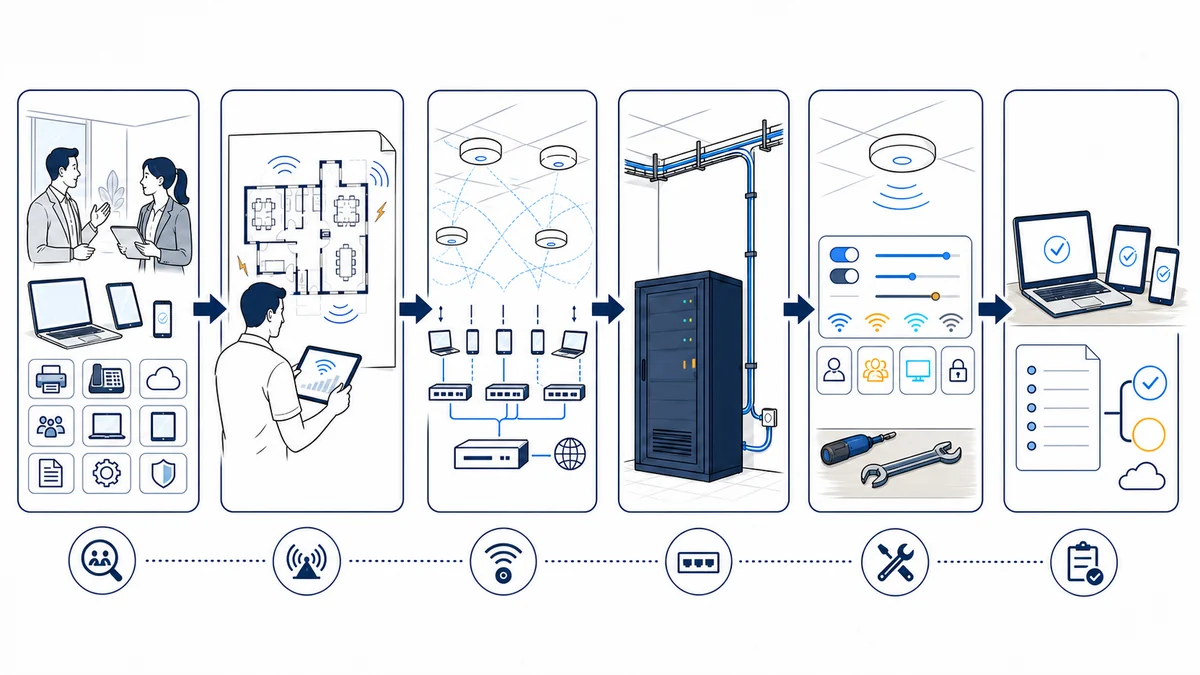
Roll Out, Test, and Document the Approved Design
- Confirm requirements and prerequisites. Approve locations, important workflows, client types, access policies, maintenance windows, cable paths, switch/PoE capacity, licenses, credentials, and responsible contacts.
- Prepare the wired network. Install or validate approved runs, switch ports, VLANs, DHCP, DNS, gateway rules, internet access, management access, and power budgets before relying on the radios.
- Stage configuration. Apply approved firmware, management, radio, SSID, authentication, guest, and segmentation settings on supported equipment. Cloud-managed features require working subscriptions and vendor services.
- Install in approved locations. Mount and connect access points using the planned orientation and hardware, subject to safe access, building rules, field conditions, and authorized changes.
- Validate after installation. Check intended areas, access-point operation, channels and power, wired links, network assignment, authentication, guest restrictions, internet access, and representative business devices. Testing samples defined places and conditions; it is not proof of every future client or RF state.
- Correct and retest. Findings may call for a setting change, placement adjustment, cable or switch work, added capacity, client remediation, or third-party coordination. Material changes require approval.
- Document the result. Record access-point names and locations, switch ports, cable labels, SSIDs, network mappings, management ownership, licensing, key exclusions, test results, and support contacts without placing sensitive credentials in general documentation.
Use Remote Support for Reachable Systems and Onsite Work for the Physical Environment
Remote work may include reviewing supported controller or cloud-management data, configurations, client association history, radio settings, switch ports, logs, and documented test results. It can help distinguish a single-device issue from a broader access-point, LAN, ISP, or application symptom. Available visibility depends on platform support, licensing, credentials, telemetry, and a working management path.
Onsite service is appropriate when RF measurements, floorplan changes, construction materials, mounting, cabling, power, switch access, or representative-client testing must be observed directly. Business Wi-Fi design and installation do not automatically provide ongoing monitoring. If the business wants selected infrastructure checks and alerts, that belongs in a defined network monitoring arrangement. Ongoing user and device assistance may instead fit IT support services or managed IT services.
Business Wi-Fi Support Across Orange County
Apex IT Solutions works with businesses in Anaheim, Irvine, Santa Ana, Costa Mesa, Fullerton, Brea, Buena Park, and other Orange County communities. Local offices, warehouses, medical and professional workplaces, retail environments, and multi-suite facilities each present different materials, neighbors, device mixes, access rules, and installation constraints. An onsite assessment helps turn those differences into a practical scope.
Business Wi-Fi FAQs
How many access points does our office need?
There is no reliable square-foot formula by itself. The count depends on layout, materials, ceiling and mounting options, required areas, active-client density, applications, bands, channels, interference, antennas, and wired connectivity. An assessment develops a proposed count and placement, followed by validation after installation.
Can you guarantee complete coverage or eliminate every dead zone?
No. Apex can design toward agreed requirements, test representative locations, and adjust supported equipment, but RF conditions, inventory, neighboring systems, construction, and clients change. The service does not promise complete coverage, interference-free operation, or identical performance everywhere.
Will new business Wi-Fi increase our internet speed?
It may address a verified wireless limitation, but it cannot increase the service delivered by the ISP or correct every router, firewall, DNS, application, or remote-service constraint. Testing should separate the client-to-access-point link, wired LAN, internet edge, provider circuit, and destination service before recommending a remedy.
Do business access points require new cabling or switches?
They normally require suitable Ethernet backhaul and compatible PoE. Existing runs and switches may be reusable after reviewing cable condition, port speed, VLANs, uplinks, PoE standard and budget, and equipment support. New runs, switch upgrades, injectors, or rack work are separately listed when needed.
Can employee and guest Wi-Fi be separated?
Often, where the access points, switches, firewall, DHCP, and network design support separate SSIDs, VLANs, and policies. The configuration must be carried through and tested end to end. Guest isolation does not provide a security guarantee, and guest traffic still uses shared infrastructure and the internet circuit.
Which wireless authentication option should we use?
That depends on identity systems, device ownership, client compatibility, administrative capacity, licenses, and risk priorities. A shared credential may fit a limited use case; enterprise authentication may use a supported RADIUS and identity service. Certificate and account lifecycle work must be planned. Apex can compare supported options without making compliance claims.
Will every device roam smoothly between access points?
No. Access points and infrastructure can support roaming features and a coordinated RF design, but client hardware, drivers, operating systems, power behavior, signal thresholds, and applications affect each transition. Representative voice, video, scanner, and mobile workflows should be tested where roaming matters.
Is Wi-Fi monitoring included after installation?
Not automatically. Installation and acceptance testing are project activities. Cloud-management access or device telemetry does not mean someone is continuously watching it. Automated checks, notifications, human review, support hours, response expectations, and onsite dispatch require a separate monitoring or support scope.
Can the assessment and installation be done remotely?
Planning and configuration review can begin remotely, but placement, RF conditions, cable paths, mounting, and post-install tests frequently require onsite work. Share your floorplan, device counts, important applications, current equipment, trouble areas, and timing. Request a Wi-Fi assessment or call (800) 275-6513.
Plan the Wireless Network Before Choosing Access-Point Locations
Share your Orange County locations, floorplans, high-use areas, employee and device counts, important applications, guest-access needs, existing network equipment, known wireless symptoms, and upcoming changes. Apex IT Solutions can assess the supported environment, identify prerequisites and exclusions, and develop a practical next step.