
Controlled remote connectivity for Orange County businesses
Give Authorized People a Defined Path to the Business Resources They Need
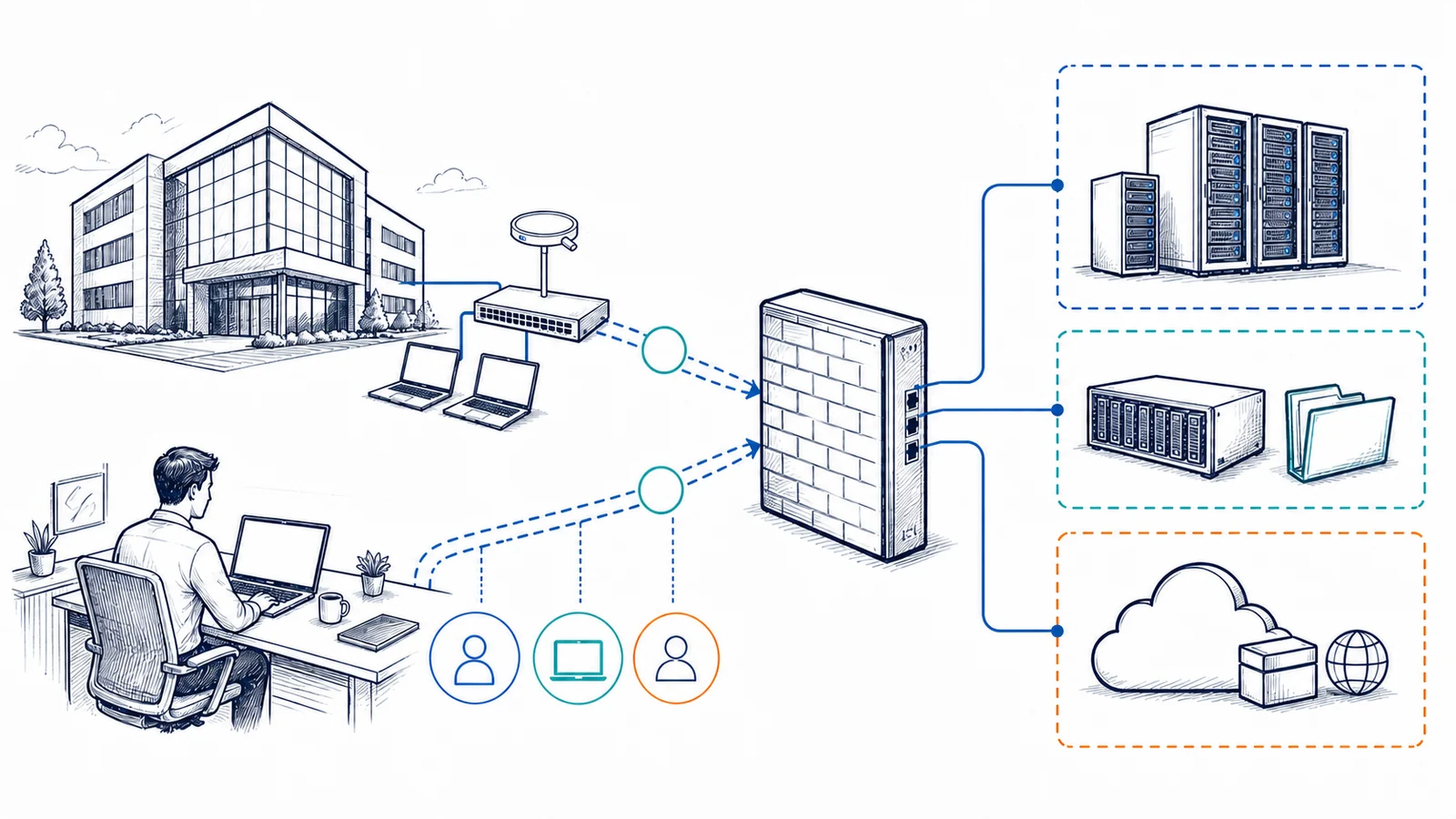
Remote employees, traveling staff, outside accountants, software vendors, and branch offices may need access to systems that are not exposed directly to the internet. A virtual private network, or VPN, can create an encrypted path between a supported remote device or site and a business firewall. Useful remote access requires more than turning on a VPN feature: identity, device condition, firewall policy, network segmentation, applications, DNS, internet service, and access-removal procedures must work together.
Apex IT Solutions helps Orange County organizations assess, configure, test, document, and troubleshoot appropriately scoped VPN connections. The goal is to match access to a real business requirement while limiting who can connect, what they can reach, and how the connection is administered. A VPN protects traffic on a defined network path; it does not make an unmanaged device safe or replace endpoint protection, identity controls, servers, routers, firewalls, or the applications people use.
Start With the Work That Must Happen Outside the Office
A remote-access plan should identify the person or organization requesting access, the business reason, the destination resource, the expected location and device, the data sensitivity, and the period of authorization. An employee opening files from a company laptop presents a different requirement from a vendor administering one server or a branch office exchanging traffic with headquarters. Granting broad internal access because it is easier to configure can expose systems that are unrelated to the approved task.
Common Business Needs
Supported uses may include reaching an internal file share, line-of-business application, remote desktop host, management interface, or approved service at another office. The application owner must confirm that remote use is permitted and supported.
Warning Signs
Repeated disconnects, authentication failures, unresolved DNS names, inaccessible applications, slow file operations, expired accounts, overlapping IP ranges, or access that remains after a worker leaves all call for structured review.
Vendor Access
Outside vendors should receive named, time-bounded access to the systems required for their work where the available technology supports it. Shared credentials and broad network reach make ownership and removal harder to manage.
Operational Ownership
The business should identify who approves access, who owns the destination system, who reports staffing changes, and who can authorize configuration changes. Technical settings cannot replace those decisions.
Remote-User VPN and Site-to-Site VPN Solve Different Problems
A remote-user VPN normally uses client software or an operating-system connection on a supported device. The user authenticates, the client negotiates an encrypted tunnel with the business VPN gateway, and approved routes and policies determine which resources are reachable. Client installation, profiles, certificates or keys, sign-in prompts, updates, and user instructions are part of the operational design. Compatibility depends on the client operating system, VPN platform, protocol, licensing, identity source, and current vendor support.
A site-to-site VPN connects two network gateways, often for an office, warehouse, or branch. Traffic for approved network ranges can cross between sites without each user starting a client. This design requires coordinated addressing, routing, encryption settings, firewall rules, and ownership at both ends. Overlapping subnets, changing public addresses, carrier equipment, or another organization’s managed firewall can affect what is practical.
Neither model removes the need for internet circuits, routers, firewalls, switching, local networks, or application servers. Availability still depends on power, both internet paths, gateway health, identity services, remote devices, DNS, and the destination system. A site tunnel may be established while an application remains unavailable for a separate reason.
Tie Access to Identity, Approval, and Least Privilege
VPN access should be assigned to identifiable users or approved systems rather than treated as a universal employee entitlement. Apex may review the supported account directory, VPN groups, local gateway accounts, certificates, role mappings, and access rules. Multi-factor authentication can add an important sign-in control where the selected VPN, identity provider, licensing, user workflow, and recovery process support it. It does not remove the risk of session theft, social engineering, unsafe approvals, compromised endpoints, or misconfigured authorization.
Least privilege means limiting access to what the role needs. Controls may include source or destination networks, specific systems, ports, schedules, user groups, or a dedicated vendor segment, depending on platform capability. Network segmentation can reduce unnecessary reach, but it must be carried through VLANs, routing, firewall rules, DNS, and application permissions. A successful VPN sign-in should not silently override authorization inside a server or business application.
Account lifecycle is part of the service boundary. The customer must promptly report departures, role changes, completed vendor work, lost devices, and suspected account compromise through the agreed support method. Offboarding may require disabling the identity account, removing group membership, revoking certificates or tokens, deleting local VPN accounts, rotating shared secrets, and checking active sessions. The exact steps depend on how access was built.
The Encrypted Tunnel Is Only One Layer of Remote Access
A VPN encrypts traffic between defined tunnel endpoints. It does not make a personally owned or unmanaged computer trustworthy. Operating-system updates, endpoint security, local administrator rights, disk encryption, screen locking, malware exposure, and device loss remain separate concerns. Apex may identify device prerequisites or coordinate with business IT support, but device management and endpoint security are included only when stated in the service scope.
The business firewall or VPN appliance must have supported firmware, suitable licensing, available capacity, correct time, valid certificates where used, a stable management process, and rules that match approved traffic. The local network also needs coherent addressing, routing, segmentation, DNS, and reachable destination systems. Network monitoring can provide selected device or tunnel indicators under a separate network monitoring arrangement; a log entry or automated check does not mean a person is continuously reviewing activity.
Choose Routing Behavior With Security, Capacity, and Application Needs in View
With split tunneling, selected business routes pass through the VPN while other internet traffic leaves through the user’s local connection. This can reduce load on the office internet circuit and avoid sending unrelated traffic through headquarters, but it creates policy, visibility, DNS, and local-network considerations. With full tunneling, the client sends more or all traffic through the business gateway. That can apply central internet-edge controls where supported, while increasing dependency on gateway capacity, office bandwidth, routing, and DNS.
The right approach depends on business policy, the resources being accessed, endpoint management, security tooling, licensing, internet capacity, user locations, and the VPN platform. Neither choice by itself assures privacy from all systems or services. The remote ISP, VPN operator, destination service, endpoint software, and other intermediaries may still process connection or application data according to their roles.
Applications also behave differently across a tunnel. Remote desktop may be more tolerant of limited bandwidth than transferring a large database or opening many files across a high-latency link. Voice, video, printing, mapped drives, name resolution, certificate validation, cloud sign-in, and software licensing can have distinct routes and dependencies. Testing should use representative accounts, devices, networks, and workflows rather than assuming that one successful ping proves the application is ready.
Define What Apex May Provide and What Remains Outside the VPN Scope
A Defined VPN Project May Include
- Business requirements, authorized users or sites, destination resources, and risk boundaries
- Review of supported firewall, VPN, identity, licensing, certificate, addressing, routing, and DNS prerequisites
- Approved client profiles, gateway settings, user groups, multi-factor integration, routes, and access rules
- Segmentation and least-privilege rules supported by the existing network design
- Representative connection, authentication, DNS, route, application, and disconnect testing
- Configuration records, user instructions, ownership, change history, and offboarding steps
It Does Not Automatically Include
- Internet service, carrier repair, firewall hardware, licenses, identity subscriptions, or endpoint-management tools
- Support for unsupported operating systems, consumer routers, unsafe devices, or all application protocols
- Unrestricted internal access for staff, contractors, or vendors
- Endpoint protection, data-loss prevention, server administration, application support, or identity remediation
- Anonymous browsing, universal privacy, fixed remote performance, or elimination of cyber risk
- Continuous log review, staffed security operations, or response and availability commitments not stated in an agreement
Customers are responsible for authorized-access decisions, accurate user and device information, appropriate internet service, safe physical custody of devices, timely staffing-change notices, vendor cooperation, licensing, and access to systems they control. Third-party administrators may need to approve or perform changes. Material work outside the agreed scope is reviewed before proceeding.
Assess, Configure, Test, Document, and Control Changes
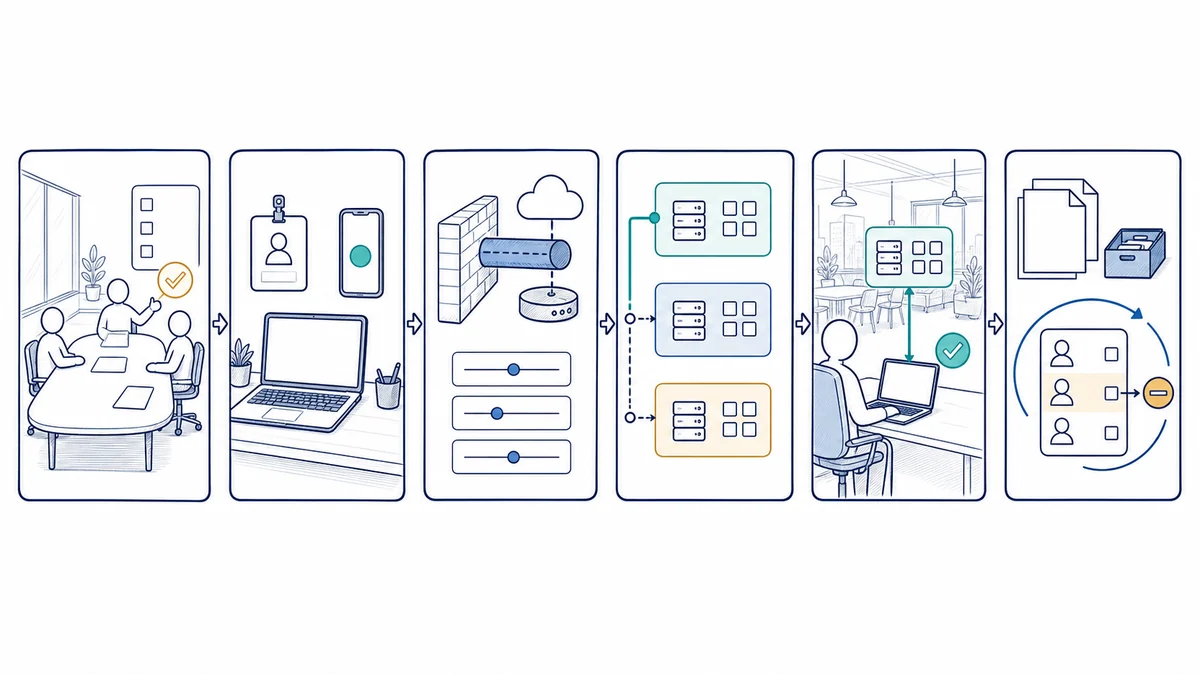
- Define the use case. Identify users or sites, devices, locations, resources, applications, data sensitivity, access duration, approvers, and operating priorities.
- Review the environment. Inspect supported gateway capability, firmware, licensing, internet service, identity, multi-factor options, certificates, endpoint readiness, addressing, routing, segmentation, DNS, and application requirements.
- Design the access policy. Select the supported connection model, authentication method, tunnel routes, split- or full-tunnel approach, least-privilege rules, logging level, ownership, and offboarding process.
- Plan the change. Record current settings, create a rollback approach, obtain authorization, coordinate third parties, schedule an appropriate change window, and communicate possible user impact.
- Configure supported components. Apply approved gateway, identity, firewall, routing, DNS, client, and segmentation settings without publishing credentials in general documentation.
- Test representative workflows. Validate authentication, multi-factor prompts where used, address assignment, intended routes, blocked destinations, name resolution, remote desktop or business applications, disconnect behavior, and available logs.
- Document and hand off. Record the approved design, users or groups, client process, dependencies, test results, exclusions, access-removal steps, configuration ownership, and method for requesting future changes.
VPN Support for Orange County Business Environments
Apex IT Solutions works with businesses and organizations in Anaheim, Irvine, Santa Ana, Costa Mesa, Fullerton, Brea, Buena Park, and other Orange County communities where service is operationally available. Professional offices, warehouses, medical and operational workplaces, and multi-site organizations can have different identity platforms, firewalls, applications, vendors, working hours, and tolerance for change. The VPN scope should reflect those conditions.
Some discovery and configuration can be performed remotely when supported systems are reachable and authorized. Onsite work may be appropriate when the firewall, circuits, rack, local network, or destination equipment requires direct inspection. Broader network dependencies can be assessed through computer networking services.
VPN and Secure Remote Access FAQs
Does a VPN make a remote computer secure?
No. It encrypts a defined network path, but the device still needs appropriate updates, endpoint protection, account controls, safe use, and physical custody. Malware or an unauthorized person using an approved device can still create risk. Device requirements should be part of the access decision.
What is the difference between a remote-user VPN and a site-to-site VPN?
A remote-user VPN typically connects one supported user device through a client or operating-system profile. A site-to-site VPN connects network gateways so approved traffic can move between locations. They have different identity, routing, addressing, hardware, and administration requirements.
Should all employees have access to the full internal network?
No. Access should follow approved job needs and available technical controls. User groups, destinations, ports, schedules, application permissions, and segmented networks can limit reach where supported. The business remains responsible for approving roles and reporting changes.
Can multi-factor authentication be used with a VPN?
Often, when the VPN platform, identity provider, licensing, user devices, and recovery procedures support compatible integration. The design must account for enrollment, prompts, lost authenticators, support ownership, and offboarding. Multi-factor authentication strengthens sign-in but does not remove endpoint or authorization risks.
Is split tunneling or full tunneling better?
Neither is right for all situations. Split tunneling can reduce traffic through the office but changes policy and visibility considerations. Full tunneling can apply central controls while increasing gateway and bandwidth dependencies. The choice should follow business policy, application routes, endpoint management, capacity, and supported platform behavior.
Why can the VPN connect while a business application still fails?
The tunnel may be established even when DNS, routing, firewall rules, server availability, application permissions, certificates, licensing, or the application itself has a problem. Troubleshooting should test the path in layers rather than treating tunnel status as proof of application health.
Can outside vendors receive temporary remote access?
Potentially, with business approval and supported controls. The scope should define the named user, device expectations, destination, access period, authentication, logging, and owner. Access should be removed when the work ends, and shared credentials should be avoided where practical.
Will VPN performance match working in the office?
Not necessarily. Performance depends on both internet connections, latency, packet loss, Wi-Fi or local networks, gateway capacity, encryption overhead, device condition, tunnel routing, DNS, and application design. Representative testing can identify constraints but cannot fix third-party or changing network conditions.
How do we start a VPN assessment?
Provide the Orange County locations, users or vendors, supported devices, applications, destination systems, current firewall, identity source, known symptoms, and desired timing. Apex can review prerequisites and recommend a scoped next step. Request IT Support or call (800) 275-6513.
Plan Remote Access Around People, Resources, and Real Dependencies
Share who needs access, what work they must perform, which devices and locations are involved, and what firewall, identity, and application systems are already in place. Apex IT Solutions can assess the supported environment, identify boundaries, and develop a controlled path forward.