
Practical visibility for Orange County business networks
Know What the Monitoring System Can See—and What Happens When It Detects a Problem
A business network can appear normal until employees lose access to the internet, cloud applications, shared systems, phones, or another location. Network monitoring provides a more consistent way to observe selected devices and services, record changes, and create alerts when defined conditions occur. It can help identify a developing pattern or narrow the time and place of a failure, but only when the monitored environment, thresholds, dependencies, and notification path are clearly configured.
Apex IT Solutions helps Orange County businesses assess and monitor supported network equipment and selected availability or performance indicators. The work may include routers, managed switches, firewalls, wireless access points, internet paths, VPN endpoints, and other approved services. Monitoring coverage is never assumed: each device, check, alert recipient, support boundary, and response arrangement must be defined for the client’s environment.
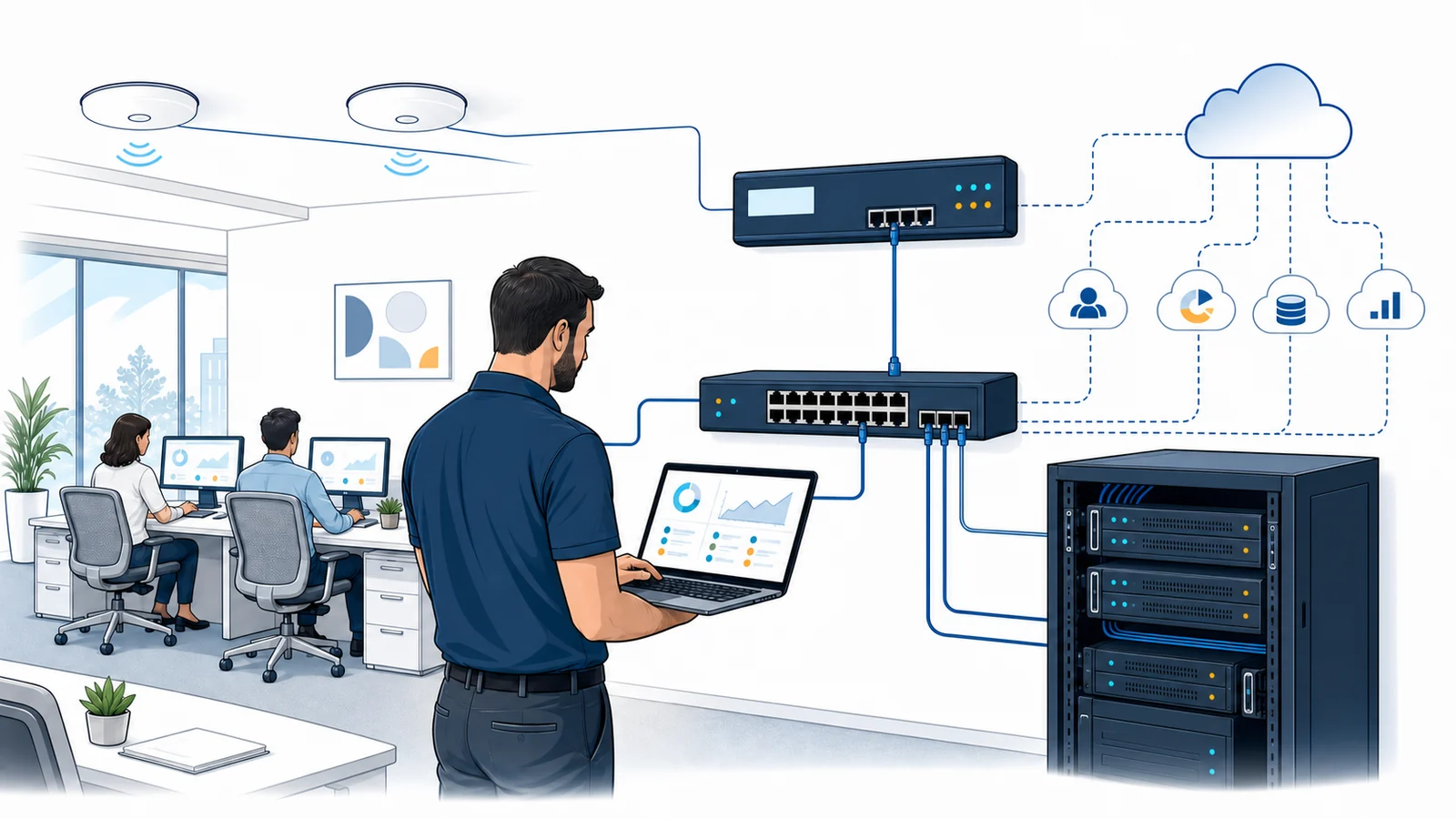
Network Monitoring Turns Selected Conditions Into Usable Evidence
Monitoring is not simply a green or red screen. A configured system performs defined checks at intervals, collects available measurements, compares results with rules or thresholds, and keeps a history. Depending on the device and method, that history can show when a device stopped responding, when an interface changed state, whether measured utilization rose, or whether a test path experienced delay or failed checks. This evidence can make troubleshooting more focused than relying on memory after the disruption has passed.
The result is still an indicator, not a complete diagnosis. A failed reachability check may mean a device is down, a circuit is unavailable, an upstream firewall blocks the test, power has failed, or the monitoring path itself has a problem. High utilization may reflect expected business activity or an abnormal load. Good monitoring provides context for investigation; it does not automatically prove root cause, repair a fault, or prevent every outage.
Earlier Awareness of Selected Events
Configured alerts can notify designated recipients when a monitored condition changes. This may reduce the time between a detectable event and awareness, subject to the check interval, alert rules, notification delivery, and service arrangement.
Historical Context
Recorded status and measurements can show whether a symptom was brief, recurring, limited to one device, or aligned with another event. Retention and reporting depend on the selected platform, storage, licensing, and configuration.
More Focused Troubleshooting
Device, interface, and path data can help separate a local workstation issue from a switch, wireless, firewall, carrier, server, or remote-service dependency. Additional tests may still be required.
Capacity and Change Conversations
Trends from appropriate measurements can support discussions about busy links, equipment limits, internet service, growth, or recurring instability. A monitoring graph is one input, not a complete capacity plan.
What May Be Monitored in a Supported Business Environment
Apex begins with an inventory and the business services that matter. Devices must support an approved monitoring method and be reachable from the chosen monitoring location. Credentials, management interfaces, firewall rules, software agents, platform subscriptions, or vendor access may be required. Older, unmanaged, isolated, or vendor-controlled equipment may provide limited data or no supported monitoring path.
Network Device Reachability
Periodic checks may indicate whether selected routers, managed switches, firewalls, access points, or other approved devices respond from the monitoring system. Reachability alone does not establish that every function on the device is healthy.
Interfaces and Selected Device Health
Where supported, monitoring may collect interface status, errors, utilization, CPU or memory measurements, temperature, or similar device-reported values. Available indicators vary by make, model, firmware, enabled protocol, and permissions.
Internet and Network Paths
Defined tests can observe reachability and selected measurements such as response time or failed checks between known points. Results describe that test path and interval; they do not represent every user, application, destination, or moment.
Wireless Infrastructure
Supported controllers or access points may expose device state, connected-client counts, interface conditions, or other measurements. This does not replace an onsite review of coverage, interference, construction materials, placement, or client behavior. See business Wi-Fi services.
VPN and Remote-Service Availability
A selected endpoint or service check may show whether a remote-access component responds. User authentication, endpoint health, home internet, permissions, and destination applications remain separate dependencies. Review VPN and secure remote access support.
Selected Server Services
Network checks may observe whether an approved server or port responds, while deeper operating-system, application, storage, or resource monitoring belongs in a defined server monitoring scope.
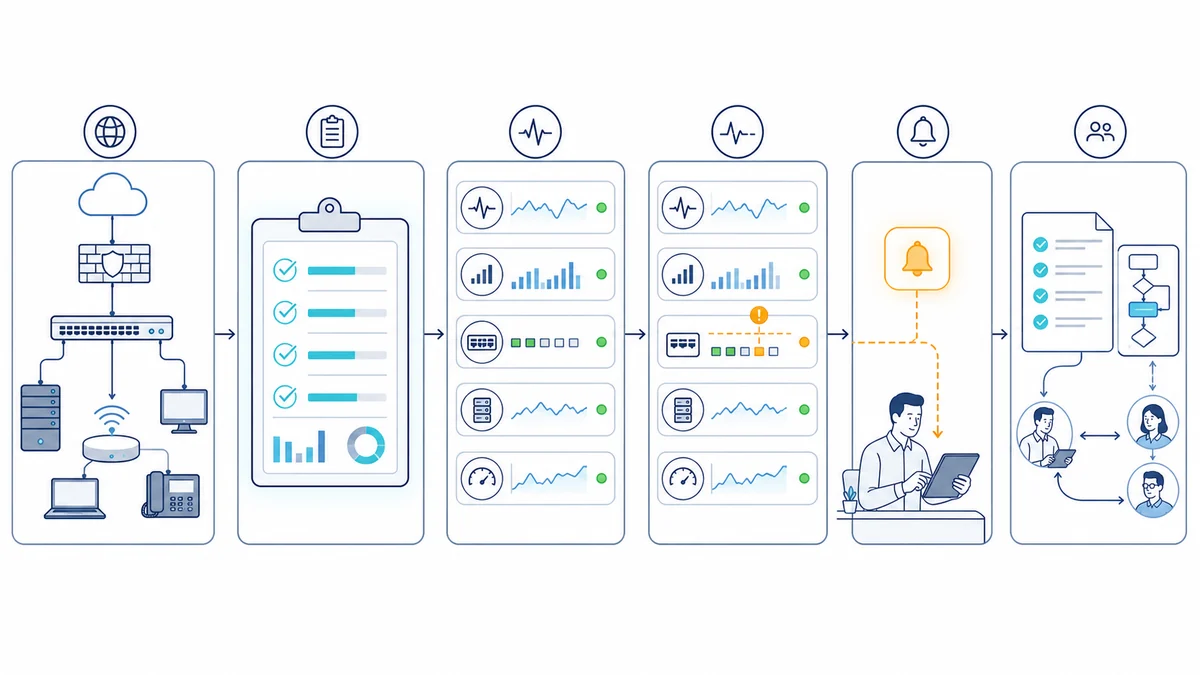
An Automated Alert Is Not the Same as a Technician Watching or Responding
Monitoring software may run continuously if the platform, probe, network path, power, and subscriptions are available. That does not mean a person is continuously watching the dashboard. It also does not promise that every alert is reviewed immediately. Human availability, support hours, contact methods, severity definitions, acknowledgment, escalation, and response expectations are governed by the applicable proposal or service agreement.
Alert design matters. A threshold that is too sensitive can create noise; one that is too broad can miss useful warning signs. Delays can result from polling intervals, confirmation rules, scheduled maintenance, notification queues, email or messaging delivery, or a failure in the monitoring path. Apex can help define priorities and recipients, but notification delivery or a defined response commitment should not be inferred from the existence of monitoring.
Monitoring Depends on the Same Infrastructure It Observes
A monitoring result is only as reliable as its collection path. An onsite probe may lose visibility when local power or internet service fails. A cloud-based check may see the public edge but not an internal switch. A device can stop reporting because credentials changed, management access was disabled, firmware behavior changed, or a vendor subscription expired. Dependencies should be mapped so one upstream failure does not produce a confusing flood of downstream alerts.
A Defined Scope May Include
- Inventory and suitability review for supported network devices and services
- Approved discovery, credential, protocol, probe, and connectivity configuration
- Selected reachability, interface, utilization, error, health, or path checks
- Threshold, maintenance window, dependency, notification, and recipient setup
- Dashboard, reporting, documentation, and periodic tuning where included
- Coordination with managed IT services or broader computer networking support
It Does Not Automatically Include
- Unsupported, unmanaged, inaccessible, obsolete, or third-party-controlled devices
- Full packet capture, full packet inspection, user-content surveillance, or security-event analysis
- A staffed SOC or NOC, round-the-clock human review, promised response times, or promised uptime outcomes
- Automatic repair, hardware replacement, carrier restoration, or onsite dispatch
- Monitoring of every application, endpoint, cloud service, camera, phone, or building system
- Compliance certification, legal conclusions, intrusion detection, or prevention of every security event
- Licenses, subscriptions, circuits, hardware, or vendor charges unless expressly listed
A Practical Network Monitoring Assessment and Setup Process
- Identify business priorities. Apex asks which locations, workflows, devices, and services matter, what symptoms have occurred, who owns each system, and what decisions the business wants monitoring to support.
- Inventory the environment. We review supported equipment, management access, topology, internet circuits, remote sites, power, existing tools, warranties, vendors, subscriptions, and documentation. Physical cabling issues may point to CAT5e or CAT6 structured cabling service.
- Define checks and boundaries. Each proposed check is tied to a device, service, method, interval, threshold, dependency, maintenance window, recipient, and purpose. Unsupported equipment and visibility gaps are recorded rather than silently assumed covered.
- Configure and baseline. Approved monitoring components are installed or configured, permissions are limited to what is needed, and initial data is observed. Thresholds may need adjustment after normal business patterns are better understood.
- Test alerts and failure scenarios. Where safe and authorized, Apex verifies that selected state changes produce the expected notification and that dependency rules reduce misleading downstream noise. Testing cannot reproduce every real outage or guarantee third-party message delivery.
- Document operations. Records identify monitored items, exclusions, alert recipients, support boundaries, access ownership, licensing, maintenance procedures, and the path for requesting help.
- Review and tune. Business priorities, equipment, vendors, sites, and network patterns change. Periodic review can remove stale checks, add approved devices, refine thresholds, and keep contacts current when that work is part of the arrangement.
Remote Visibility Helps, but Some Network Problems Are Physical
When the monitoring platform and supported devices are reachable, remote work may include reviewing status, trends, logs, interfaces, thresholds, configurations, and alert history. Remote access can help isolate whether a symptom aligns with a device, path, provider, or service and can guide a focused troubleshooting plan.
Onsite service is appropriate when equipment is unreachable, power or environmental conditions must be checked, cables or jacks need testing, a rack or provider handoff must be inspected, wireless conditions require measurement, or hardware must be installed or replaced. Monitoring does not see a loose patch cable, damaged run, blocked equipment vent, or changed office layout unless a resulting condition is exposed through a configured check. Dispatch timing and onsite work require a separate support arrangement or approved request.
Business Network Monitoring Across Orange County
Apex IT Solutions supports businesses in Anaheim, Irvine, Santa Ana, Costa Mesa, Fullerton, Brea, and Buena Park, as well as other Orange County communities. A professional office, medical practice, warehouse, production facility, and multi-location company can have very different equipment, internet providers, wireless layouts, vendor systems, and tolerance for disruption. Monitoring should reflect those real operating conditions rather than use the same template everywhere.
Local availability is especially useful when remote evidence points to a physical problem or when the environment must be documented before monitoring begins. The first step can be a focused assessment of the current network, recurring symptoms, critical services, support expectations, and practical visibility gaps.
Network Monitoring FAQs
What does business network monitoring watch?
It watches only the supported devices, services, and indicators defined in the scope. Examples may include reachability, interface state, measured utilization, device-reported health values, or selected path tests. Available data depends on the equipment, access, monitoring method, and platform. Connection to the network does not automatically mean a device is monitored.
Does network monitoring mean someone is always watching our network?
No. Software may perform automated checks at all hours when its dependencies are available, but human review and support availability are separate. The applicable service arrangement defines support hours, contacts, severity, escalation, and response expectations. This page does not promise continuous human staffing or immediate action.
Will monitoring prevent network outages?
No. Monitoring may provide earlier awareness of detectable conditions and useful history for troubleshooting, but it cannot prevent every equipment failure, carrier outage, software problem, power event, configuration error, or security incident. Resilience, maintenance, backup power, failover, and support procedures require their own planning.
Can every router, switch, firewall, or access point be monitored?
No. The device must be supported, reachable, appropriately licensed where required, and capable of providing the needed data through an approved method. Unmanaged, obsolete, isolated, vendor-controlled, or unsupported equipment may offer limited visibility or none. Assessment identifies these gaps before coverage is represented.
What happens after an alert is created?
The configured notification method attempts to contact designated recipients according to the alert rules. What happens next depends on the documented service arrangement: a client contact may review it, a support request may be opened, or an agreed escalation may apply. An alert does not by itself guarantee delivery, acknowledgment, technician response, repair, or onsite dispatch.
Can monitoring tell you exactly why the network is slow?
Not always. A trend or failed test can identify a time, path, device, or measured condition worth investigating. User devices, Wi-Fi, cabling, switching, firewalls, internet providers, remote services, and applications can all affect performance. Root-cause analysis may require correlated data, configuration review, active testing, vendor coordination, or onsite work.
Is network monitoring the same as cybersecurity monitoring?
No. Availability and performance checks are not the same as security-event monitoring, intrusion detection, full packet inspection, or a staffed security operations function. Security-related services must be separately defined. Monitoring also does not certify compliance or establish that every threat has been detected.
Can you monitor multiple Orange County locations?
Potentially, after reviewing each site’s equipment, connectivity, management access, business priorities, and monitoring path. Dependencies should be designed so a failed site circuit or upstream device does not create misleading alerts for every downstream item. Multi-location coverage, licensing, notifications, and support procedures are documented in the selected scope.
How do we get started?
Contact Apex with the business locations, important network services, known equipment, recurring symptoms, current support arrangement, and the people authorized to discuss access and alerts. Apex can determine whether the right first step is remote discovery, an onsite network assessment, or a broader support review. Request IT Support or call (800) 275-6513.
Build Monitoring Around the Network Your Business Actually Uses
Start with the devices, services, locations, dependencies, and response expectations that matter. Apex IT Solutions can assess the current environment, identify practical monitoring options, document limitations, and define the next step for your Orange County business.