
Planned business connectivity for Orange County workplaces
Turn Business Requirements Into a Buildable, Documented Network
A business network must connect people and approved devices to applications, internet services, shared systems, voice platforms, printers, and other operational resources. Designing it means more than choosing a router or adding switch ports. The users, traffic paths, floorplan, security boundaries, cabling, wireless coverage, equipment space, power, carrier service, support model, and expected changes need to work as one system.
Apex IT Solutions helps Orange County businesses assess existing environments and plan new or revised networks. A defined project may include topology, switching, routing, addressing, wired and wireless integration, segmentation, equipment placement, installation sequencing, testing, and handoff records. Recommendations depend on the approved scope and observed requirements; network design does not by itself correct an ISP outage, application defect, endpoint problem, or cybersecurity weakness.
Begin With the Work, the Site, and the Network Already in Place
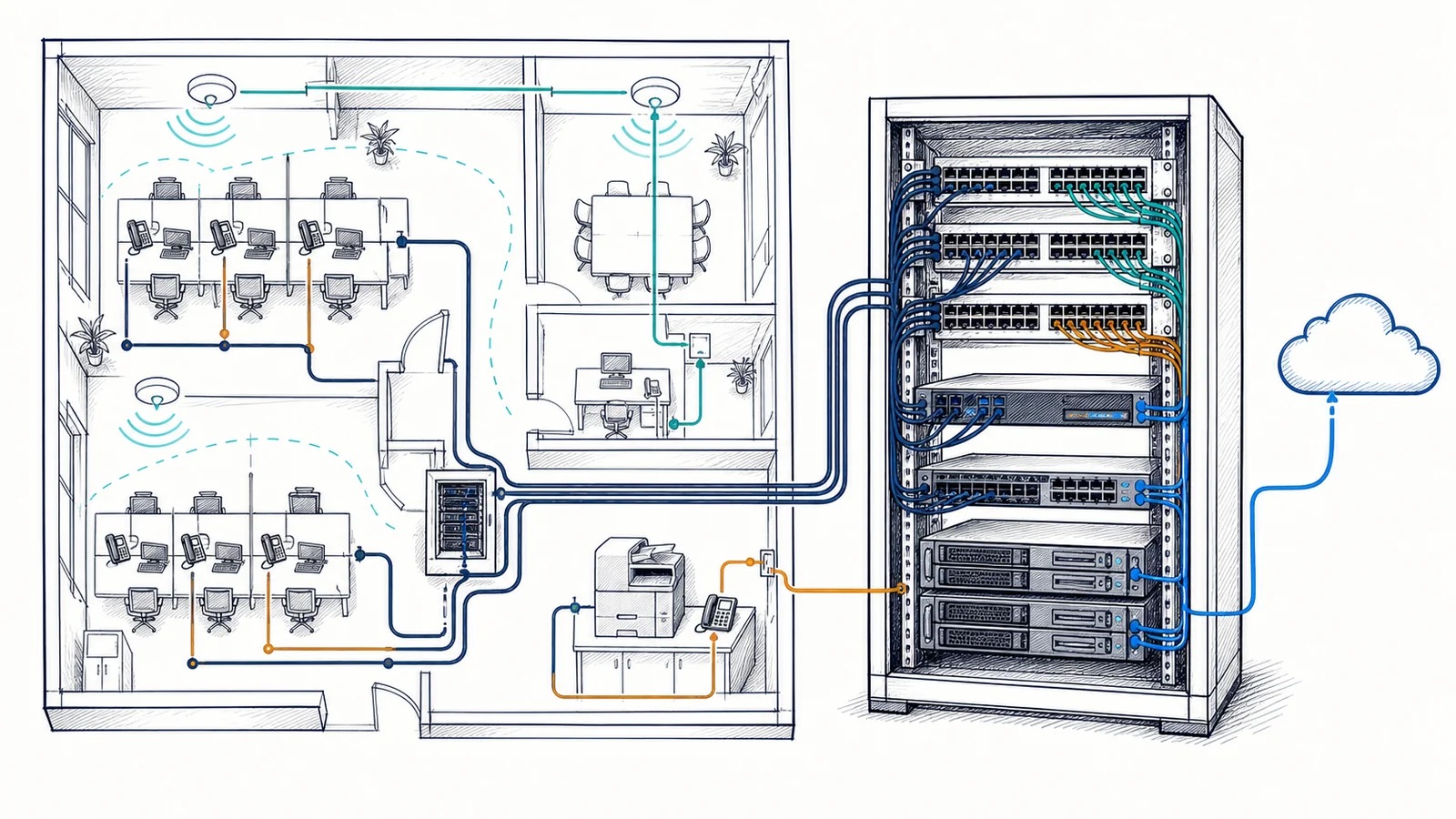
Requirements start with how the business operates. Useful discovery covers employee and visitor counts, concurrent devices, important applications, servers and cloud services, voice and video traffic, printing, approved specialty systems, remote users, vendor access, service hours, maintenance constraints, known trouble areas, and planned hiring or moves. A conference room, warehouse aisle, front desk, production-adjacent area, and ordinary office may each place different demands on connectivity.
Users, Devices, and Applications
Document representative endpoints and the services they must reach. Identify workflows that are local, internet-dependent, delay-sensitive, wireless-only, or controlled by another vendor. Device count alone does not describe traffic or availability priorities.
Existing Network Review
Compare available diagrams and configurations with accessible equipment, carrier handoffs, racks, switches, access points, cable labels, addressing, and current traffic paths. Unknown ownership, unsupported hardware, missing credentials, and undocumented changes become project risks.
Floorplans and Constraints
Review work areas, telecom spaces, pathways, ceiling and wall conditions, distances, mounting options, environmental limits, landlord rules, safe access, and other trades. A logical diagram must still be installable in the actual building.
Growth and Change
Known hiring, additional suites, remodeled space, new applications, added access points, remote sites, and equipment lifecycle concerns inform capacity and port planning. Future readiness is based on stated scenarios rather than an unlimited-growth promise.
Define Switching, Routing, Addressing, DHCP, and DNS as a Coordinated Plan
The logical design describes device roles and traffic paths. Switch selection should account for compatible interfaces, port counts, uplink needs, managed features, Power over Ethernet requirements, support status, licensing where applicable, rack fit, and expected expansion. Router and firewall placement should reflect the carrier handoff, internal networks, approved remote or site connections, and the boundary between provider-managed and customer-managed equipment. Product selection may reflect compatibility and support needs; the service does not represent every design as vendor-neutral.
VLANs can create logical network segments on supported switches, but segmentation works only when trunks, access ports, routing, firewall policy, DHCP service, wireless mappings, and connected-device behavior agree. Separating employee, guest, voice, server, management, or approved operational traffic can reduce unnecessary reach and clarify policy. It does not remove the need for endpoint, identity, application, and monitoring controls.
IP planning assigns nonoverlapping networks with enough usable space for present devices and realistic change. Private address ranges should be selected consistently, especially when VPNs, acquired offices, or branches may connect later. DHCP can provide client configuration dynamically when scopes, exclusions, reservations, relay behavior, lease settings, and gateway information are correctly planned. Static addressing may remain appropriate for selected infrastructure or vendor systems, but it needs an ownership record.
DNS translates application and host names through the configured naming system. A device can have a valid IP address and still fail to reach a resource when DNS settings, forwarding, records, search suffixes, filtering, or upstream services are wrong. Addressing, DHCP, DNS, routing, and firewall behavior should therefore be tested together instead of treating a successful link light as network acceptance.
Plan Security Boundaries and Resilience Around Specific Business Risks
Network design can support least-necessary connectivity through documented segments, controlled routing, firewall policy, separate management access, and restricted guest traffic. The scope should identify which groups need to communicate and which paths should be denied or mediated. Vendor access, remote administration, wireless authentication, and site-to-site connectivity add identity, endpoint, firewall, VPN, logging, and account-lifecycle dependencies. A diagram or VLAN name alone does not establish an effective security boundary; approved behavior must be configured and tested end to end.
Resilience planning begins with the failures the business wants to address. Options may include redundant uplinks, alternate switch paths, UPS-backed network equipment, configuration backups, spare capacity, or a secondary internet circuit where equipment and services support them. Each option has limits. A UPS has finite runtime, redundant paths can share the same physical or power dependency, and a second carrier does not ensure that every application session survives a path change. Maintenance, testing, replacement planning, and documented recovery steps remain necessary.
Remote sites add addressing, routing, carrier, firewall, VPN, identity, application, and local-support considerations. A small branch may not need the same hardware as headquarters, but consistent naming, configuration standards, diagrams, and responsibility records can simplify change and fault isolation. Site differences—available carriers, layout, staffing, workflows, and business criticality—should be documented rather than forced into an unsuitable template.
Integrate Cabling, Wireless, Racks, Power, and Environmental Dependencies
The physical design connects proposed switch ports and equipment locations to actual pathways and work areas. Cat5e or Cat6 decisions should consider the intended Ethernet application, link distance, existing components, pathway space, installation environment, device interfaces, lifecycle, and required test method. Cat6 has different transmission-performance characteristics than Cat5e, but the category printed on a cable does not determine internet speed or application performance. Jacks, patch panels, patch cords, termination, handling, length, testing, switches, endpoints, and the wider traffic path all matter.
Wireless access points require suitable placement as well as wired backhaul, compatible switch ports, VLAN configuration, uplink capacity, and an adequate PoE standard and budget. Coverage and capacity depend on floorplan, materials, interference, channels, client density, applications, radios, and mounting choices. Wired and wireless planning should share the same addressing, security, and service assumptions rather than becoming separate projects that meet only at installation.
Racks and cabinets need usable space, mounting depth, cable management, ventilation, equipment access, patching, and an intentional layout. Network equipment also depends on appropriate electrical service and environmental conditions. UPS selection should consider supported load, runtime objective, management, battery lifecycle, shutdown behavior, and which carrier or upstream devices also require power. Apex does not imply electrical installation, construction work, permits, or licensed-trade services through this page; those needs are identified and coordinated separately.
Sequence Installation, Migration, Validation, and Handoff
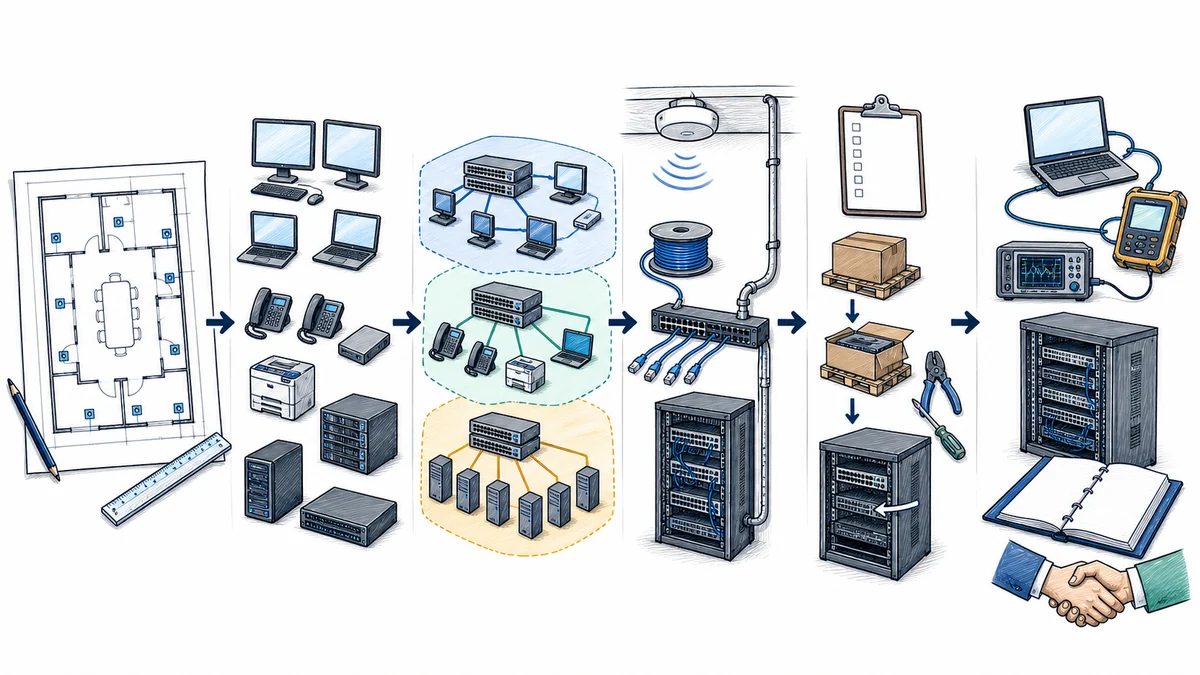
- Confirm the approved baseline. Record business requirements, floorplans, current topology, carriers, equipment ownership, addressing, application paths, security needs, vendor contacts, constraints, and open questions.
- Develop the design package. Define equipment roles, topology, port and capacity assumptions, VLANs, addressing, DHCP and DNS dependencies, wireless integration, cable endpoints, rack layout, power needs, naming, and diagrams at the agreed level.
- Resolve prerequisites. Confirm equipment and licensing, administrative access, provider tasks, cable and electrical readiness, property approvals, vendor participation, backups, test resources, authorized contacts, and change-window requirements.
- Plan the migration and rollback. Break work into controlled stages, identify expected interruptions and dependencies, preserve supported configurations, state decision points, and define how the prior state will be restored when practical if acceptance checks fail.
- Stage and install the approved scope. Prepare supported configurations, label equipment, install and connect components in the required order, and record authorized deviations caused by field conditions. Physical and configuration changes should follow change control.
- Validate layers and workflows. Check cabling and links as scoped, switch ports, VLAN assignment, addressing, DHCP, DNS, routing, approved firewall behavior, wired and wireless access, internet connectivity, remote or site links, and representative business applications.
- Hand off usable records. Update logical and physical diagrams, device names and roles, port and cable schedules, network and VLAN records, circuit information, configuration-backup location, test notes, exceptions, vendor responsibilities, and follow-up priorities. Sensitive credentials belong in an approved secure system, not a general diagram.
Acceptance criteria should be agreed before the change window. A ping or speed test can answer a limited question, but neither proves that printing, voice, cloud access, vendor systems, roaming, remote access, and every business workflow operate as intended. Authorized customer contacts and application vendors may need to complete representative tests.
Set Clear Project Scope, Dependencies, and Responsibilities
A Defined Network Project May Include
- Business, site, application, user, device, and existing-network assessment
- Logical and physical topology, equipment-role, port, addressing, VLAN, and naming plans
- Supported switch, router, firewall, wireless, and network-service configuration
- Coordination of approved structured cabling, rack, carrier, vendor, and remote-site dependencies
- Implementation sequence, change window, configuration backup, rollback approach, and validation plan
- As-built diagrams, schedules, test notes, exceptions, and support handoff
It Does Not Automatically Include
- Internet circuits, carrier construction, provider repair, public addressing, or third-party service fees
- Electrical work, construction, engineering, permits, inspections, landlord approval, or work by other trades
- Support for every vendor, device, application, building system, or unsupported product
- Access-control systems, residential support, or consumer network installation
- Endpoint remediation, identity administration, application repair, legal advice, or compliance certification
- Promises of a particular speed, uninterrupted service, universal wireless coverage, or prevention of every security event
The customer provides authorized access, accurate business priorities, known credentials through a secure process, floorplans where available, vendor and carrier details, property permissions, responsible decision-makers, and suitable windows for disruptive work. Hardware, licenses, subscriptions, cabling, lifts, UPS equipment, and third-party labor are included only when the approved proposal states so.
Combine Remote Planning With Onsite Inspection and Installation
Remote work can support discovery interviews, document and configuration review, topology development, equipment research, staging, vendor coordination, and analysis of reachable supported systems. Its usefulness depends on authorization, administrative access, accurate records, platform support, and a working management path.
Onsite work is appropriate for verifying floorplans, pathways, racks, provider handoffs, equipment condition, power context, cable labels, switch connections, wireless conditions, mounting constraints, and installation results. Orange County offices, warehouses, professional facilities, retail workplaces, and multi-tenant sites can have different access rules and physical dependencies. Apex serves businesses in Anaheim, Irvine, Santa Ana, Costa Mesa, Fullerton, Brea, Buena Park, and other Orange County locations where work is operationally available.
Network Design and Installation FAQs
What information should we provide before a network design assessment?
Share the Orange County locations, floorplans, employee and device counts, important applications, internet providers, current equipment and diagrams, wireless trouble areas, remote or branch needs, security boundaries, known vendors, move dates, maintenance constraints, and expected growth. Missing records can be identified during discovery.
Can an existing network be expanded instead of replaced?
Possibly. The review considers support status, capacity, interfaces, configuration, cabling, rack and power limits, documentation, compatibility, and business risk. Working equipment does not need replacement solely because it is existing, but unknown, unsupported, damaged, or capacity-limited components may constrain the design.
How are VLANs different from separate physical networks?
VLANs create logical separation on supported switching infrastructure. They still depend on correct port assignments, trunks, routing, firewall policy, DHCP, wireless mappings, and administration. Separate physical equipment may be appropriate for some requirements, but it also adds cost, space, power, and support considerations.
Should our project use Cat5e or Cat6 cabling?
The choice depends on the intended Ethernet application, distance, pathway and environment, current components, device lifecycle, budget, and required test result. Cat6 has different transmission specifications, but neither label promises an internet or application speed. The complete channel and active equipment must be considered.
Does a new network design include business Wi-Fi?
Wireless integration can be included when scoped. It requires floorplan and capacity requirements, access-point placement, compatible cabling and PoE, switch ports, VLANs, DHCP, DNS, firewall policy, authentication, and client testing. A wireless design is not established by adding an access point wherever a cable is convenient.
Can installation occur without interrupting business operations?
Some preparation can happen outside the production path, but cutovers, readdressing, equipment replacement, cable changes, and provider work may interrupt dependent services. The plan should identify expected effects, change windows, backups, rollback steps, authorized contacts, and acceptance checks rather than promise no disruption.
Will a UPS keep the network available during any power outage?
No. Runtime depends on UPS capacity, actual load, battery condition, environmental factors, and which devices are connected. Carrier handoffs, upstream provider facilities, servers, and endpoints may have separate power dependencies. UPS design supports a defined runtime or shutdown objective, not unlimited operation.
Can network planning and installation be completed remotely?
Discovery, document review, design, supported configuration, and coordination may be performed partly remotely. Physical inspection, cable and rack verification, equipment installation, wireless measurements, and some acceptance tests require onsite access. Request IT Support or call (800) 275-6513 to discuss the location and scope.
Plan the Network Before the Cutover Window Arrives
Share the business requirements, locations, floorplans, devices, important applications, current network, carrier information, known constraints, schedule, and expected growth. Apex IT Solutions can help define an Orange County business network scope, identify physical and technical dependencies, and prepare a practical implementation and handoff plan.