
Planned cloud transitions for small-business systems and data
Move Workloads With a Defined Scope, Cutover Plan, and Validation Process
A cloud migration can affect how employees sign in, open files, use email, reach applications, protect data, and work with customers. The technical transfer matters, but so do the operating decisions around it: what moves, what remains, who approves access, which applications are compatible, how users are prepared, when the cutover occurs, and what happens if an important dependency does not behave as expected.
Apex IT Solutions provides project-based cloud migration services for Orange County businesses. Depending on the project, work may be delivered directly by Apex, coordinated with a vendor or partner, or completed with third-party migration tools. The appropriate model is determined during assessment; this page does not assign one delivery model to every workload.
Supported projects may involve Microsoft 365 and Exchange Online, files, SharePoint, OneDrive, selected Azure services, applications, server-to-cloud transitions, cloud backup, Google Workspace, tenant-to-tenant moves, identity and directory work, migration tools, and licensing procurement. Support is subject to source and destination access, provider requirements, compatibility, licensing, data condition, security needs, and an approved written scope.
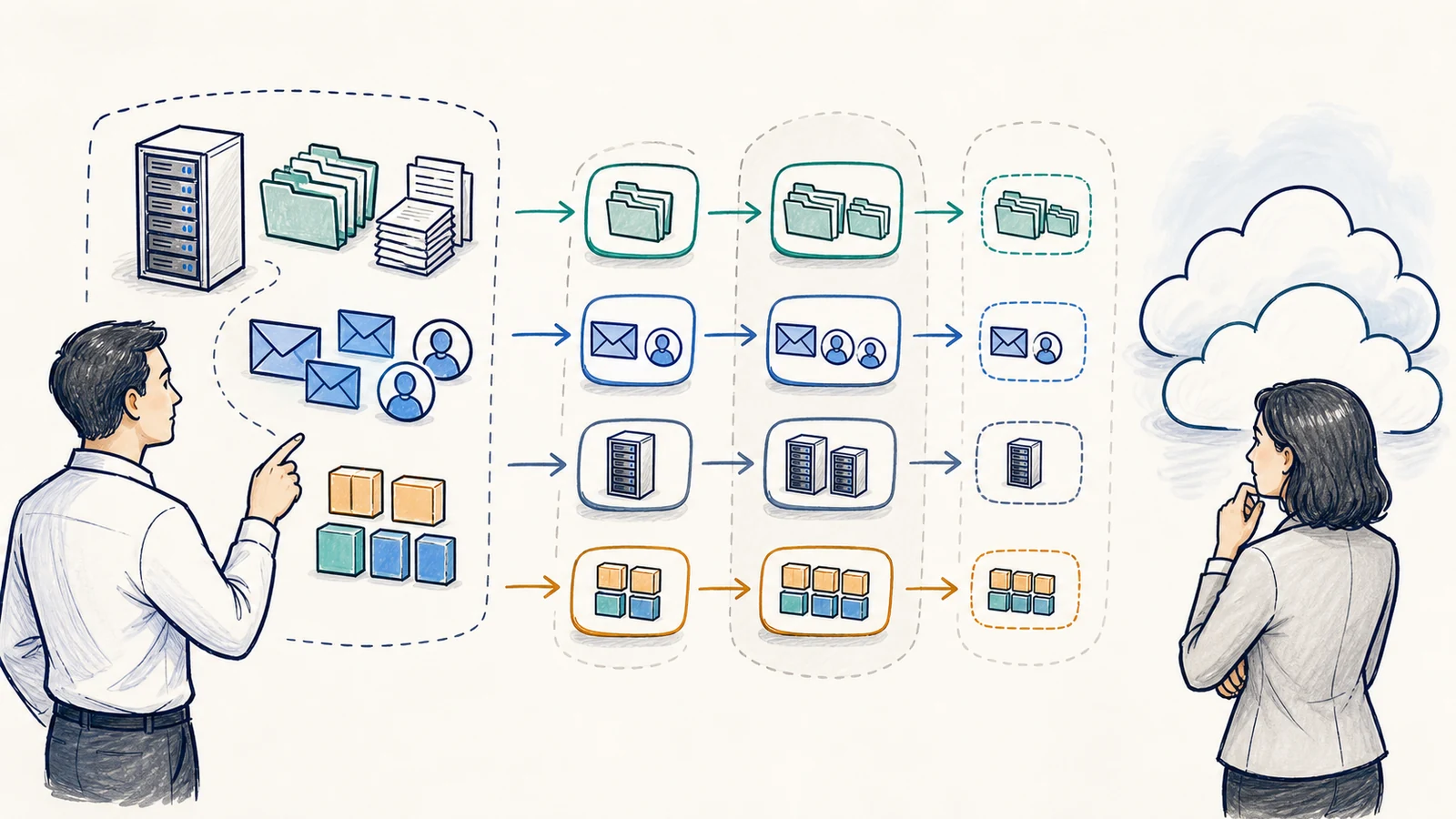
Match the Migration Approach to the Workload
“Moving to the cloud” can describe very different projects. One business may need to transfer mailboxes and identities. Another may need to reorganize shared files, move a server-based application, separate two tenants, or establish a new cloud backup destination. The work should be defined by the actual business dependency rather than by a generic cloud label.
Email and Collaboration
Projects may involve Microsoft 365, Exchange Online, SharePoint, OneDrive, Google Workspace, tenant-to-tenant transitions, user access, and related licensing.
Files and Data
File migrations may include permissions, folder structure, data ownership, duplicate or obsolete content, transfer limits, user access, and validation at the destination.
Applications and Servers
Selected applications, Azure services, server-to-cloud workloads, and identity dependencies require compatibility review, vendor input, performance expectations, and a supported destination.
Backup and Recovery
Cloud backup migrations can involve source retention, transfer, destination policy, recovery access, monitoring ownership, and testing that is separately defined in the project.
Inclusion in this list is not a promise that every legacy application, source system, data set, or provider combination can be migrated as requested. Apex assesses compatibility, available tools, access, provider limitations, security requirements, licensing, and the operational effect before confirming scope.
Begin With Authorized Discovery and an Accurate Inventory
A migration plan is only as reliable as the inventory behind it. Discovery identifies the systems, accounts, mailboxes, files, applications, databases, integrations, devices, vendors, licenses, permissions, and business owners within the proposed scope. It also identifies what is intentionally excluded and what must remain available during or after the project.
Apex works with authorized customer contacts to understand where information resides, who uses it, which workflows are time-sensitive, and which dependencies are not obvious from a technical scan. A shared file may feed an accounting process. A mailbox may be used by a line-of-business application. A server may support specialized equipment. Those relationships can change the migration sequence or require separate vendor review.
Discovery may use administrative records, customer interviews, available reports, third-party tools, source and destination consoles, and vendor documentation. Tool output supports the inventory; it does not replace customer confirmation. Access limits, unknown systems, incomplete records, or unsupported sources can constrain what Apex can establish before the project begins.
Use Direct, Partner, Vendor, or Tool-Assisted Work Where the Project Requires It
Apex may perform migration activities directly, coordinate work with a provider or partner, use third-party migration tools, or combine those methods. The delivery choice depends on the source and destination, provider rules, application ownership, available utilities, support requirements, and the expertise needed for that particular workload.
This model gives the project a practical coordination point without suggesting that Apex alone controls every platform. Cloud providers, application vendors, registrars, carriers, licensing distributors, and tool vendors may own parts of the service or escalation path. The written project scope should identify which party performs key tasks, who supplies credentials and approvals, and who makes a cutover or rollback decision.
Migration pricing is quoted from the assessed project scope rather than published as a fixed package. Source condition, destination requirements, users, data volume, applications, identity changes, licensing, provider fees, tooling, onsite needs, vendor participation, cutover planning, and post-migration support can all affect the work.
Build the Project Around Stages and Decision Gates
- Define the business outcome. Identify why the organization is moving, which users and workflows are affected, what success must be validated, and what is outside the project.
- Inventory the source and destination. Review accounts, data, applications, permissions, integrations, licensing, devices, vendors, network dependencies, and available administrative access.
- Assess compatibility and risk. Confirm supported versions, destination requirements, identity design, transfer limits, data condition, security controls, user impact, and known exceptions.
- Design the sequence. Establish migration groups, pilot candidates, prerequisites, communications, maintenance or cutover windows, decision-makers, escalation paths, validation steps, and issue-handling options.
- Prepare and pilot where appropriate. Configure the destination, licensing, access, tools, and representative test group. A pilot can reveal issues but cannot reproduce every production condition.
- Execute the approved cutover. Perform the agreed transfer and changes within the planned window, coordinate vendors, track exceptions, and communicate material status to designated contacts.
- Validate with technical and business owners. Check agreed data, access, mail flow, permissions, applications, devices, integrations, and representative business tasks.
- Stabilize and transition support. Address scoped issues, document remaining exceptions, confirm ownership, and begin separately defined post-migration support where included.
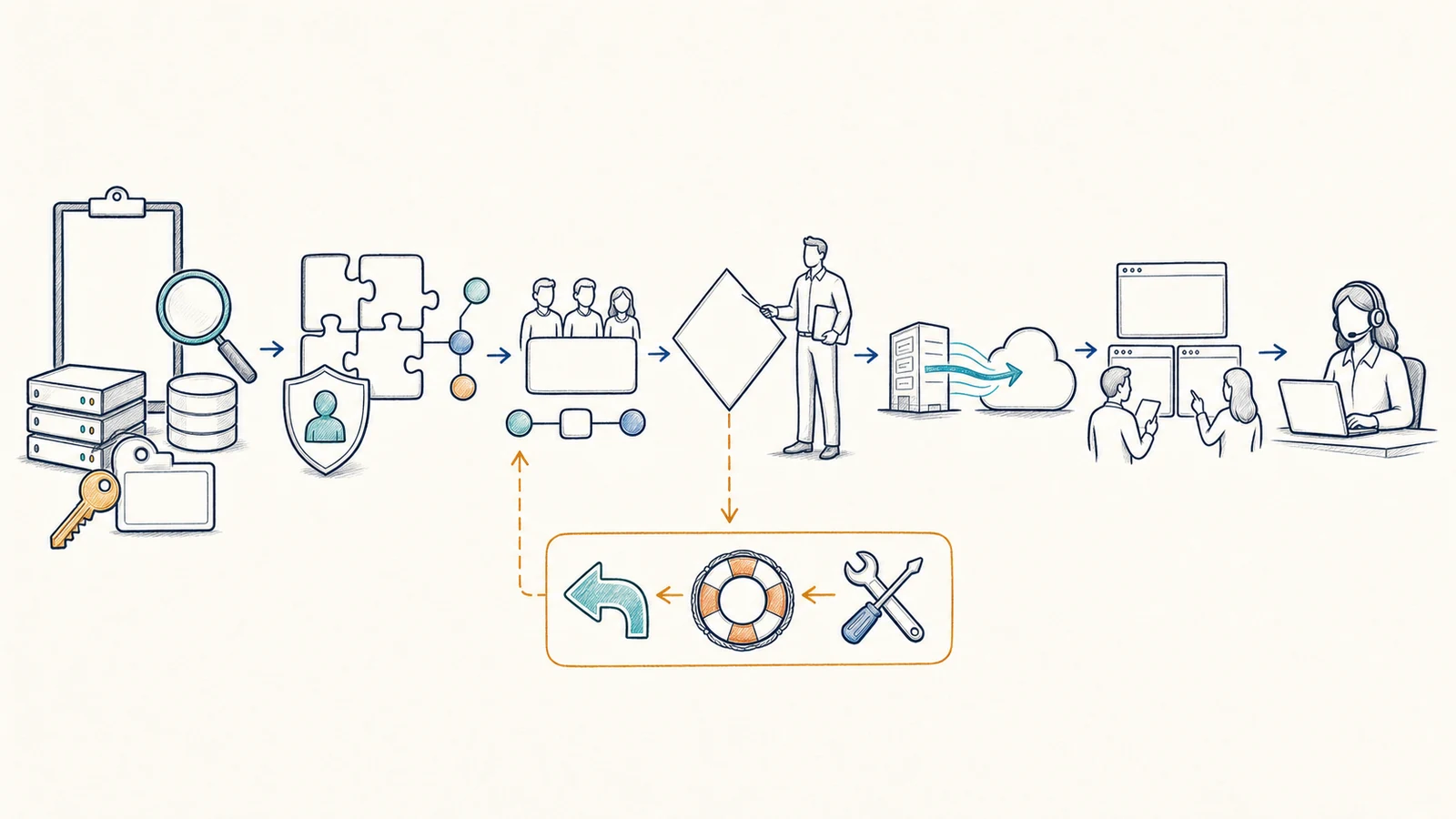
Treat Compatibility and Identity as Business Requirements
Data transfer is only one part of a usable destination. Employees need the correct accounts, authentication methods, permissions, licenses, devices, applications, and instructions. Applications may depend on a particular operating system, database, file path, identity source, network location, vendor license, peripheral, or integration. Some dependencies can be updated; others require a different design or must remain outside the migration.
Identity and directory work may include account preparation, domain and tenant considerations, access groups, administrative roles, multifactor authentication dependencies, device sign-in, shared resources, and service accounts. The exact design is scoped to the project. Apex does not assume that a tenant-to-tenant move, provider change, or directory transition preserves every permission or behavior automatically.
Customers and application owners participate in representative testing because a technical connection alone cannot prove that a business workflow is acceptable. Where a vendor controls the application, Apex may coordinate documentation and escalation, but compatibility and vendor support remain subject to that provider’s requirements.
Document Cutover Decisions, Issue Handling, and Rollback Ownership
The project plan establishes the proposed cutover window, prerequisites, communications, responsible contacts, validation criteria, vendor escalation path, and authority to continue, pause, or change course. Remote or onsite activity is selected according to the environment and project plan. Cutover and support windows are agreed for the project; this service does not imply staffed 24-hour support.
A rollback plan is not a universal undo button. Some changes can be reversed, while others involve copied or changed data, updated identity, DNS, licensing, user activity, application state, or provider processes that cannot be restored instantly. The plan should identify available recovery or fallback options, the conditions for using them, who makes the decision, what data or activity may require reconciliation, and which vendor must participate.
Apex coordinates project escalation within the agreed scope. Vendor escalation, rollback ownership, and cutover decisions are documented rather than assumed. No migration can promise zero interruption, zero data loss, or successful rollback under every condition. Risk is managed through inventory, preparation, staged work, backups where applicable, validation, communication, and bounded decision points.
Validate the Destination and Define What Happens Next
Validation compares the destination with the agreed project criteria. Technical checks may address account access, data presence, permissions, mail flow, synchronization, application connectivity, device access, integrations, backup status, or other scoped items. Business validation asks designated users to complete representative tasks and report material differences.
Validation is evidence from the agreed checks, not proof that every file, historical item, permission, application path, or future condition is perfect. Exceptions are documented and prioritized. Some can be corrected within the project; others may require customer decisions, vendor work, licensing, additional discovery, a separate project, or an accepted limitation.
Post-migration support is defined per scope. It may include a stabilization period, user assistance, vendor coordination, documentation, licensing adjustments, or transition into an ongoing support arrangement. Ongoing monitoring is included only when separately agreed. Cloud services continue to require account security, access management, maintenance, backup decisions, and business continuity planning. Related help is available through Microsoft 365 support, managed IT services, cybersecurity services, and backup and disaster recovery.
Prepare Access, Decisions, Communications, and Business Validation
Apex Project Responsibilities
- Document the agreed technical and coordination scope
- Assess available source, destination, tools, licensing, and compatibility evidence
- Build the migration sequence, decision points, and validation plan
- Coordinate agreed direct, partner, vendor, and tool-assisted activities
- Communicate material project status, exceptions, and required decisions
- Document scoped outcomes and transition agreed post-migration support
Customer Responsibilities
- Provide authorized administrative access and accurate inventories
- Identify data owners, sensitive information, retention needs, and excluded content
- Approve licensing, identity, security, cutover, and rollback decisions
- Identify application vendors, business-critical workflows, and decision-makers
- Prepare users and deliver agreed business communications
- Participate in compatibility testing and timely business validation
Do not send passwords, private keys, confidential data, or sensitive migration evidence through the public contact form. Initial inquiries should describe the current platform, intended destination, approximate users and data, important applications, timing considerations, and known concerns without exposing credentials.
Cloud Migration Services FAQs
What types of cloud migrations can Apex support?
Projects may involve Microsoft 365 or Exchange Online, files, SharePoint, OneDrive, selected Azure services, applications, server-to-cloud workloads, cloud backup, Google Workspace, tenant-to-tenant moves, identity or directory work, third-party migration tools, and licensing procurement. Each item is subject to assessment, compatibility, provider requirements, access, licensing, and an approved written scope.
Does Apex perform every migration directly?
Not necessarily. Depending on the project, Apex may perform work directly, coordinate with a partner or vendor, use third-party migration tools, or combine these methods. The project plan identifies responsibilities and escalation paths without assigning one delivery model to every workload.
Can Apex guarantee no downtime or data loss?
No. Planning, staged work, appropriate backups, pilot testing, validation, and issue handling can reduce risk, but Apex does not promise zero downtime, no data loss, universal compatibility, or a successful rollback in every condition. Provider behavior, source data, identity changes, integrations, access, and user activity can affect results.
Will all of our existing applications work in the cloud?
Compatibility must be assessed. Applications may depend on operating systems, databases, identity, local networks, devices, peripherals, file paths, licenses, or vendor support. Some can be migrated or redesigned; others may require upgrades, vendor work, a different destination, or continued local operation.
How is a cutover window selected?
Apex and the customer consider business schedules, transfer requirements, provider limitations, application dependencies, vendor availability, user communications, validation, and issue-handling options. The approved window and responsible contacts are recorded in the project plan. No fixed timeline applies to every migration.
Does every project include a pilot?
A representative pilot may be appropriate when the platform, tools, user groups, or risk justify it. The project plan determines whether a pilot is practical. A successful pilot provides useful evidence but does not reproduce every production account, file, application, integration, or condition.
Who decides whether to roll back?
The project plan identifies decision authority, available fallback or recovery options, validation criteria, vendor dependencies, and communication paths. Rollback ownership is documented because not every change is fully or instantly reversible, and data or user activity may require reconciliation.
Is post-migration support included?
Post-migration support is defined per project. It may include a stabilization period, user assistance, issue coordination, documentation, licensing adjustments, or separately agreed ongoing service. Continuous monitoring and indefinite support are not automatically included.
How do we start planning?
Use the Request IT Support form to describe your current service, proposed destination, approximate users and data, applications, locations, desired business outcome, and known constraints, or call (800) 275-6513. Do not send credentials or confidential data through the public form.
Plan the Migration Around Your Business, Not a Generic Checklist
Tell Apex what you use today, what you want to change, which employees and workflows are affected, and what constraints matter. We can assess the available environment and define a practical project scope, delivery model, cutover plan, validation process, responsibilities, and support boundaries.