
Business camera planning, installation, and support in Orange County
Build a Camera System Around the Property, Network, and People Who Will Use It
A useful business security camera system begins with practical questions: which areas matter, what detail is needed, who may view footage, how long local storage should last, and how the system will connect to the company network. Camera quantity alone does not answer those questions. Placement, lighting, obstructions, field of view, image settings, cabling, power, recorder capacity, permissions, and day-to-day operating procedures all affect the result.
Apex IT Solutions provides project-based security camera installation for Orange County businesses. Apex can help plan camera placement, physically mount supported cameras, run network cabling, configure local recording, establish supported remote viewing, and assist with compatible existing camera systems. The work is business-only; Apex does not advertise residential camera installation on this page.
The goal is a supportable system matched to the approved site and project scope. No camera design can promise complete visibility, capture every event, prevent crime, or remove the customer’s responsibility for privacy, signage, audio, retention, access, and lawful use. Apex provides recommendations, while the customer approves placement, retention, permissions, and operating decisions.
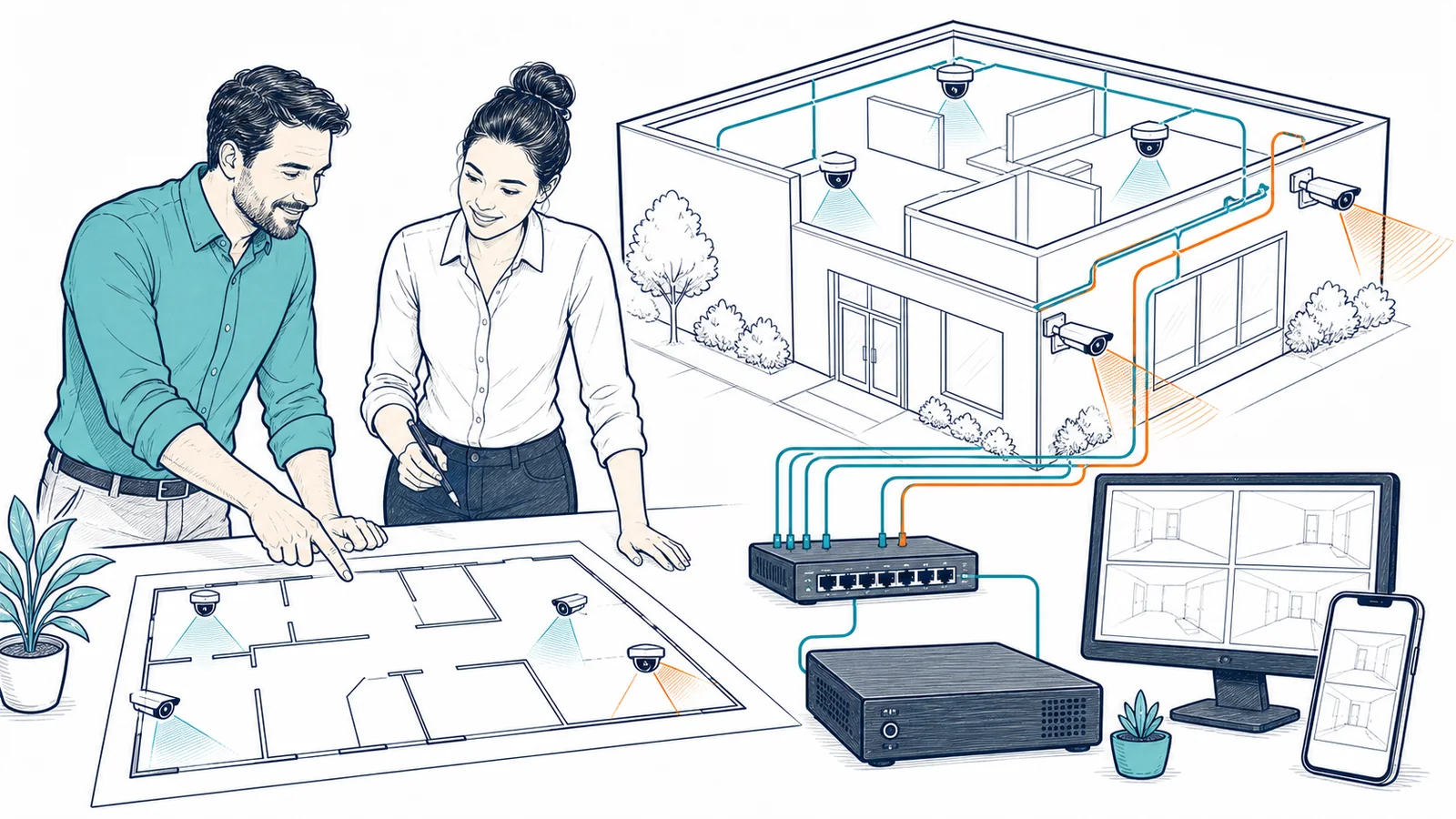
Start With the Business Need, Not a Box of Cameras
Commercial camera projects can support many everyday operational needs. A small office may want visibility at the main entrance and equipment room. A warehouse may need selected loading, receiving, aisle, and exterior views. A professional office may need a clear record of access to a shared lobby without placing cameras in inappropriate private areas. A retail or service business may need carefully chosen views of entrances, customer areas, counters, inventory, parking approaches, or delivery points.
The right design depends on what the business wants to observe and review. General awareness, identifying activity at a doorway, seeing movement across a parking area, and reading a small detail at distance are different goals. They can require different camera positions, lenses, resolution, lighting, exposure settings, and storage resources. Apex helps translate the customer’s priorities into a practical project plan rather than treating every camera location as interchangeable.
Entrances and Exits
Plan selected views around doors, gates, lobbies, reception areas, and other approved access points while accounting for backlighting, traffic direction, height, and obstructions.
Interior Operations
Evaluate appropriate business areas such as shared work zones, inventory spaces, corridors, equipment rooms, counters, and loading or receiving areas.
Exterior Areas
Consider approved parking, delivery, perimeter, and approach views along with weather exposure, mounting surfaces, night lighting, glare, landscaping, and future obstruction.
Existing Systems
Assess a compatible installed system when the business needs help with cameras, recorder access, viewing, cabling, network connectivity, configuration, or an expansion decision.
Camera placement must remain appropriate for the workplace and customer-approved use. Apex does not decide where surveillance is legally permitted, whether notice or consent is required, or whether audio should be enabled. The customer should obtain qualified legal guidance when those questions are material.
Plan Placement Around Field of View, Detail, Light, and Physical Conditions
A camera can be pointed at the right area and still fail to provide the expected detail. A view that is too wide may show overall activity but make faces, packages, or other small objects appear too small. A narrow view may provide more detail but miss activity outside its frame. Mounting height, angle, focal length, distance, resolution, compression, frame rate, lighting, reflections, glare, weather, dirt, vibration, and changing objects can all influence useful footage.
Apex reviews the approved location and discusses what the customer expects from each view. The plan may distinguish overview views from more focused views, identify likely blind spots, and account for doors, walls, shelves, vehicles, signs, trees, lights, windows, and other site features. Exterior locations also require attention to suitable equipment, cable entry, mounting surfaces, weather exposure, and maintenance access.
- Purpose: define what each camera is expected to show instead of assigning a location only by room name.
- Distance and detail: match the intended level of detail to a realistic field of view and installation position.
- Lighting: consider daylight, night conditions, backlighting, reflections, shadows, existing fixtures, and changing seasonal conditions.
- Obstructions: identify doors, signs, displays, shelving, landscaping, vehicles, equipment, and future changes that may block the view.
- Mounting: assess the surface, routing path, equipment access, camera protection, and the appearance of the finished installation.
- Privacy: keep placement and configuration aligned with customer-approved business use and applicable legal guidance.
Planning improves the likelihood that the installed views match the stated purpose, but a site changes. Furniture moves, trees grow, lights fail, weather shifts, and business workflows evolve. Customer review after installation—and after material site changes—remains important.
Treat Cabling, PoE, Switching, and Network Design as Part of the Camera System
Many current business cameras use Ethernet for data and may receive power through Power over Ethernet. That makes the cable path, termination, switch, PoE budget, network configuration, and recorder connection part of the system. A camera may power on yet remain unreliable if cabling is damaged, a link is unstable, the switch lacks capacity, the PoE budget is insufficient, or network addressing and segmentation are not properly planned.
Apex can run cabling and physically mount cameras as part of the approved project. Before installation, the site and intended routes are reviewed for practical access, cable length, pathway, penetration, mounting, termination, labeling, equipment location, and the relationship to existing network components. Unseen conditions above ceilings, inside walls, outdoors, or around occupied areas can affect the final method and scope.
Camera traffic can also affect network and storage design. The number of cameras, resolution, frame rate, compression, recording mode, viewing activity, and recorder architecture influence bandwidth. Remote viewing adds internet, firewall, application, account, and vendor dependencies. A project may require related network design and installation work when the existing switch, cabling, PoE capacity, segmentation, or equipment location is not suitable.
Size Local Recording Around the Customer’s Retention and Review Needs
Apex supports local recording for approved business camera projects. Local recording may use a compatible network video recorder or another supported onsite recording platform. The recorder, drives, camera licenses where applicable, network connections, power protection, and physical location must fit the selected system and customer requirements.
Storage duration is not determined by drive capacity alone. Camera count, resolution, frame rate, compression, image complexity, recording schedule, continuous versus event-based recording, retained audio if approved, and system overhead can materially change consumption. A nominal estimate is therefore a planning value rather than a promise that every camera will retain an exact number of days under every condition.
The customer decides the desired retention period with Apex recommendations and any appropriate legal, insurance, contractual, or operational guidance. The customer also decides who may export footage, how exported files are stored, who may receive them, and when they should be deleted. Apex can configure supported retention and access settings within the selected platform, but the business owns its footage-handling policy.
Recorder health and footage availability should not be assumed merely because live video appears. Storage devices can fail, cameras can disconnect, passwords can be lost, time settings can drift, and recording rules can be changed. The project should include validation of representative recording and playback behavior at completion. That validation confirms observed operation at the time; it does not guarantee future footage availability or capture of every event.
Configure Remote Viewing With Named Users and Controlled Access
Remote viewing can help authorized owners, managers, or designated staff review supported camera views away from the recorder location. Apex can establish supported remote viewing as part of the project, subject to the camera or recorder platform, licenses, accounts, applications, devices, internet connectivity, firewall design, and vendor service dependencies.
Access should be assigned intentionally. Shared administrator credentials make it difficult to know who can change settings or view footage. Where the platform supports it, named accounts and role-appropriate permissions provide a clearer approach. The customer identifies authorized users and approves which locations, live views, recordings, exports, and administrative controls each person may access.
Remote access does not mean Apex or another person continuously watches the cameras. This page does not advertise staffed monitoring, alarm response, emergency dispatch, or after-hours observation. It also does not promise that remote viewing will remain available during an internet, power, network, recorder, application, account, device, or vendor outage.
The customer should promptly report staffing changes and remove access that is no longer appropriate. Mobile devices and personal computers used for viewing remain subject to their own operating systems, updates, credentials, screen locks, connectivity, and security practices. Apex can help configure supported access, but the customer owns user approval and device-use policy.
Evaluate Existing Camera Systems Before Assuming They Must Be Replaced
An existing system may have useful cameras and cabling, or it may contain a mix of unsupported, inaccessible, damaged, obsolete, or poorly documented components. Apex can assess compatible existing business camera systems and help determine whether troubleshooting, reconfiguration, selective replacement, cabling repair, recorder work, or a planned redesign is the more practical path.
The assessment may review available administrator access, camera models, recorder, storage condition, licenses, network connectivity, PoE, cabling, remote-viewing method, current user access, time settings, firmware availability, recording rules, and representative live and playback behavior. Access to current credentials and vendor accounts can materially affect what can be verified or changed.
Compatibility is evaluated case by case. A camera using a familiar connector or protocol is not automatically compatible with every recorder, application, feature, resolution, codec, firmware version, or license. Existing cable may look serviceable but still fail testing or be unsuitable for the intended speed, environment, pathway, or location. Apex does not promise reuse before the relevant components are identified and assessed.
If the existing system is supportable, the project can focus on documented improvements. If key equipment is no longer supported or access cannot be recovered, Apex can explain the observed constraint and scope alternatives. Replacement recommendations are tied to the customer’s approved goals rather than a blanket assumption that newer equipment is always necessary.
A Practical Business Security Camera Installation Process
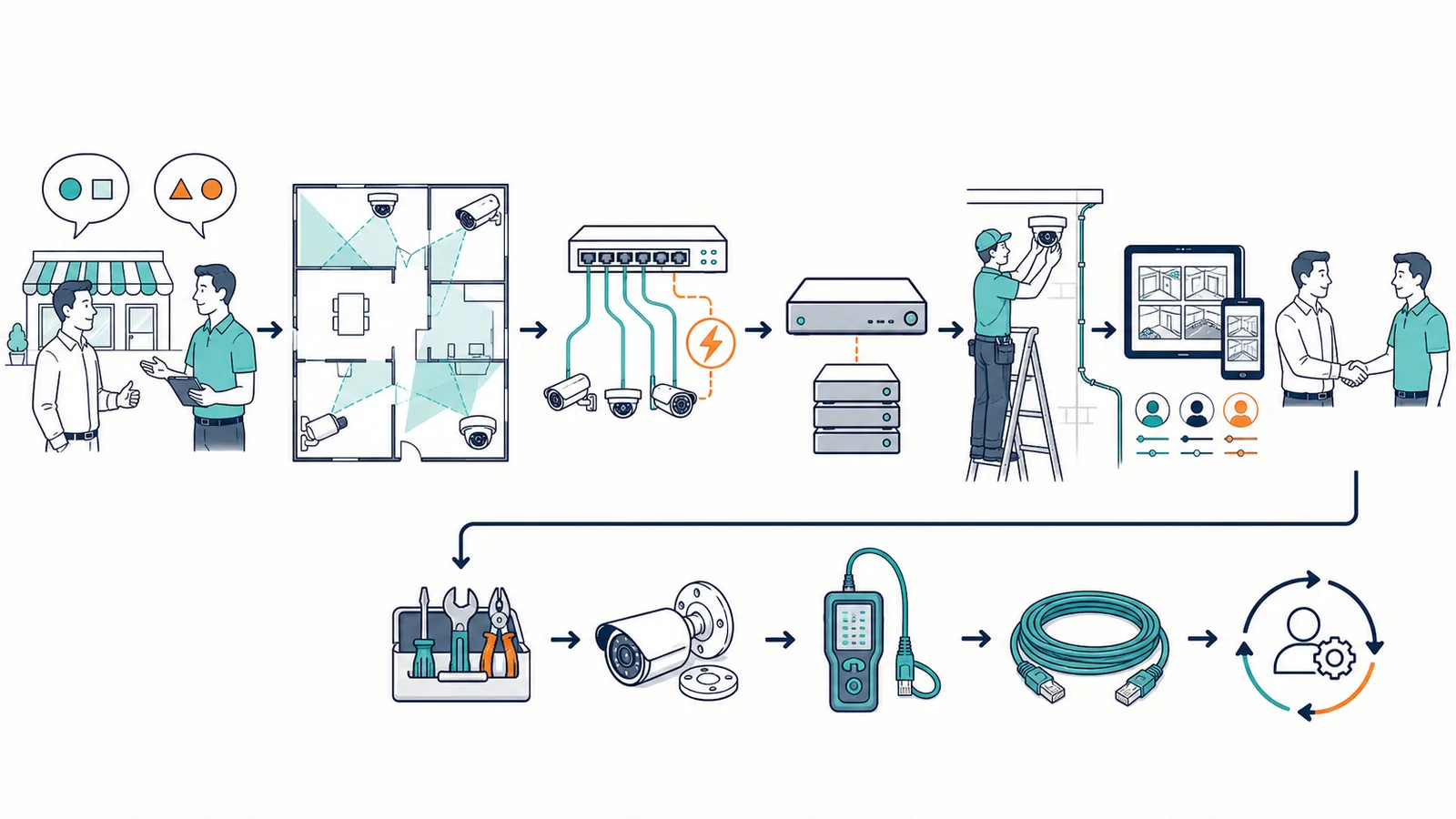
- Discuss the business objective. Identify the property, approved areas, operational concerns, expected detail, local-recording needs, remote viewers, existing equipment, schedule, and customer decision-makers.
- Walk the site. Review proposed views, distances, lighting, obstructions, mounting surfaces, pathways, network equipment, recorder location, power, internet service, and physical access.
- Define the design. Document supported camera locations, general fields of view, recorder and storage approach, cable routes, PoE and switch needs, remote-viewing method, user roles, and important limitations.
- Confirm the project scope. Identify hardware, materials, licenses where applicable, included installation work, access requirements, customer approvals, project-based pricing, and separately scoped network or repair work.
- Prepare cabling and infrastructure. Install approved cable routes and terminations, confirm suitable switching and PoE capacity, prepare the recorder location, label connections, and address agreed network dependencies.
- Mount and connect cameras. Install supported cameras at approved locations, make appropriate physical and network connections, and adjust initial positioning based on the planned purpose.
- Configure recording and access. Apply supported local recording, retention, time, user, permission, playback, export, and remote-viewing settings using customer-approved decisions.
- Validate with the customer. Review representative live views, day or night conditions available at that time, playback, storage estimates, remote access, permissions, documentation, and known limitations. Adjust included settings or positioning where practical.
Project conditions can change after discovery. Hidden pathway issues, unsuitable cabling, damaged surfaces, restricted access, unavailable credentials, unsupported equipment, network constraints, or changed customer requirements may require a revised method or scope. Apex communicates observed constraints rather than treating an early estimate as proof that every condition is known.
Keep Responsibilities, Privacy Decisions, and Project Limits Clear
What Apex Can Handle Within the Agreed Project
- Business-site camera and field-of-view planning based on customer priorities
- Supported camera mounting and network-cabling installation
- Compatible local recorder, storage, PoE, switching, and network preparation
- Supported local recording, playback, user permissions, and remote viewing
- Assessment and support for compatible existing business camera systems
- Configuration validation, project documentation, and explanation of known dependencies
What the Customer Owns
- Final approval of camera locations, views, retention, users, permissions, exports, and operating procedures
- Privacy, notice, signage, audio, recording, retention, access, employment, and legal decisions
- Accurate site information, authorized access, timely approvals, and disclosure of known restrictions
- Internet service, utility power, physical security of the recorder, and business-continuity choices
- Prompt notice of staffing, property, network, account, device, or workflow changes
- Qualified legal, insurance, or compliance guidance when required for the customer’s use
Security camera work is quoted as a project. Pricing depends on the approved site, camera and recorder requirements, cabling and mounting conditions, storage, network readiness, remote-viewing needs, existing-system condition, materials, access, and project schedule. This page does not publish a standard price or imply that every listed activity is included in every project.
Apex does not provide residential installation through this service and does not present this page as an access-control, door-entry, badge, electronic-lock, alarm-monitoring, emergency-response, or continuous camera-monitoring service. The project does not promise complete coverage, identification of every person or object, prevention of an incident, capture of every event, uninterrupted recording, a fixed retention duration under all conditions, or permanent remote access.
Business Security Camera Installation FAQs
Does Apex install cameras and run cabling?
Yes. For an approved Orange County business project, Apex can physically mount supported cameras and install network cabling as part of the agreed scope. The site, pathways, surfaces, access, network, PoE capacity, equipment, and any hidden conditions are reviewed before the final installation method and price are confirmed.
Do you install security cameras in homes?
No. This service is for business and commercial environments. The page does not advertise residential camera installation, home surveillance, or consumer smart-home camera work.
Can you help decide where cameras should go?
Apex can recommend locations and fields of view based on the customer’s approved goals, site conditions, lighting, distance, obstructions, network, and mounting options. The customer gives final approval and remains responsible for privacy, notice, signage, audio, retention, access, and lawful-use decisions.
Do you support local video recording?
Yes. Apex can configure compatible local recording for the approved project. Recorder and storage needs depend on camera count, resolution, frame rate, compression, recording schedules, scene activity, retention goals, licenses, and system overhead. Storage duration is estimated and validated; it is not guaranteed under every condition.
Can owners or managers view cameras remotely?
Apex can configure supported remote viewing for customer-approved users when the camera or recorder platform, licenses, accounts, applications, devices, internet, firewall, and network support it. Remote viewing does not mean Apex continuously watches the cameras, and availability remains dependent on the connected systems and services.
Can Apex work on an existing camera system?
Yes, when the existing system is compatible and sufficient access is available. Apex can assess cameras, recorder, storage, cabling, PoE, network connectivity, configuration, users, and remote viewing. Reuse, repair, expansion, or replacement recommendations are made after the equipment and constraints are identified.
Do security cameras guarantee complete coverage or prevent incidents?
No. Cameras can support visibility and later review when the relevant equipment, view, lighting, recording, storage, network, power, and access are functioning. No design can remove every blind spot, capture every event, identify every detail, prevent crime, or guarantee footage will always be available.
How is a camera installation priced?
Camera work is priced by project. The quote depends on the site, approved views, hardware, recorder, storage, cabling, mounting, network and PoE readiness, remote access, existing equipment, materials, access conditions, and schedule. The final scope identifies included work and any separately quoted network or repair needs.
Does Apex provide 24/7 camera monitoring or alarm response?
No. This page does not offer staffed camera monitoring, an alarm response center, emergency dispatch, or after-hours observation. Apex provides installation, local-recording and remote-viewing configuration, and compatible existing-system support within the agreed business project.
Plan the Views, Cabling, Recording, and Access Before Installation Day
Tell Apex about the business property, approved areas, existing cameras, recording needs, remote viewers, network equipment, and the operational questions you want the system to address. Apex can help turn those requirements into a clearly scoped camera installation project for your Orange County business.